




Financial close automation is usually sold as workflow software: task lists, sign-offs, status dashboards. Useful, and not where the time actually goes. This covers what can genuinely be automated in a close today, what still cannot, and the data conditions that decide which of those you get.
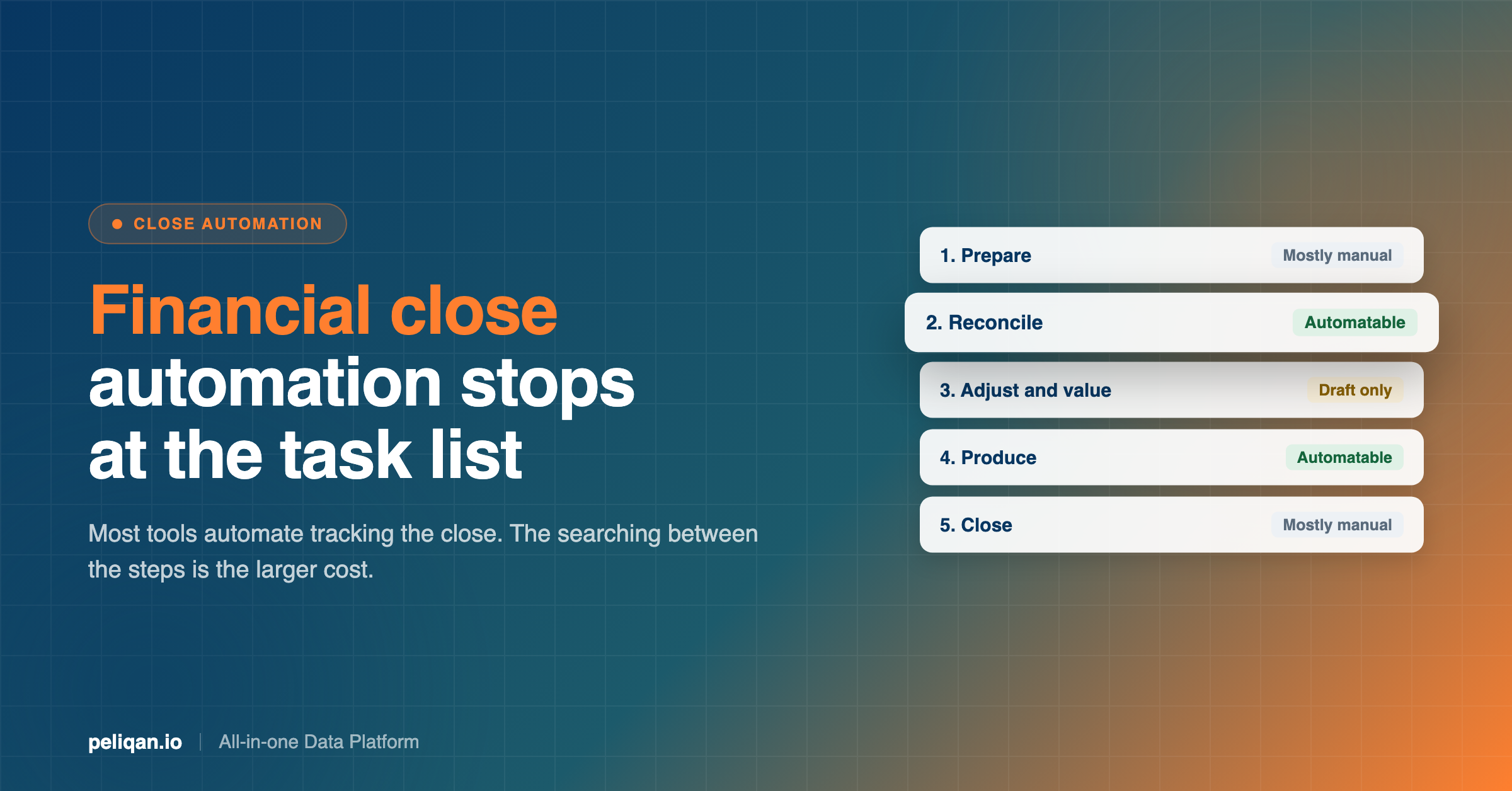
Most financial close automation tools automate the tracking of the close rather than the work in it. You get a task list, owners, deadlines and a status board. That is real value, and it addresses the third of three problems.
The other two are where the hours go.
The first is that a close is mostly confirming things are fine. You cannot know which accounts have a problem without checking all of them, so effort scales with the size of the ledger rather than the number of actual issues. Most of the time is spent on accounts that turn out to be clean.
The second is that the evidence lives in several places. Confirming a payable means holding an invoice, a bank line and a supplier record together, and those sit in different systems. Every question spanning two systems becomes a manual join.
Those are data problems, not workflow problems, and they are the ones that have only recently become addressable. This post covers the full close sequence, then goes into which steps an AI assistant can actually perform against your ledger today, which it still gets wrong, and what has to be true about your data first.
If you read one thing
Workflow tooling automates tracking the close. The searching between the steps is the larger cost, and it is a data problem, which is why most close software does not touch it.
What financial close automation actually has to solve
Three distinct problems sit inside a close, and most tooling addresses only one of them.
The exceptions are invisible until you look. A close is mostly confirming that things are fine. You cannot know which accounts have a problem without checking all of them, so the effort scales with the size of the ledger rather than with the number of actual issues. Most of the hours go into files that turn out to be clean.
The evidence lives in several places. Confirming a payable usually means holding an invoice, a bank line and a supplier record in your head at once, and those sit in different systems. Every question that spans two systems becomes a manual join.
Deadlines are fixed and the work is serial. You cannot produce the balance sheet before the reconciliations are done. A delay early in the sequence propagates through everything after it, which is why close periods compress into a few very bad weeks.
Software has attacked the third problem for years with workflow tooling and task tracking. The first two are data problems, and they are the ones that have only recently become addressable.
The close checklist, phase by phase
Grouped into five phases in dependency order, so nothing here waits on something further down the list.
Phase 1: Prepare, before the period ends
- Set the close calendar. Owner and deadline per step. Circulate it before the year ends, not during the close.
- Confirm cut-off dates for expense claims, supplier invoices, timesheets and stock counts, and tell everyone who submits them.
- Check every feed is current. Bank feeds, e-invoicing channels, integrations from your webshop or billing system. A feed that stopped in October is discovered far too late in January.
- Chase missing documents early. The supplier invoices you do not have yet are the ones that will hold up the close.
Phase 2: Reconcile
- Bank and credit cards. Every account, every statement, to the closing balance. Unmatched items investigated rather than carried, which is the substance of bank reconciliation work.
- Accounts receivable. Aged debtors reviewed, disputes identified, bad debt assessed and written off where appropriate.
- Accounts payable. Aged creditors reviewed, and critically, a duplicate sweep across the full purchase journal. Duplicates hide in supplier name variants and re-sent invoices with new references.
- Intercompany balances, if you have them, agreed on both sides before anything is consolidated.
- Loans and financing reconciled to lender statements, with interest and principal split correctly.
- Payroll reconciled to the ledger, including accruals for holiday pay and untaken leave.
- VAT and tax accounts agreed to filed returns, with the reconciling items understood.
Phase 3: Adjust and value
- Accruals and prepayments posted for anything spanning the year end.
- Depreciation calculated and posted, with the fixed asset register agreed to the ledger.
- Fixed assets reviewed for disposals, impairments and anything still on the register that no longer exists.
- Inventory valued against the physical count, with obsolete and slow-moving stock written down.
- Provisions reviewed for adequacy: warranties, legal matters, restructuring.
- Foreign currency balances revalued at the closing rate.
- Revenue cut-off tested. Sales recorded in the right period, deferred revenue correct.
Phase 4: Produce and review
- Trial balance reviewed line by line, with any account you cannot explain investigated.
- Year-on-year comparison run on every material account. Unexplained movements are where errors surface.
- Statements prepared: P&L, balance sheet, cash flow.
- Consolidation performed, if you report across entities or administrations.
- Tax computation prepared and the deferred tax position updated.
Phase 5: Close and hand over
- Periods locked so nobody posts into a closed year.
- Audit file assembled: supporting schedules, reconciliations, and the reasoning behind judgments.
- Filings submitted to the deadlines that apply in your jurisdiction.
- Close retrospective held while it is fresh. What was late, what was missing, what to fix before next year.
When to start each phase
Most close guides give you the steps and no dates, which is why so much of the work lands in the last fortnight. Working backwards from your filing deadline is more useful than working forwards from the year end.
Six to eight weeks before year end. Phase 1, all of it. This is the only phase you can complete before the period closes, and doing it here is what prevents the January scramble. Circulate the calendar, fix the cut-off dates, and check every feed is actually running.
The final two weeks before year end. Chase missing supplier invoices and outstanding expense claims. Run a trial reconciliation on the largest bank account to surface problems while there is still time to fix them cheaply.
Weeks one to three after year end. Phase 2, the reconciliations. This is the longest phase and the one most likely to overrun, because it is where unknown problems surface. Give it more room than you think it needs.
Weeks three to five. Phase 3, adjustments and valuation. Much of this depends on reconciliations being finished, which is why compressing phase 2 rarely works.
Weeks five to seven. Phase 4, production and review. Then phase 5 to the statutory deadline that applies to you.
If the reconciliation phase regularly overruns, that is the signal to automate there first rather than anywhere else.
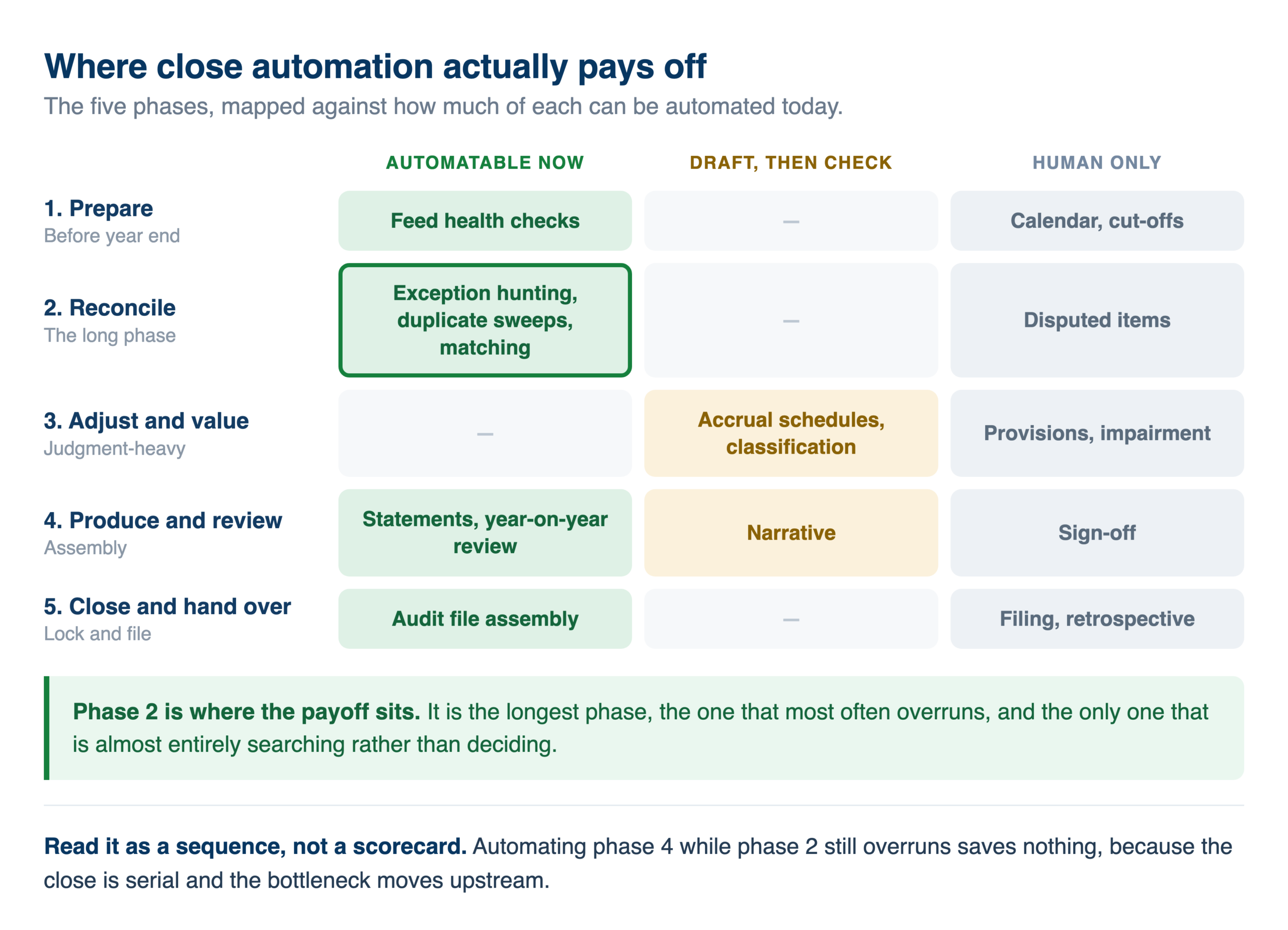
Which close steps can actually be automated?
This is where most year-end content stops, and where the useful part starts. The honest answer is that the checklist splits into three quite different groups.
What AI does reliably today
Finding the exception. This is the strongest use by a distance. Point an assistant at a discrepancy, describe it in plain language, and let it work backwards to the entry. A total a few hundred out, a payable that will not agree, a supplier invoice you suspect was booked twice. Instead of narrowing it by hand, you describe the symptom and get the entry.
Duplicate detection across a full purchase journal is a good example. It is a tedious job for a person and a natural one for a machine, because the whole task is comparing many records against each other on several fields at once.
Producing the comparative review. Year-on-year movements by account, with the material ones flagged and explained where the data supports an explanation. Building this by hand is a spreadsheet exercise. Asking for it is a sentence.
Assembling the reporting pack. P&L, balance sheet, and the supporting analysis, drawn straight from the ledger rather than from an export. This is the most common thing finance teams use AI for against accounting data, and it replaces a monthly export ritual rather than a piece of judgment. The monthly version of this runs on exactly the same mechanics, which is why teams that do it monthly find year end far shorter.
Answering the follow-up question. Often underrated. The value is less in the first answer than in being able to ask “and which of those are older than ninety days?” without rebuilding anything.
What AI can draft but a human must check
Classification and mapping. Assigning accounts to a reporting scheme, or mapping a general ledger to a national classification, is something an assistant does quickly and imperfectly. Treat the output as a first pass on a job that would otherwise start from nothing.
Accrual and prepayment schedules. It can identify what spans the year end and propose the split. Whether the treatment is right is not its call.
Draft narrative. Explanations of movements, commentary for the board pack. Genuinely useful as a starting point, and it will state things with more confidence than the evidence supports.
What AI should not be doing
Posting to the ledger unsupervised. Writing back to accounting systems is not uniformly reliable, and the variation is per operation rather than per system, so it is hard to predict. Some operations succeed consistently; closely related ones on the same system fail almost every time. Verify each specific operation you intend to depend on before building a process on it, and treat writeback claims as untested until you have tested them yourself.
Judgment calls. Whether a provision is adequate, whether a cost is deductible, whether a treatment is defensible. Nothing in the production data suggests AI is doing this, and nothing suggests it should.
Anything you cannot show your work on. If a number cannot be traced back to the entries behind it, it does not belong in a close. Automatic data lineage is what makes that traceable rather than asserted.
The rule of thumb
AI removes the search, not the decision. Anywhere the close involves looking for something, it helps immediately. Anywhere it involves deciding something, it prepares the evidence and stops.
Running the checklist across every client file
For an accounting practice the checklist is not the problem. Doing it sixty times is the problem, and this is the part no year-end guide addresses.
The economics are unusual. A review that takes twenty minutes per client is a fortnight of work across a book of clients, and the overwhelming majority of that time is spent confirming that files are fine. The exceptions are what you are paid to find, and they are a small fraction of the effort.
Running the review as a batch inverts that. The same checks run against every administration, and what comes back is the list of files that need a person. Practices doing this in production run checks like these across their whole book:
- Draft entries left unposted in any dossier
- Bank reconciliation differences against attached statements
- Duplicate entries swept across full purchase journals
- Periods not yet closed where they should be
- Unmapped accounts, which is a standard year-end readiness signal
- Fiscal year ends that do not line up with the dossier record
- Deadlines approaching per client, from the practice management system
The more interesting pattern is what practices build once that works. Several have assembled what amounts to a year-end cockpit, joining the accounting system, the reporting platform, the practice management tool and a company register into one view. Nobody sells that as a product. It becomes possible once the underlying data is reachable from one place, which is the same shape as multi-client reporting generally.
One requirement is not optional here. Access has to be scoped per client from the beginning, so a staff member working on one dossier sees that dossier. Scoping access is considerably easier to set up before people start using a system than to retrofit afterwards, and firms working across Belgian accountancy software hit this immediately.
What has to be true before any of this works
The failures here are almost never about the AI. Four prerequisites, in order of how often they are the blocker.
The data is reachable from one place
Nearly every step above spans two systems: an invoice and a bank line, a ledger and a fixed asset register, an accounting system and a practice management tool. If each has to be queried separately through its own interface, the joins go back to being manual and you have automated nothing.
Getting the systems connected and syncing into one queryable place is the unglamorous prerequisite that everything else rests on.
Somebody modelled the joins once
Asking a model to rediscover how your ledger keys to your invoicing system on every question produces answers that are individually plausible and mutually inconsistent. Build the joined views once with SQL transformations, apply your own classification, and let questions run against those.
Freshness is visible
A close built on data that stopped syncing three weeks ago is worse than no automation, because it looks right. Every answer should carry the date of the data behind it, and freshness monitoring should tell you before the close, not during it.
The work is logged
Closes get reviewed and numbers get disputed. If an assistant contributed to a figure, you need a record of what it ran. This is also what makes the approach defensible to an auditor rather than something to keep quiet about.
How to automate one step without betting the close on it
The approach that works, based on how teams actually got there.
Pick one step, not the whole checklist. The duplicate sweep across the purchase journal is the best first candidate: bounded, tedious, and easy to verify.
Run it against last year first. You already know what the answer should be. This tells you whether the setup is trustworthy while nothing is at stake.
Keep the manual version this year. Run both and compare. If they agree, you have earned the right to drop one next year. If they disagree, you have learned something more valuable than the time you saved.
Add the second step only after the first is boring. Reconciliation differences next, then the comparative review. Every team that got somewhere widened slowly.
Put it on a schedule once it is proven. The mature version of this is a check that runs weekly through the year, so year end stops being the first time anyone looks. That is where the compounding is, rather than in speeding up a January scramble.
Five mistakes that cost the most time
Not the obvious ones. These are the failures that quietly consume days.
Discovering a dead feed in January. A bank feed, e-invoicing channel or integration that stopped in October produces a gap nobody notices until reconciliation fails. The cost is not the missing data, it is that you now have to rebuild three months of it under deadline. Checking feed health before the year ends takes minutes; discovering it afterwards costs days.
Hunting duplicates by invoice number alone. Genuine duplicates rarely share a reference. They appear as a re-sent invoice with a new number, the same invoice booked against two supplier records with slightly different names, or a credit note that was never matched. A duplicate check has to compare amount, date proximity and supplier identity together, which is precisely why it is tedious by hand and well suited to being automated.
Treating the comparative review as a formality. The year-on-year movement check is where errors actually surface, and it is usually done last and fastest because everything else has overrun. Running it early, as soon as a draft trial balance exists, catches problems while there is still time to investigate them properly.
Reconciling intercompany balances at the end. Both sides have to agree, which means two teams and usually two schedules. Left until phase four, a disagreement here can hold up consolidation entirely. Agree these early, in writing.
Not writing down why. The judgment behind a provision or a valuation is obvious in January and gone by the time anyone asks in July. Capturing the reasoning alongside the number costs a sentence and saves a reconstruction.
Year end close and month-end close automate differently
They share a lot of steps and get conflated constantly, which leads teams to assume the monthly process will scale to the annual one. It does not, for three reasons.
Year end carries valuation work that months do not. Inventory write-downs, impairment reviews, provision adequacy, deferred tax. These are judgment-heavy and none of them appear in a normal month.
The audience is different. A monthly close is read internally and can carry a rough edge. A year-end close is read by auditors, lenders, tax authorities and shareholders, which raises the evidentiary bar on every number.
The comparatives matter more. Year-on-year movements get scrutinised in a way month-on-month movements rarely do, which means the underlying data has to be consistent across a full year rather than just recent.
The useful relationship runs the other way. A disciplined monthly close makes year end dramatically shorter, because most of the reconciliation work is already done and only the valuation and review layers remain. Firms that struggle at year end are usually not struggling with year end. They are absorbing twelve months of deferred monthly work in one go.
Where Peliqan fits
Peliqan syncs data from 300+ connectors, including Exact Online, Yuki, Twinfield, Silverfin, Octopus, AdminPulse and Odoo, into a built-in data warehouse running Postgres and Trino. That synced copy is what makes cross-system close questions answerable at all.
On top of it, the MCP server lets you ask in plain language from Claude or ChatGPT. For accounting sources those questions run as SQL against the data warehouse copy, so a close review does not consume your accounting system’s API quota, and a single question can span several client administrations.
That distinction, between querying a synced copy and calling the source live, decides more than it appears to. It is covered in the comparison of CLI and MCP.
Permissions are managed through Groups at the schema level, AI queries and writeback actions are logged, and the platform is SOC 2 Type II certified, ISO 27001:2022 certified, GDPR compliant and EU-hosted. Historical change tracking uses SCD Type 2, so prior-year comparatives remain answerable rather than overwritten.
Practical starting points if you want to try one step this year: connecting Exact Online to Claude, or the same for Yuki.
The takeaway
The close checklist is not the hard part, and it has not changed much in decades. The hard part is the searching between the steps, and for a practice, the repetition of the whole thing across every client file.
Those are the two things that have actually become addressable. Finding the exception, and running the same review everywhere at once. Everything else on the list still needs an accountant, and the production evidence gives no reason to think otherwise.
If you want to test one step against your own books before the close, book a demo and bring last year’s duplicate sweep. Comparing the two is a faster evaluation than any trial.