




Month-end close automation means the repetitive parts of closing the books happen without a person driving each step. AI has changed which parts those are: reconciliation and variance work that used to need judgement can now be handled by an assistant querying your own ledger. This guide covers what actually gets automated, drawn from 1,147 production requests against a single accounting system, and the constraints nobody mentions.
What the close actually consists of
Every guide to closing the books lists the same steps. Fewer are specific about where the hours go, which matters because that is what you are deciding to automate.
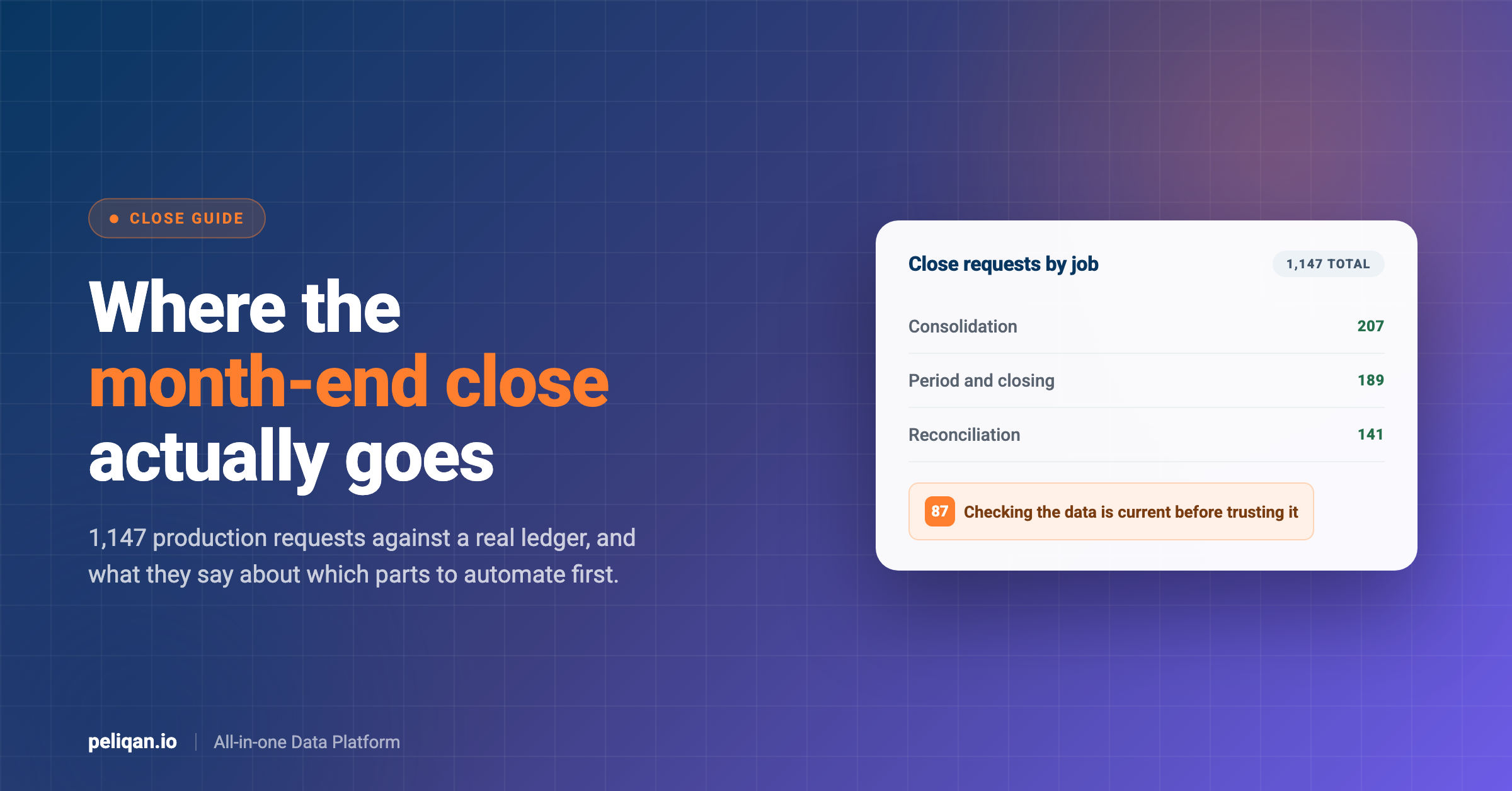
We can be specific, because we can see it. Peliqan’s production data includes 1,147 requests made against Exact Online by finance teams and accounting firms using AI assistants on their own ledger data. Those requests cluster into a small number of jobs, and the distribution is not what the software categories suggest.
Consolidation and multi-entity work forms the largest cluster, followed by period and closing questions, then reconciliation. Budget against actual comes next. Duplicate hunting and aged receivables are smaller but recur across many accounts rather than concentrating in one.
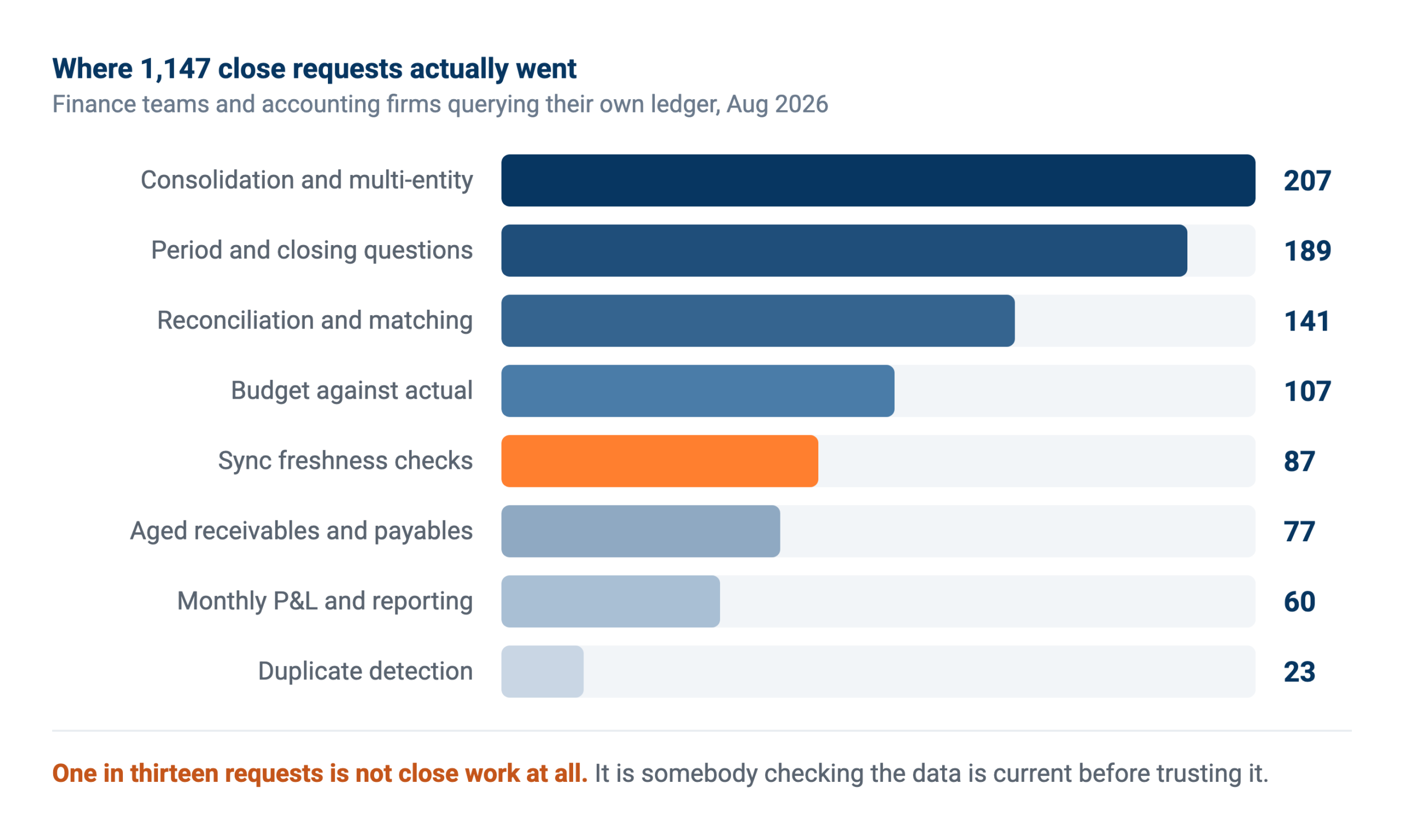
Requests made by finance teams against their own ledger through an AI assistant. Sync freshness checks are not close work at all, which is the interesting part.
One cluster in that picture is not close work. Eighty-seven of those requests are people asking whether the data is current before they trust anything else. That habit turns out to matter more than any single automation, and it comes back later in this guide.
The five jobs that automate well
These are ordered by how much of the observed work they represent, not by how impressive they sound.
Consolidation across entities
Groups running several administrations spend the close normalising them: different account code lengths per entity, fiscal years that start in different months, categorisation that has to be applied consistently before anything can be added up. One team in the data was reconciling seven administrations across countries, with one entity on a shifted fiscal year that turned out to be mislabelled periods rather than a genuine difference.
This automates well because the rules are stable once agreed. What changes month to month is the data, not the mapping, so the work is mechanical after the first pass. It is also the job where a spreadsheet hurts most, since every new entity adds a column somebody maintains by hand.
Reconciliation between two systems
The ledger against a margin workbook. The webshop against invoices against the bank. An ERP against a project tracker. Two systems each hold part of the truth and somebody compares them line by line.
This is the most repeated job across every connector we see, not just accounting ones, and it is the one where an assistant genuinely outperforms a rule. Deciding whether a twelve euro difference is a rounding artefact, a shipping charge or a real error needs context that a matching rule does not have.
Budget against actual
Pulling the right budget scenario for the fiscal year, filtering it to the right cost units, and comparing it to what actually happened per period and per account. The work is fiddly rather than hard: budget scenarios are named inconsistently, cost unit tagging is incomplete, and the person doing it has to know which of three similarly named scenarios is the live one.
In the production data this shows up as a lot of small verification requests, checking which scenario applies before pulling any numbers. That is the assistant doing what a careful analyst does, and it is the reason the output can be trusted.
Aged receivables and payables
Who has not paid, which supplier invoices are still open, which installment plans are running. Straightforward to produce from synced data, and it replaces an export that somebody rebuilds monthly. The same tables feed a Power BI report if the pack lives there.
Duplicate detection
Duplicate purchase invoices, the same booking entered twice, mispostings that leave a report a few hundred euros out. Smaller in volume than the others but disproportionately valuable, because a duplicate found after the books close is an adjustment and a conversation rather than a fix.
The constraint nobody writes about
Here is something absent from every close automation guide on the first page of Google, and it will shape your first attempt more than any feature comparison.
Accounting data is big at the transaction level and the tools that read it have limits. In one production case, rebuilding a full-year profit and loss meant pulling roughly 45,000 transaction lines against a query cap of 10,000 rows, so the work had to be paginated into chunks and reassembled. That is not a failure, it is arithmetic, but it changes how you design the job from the start.
The practical consequence is that anything touching a full year of transaction detail needs to be built as a repeatable pipeline rather than a single request. Materialising the heavy aggregation as a table on a schedule, rather than recomputing it live each time somebody asks, is the difference between a close pack that takes seconds and one that times out. The materialisation docs cover the mechanics.
It also means the honest answer to “can AI just build my close pack” is: yes for a month, with care for a year, and only as a scheduled job for anything larger.
Checking the data before trusting it
The behaviour that separates teams getting value from teams getting burned is small and easy to miss. Before asking for a number that matters, they ask whether the data is current.
Eighty-seven of the 1,147 requests are exactly this: has the sync run, when did it last complete, which streams did it actually load, is this month’s data in yet. Nobody told those users to check. They learned it, presumably the hard way.
The reason it matters is that stale data fails silently. In one account, a connection scheduled to run every six hours had not actually updated for five days. Nothing broke. Every report still rendered, every number still looked plausible, and the dashboards said the connection was healthy. Only the run history showed the gap.
Build the freshness check into the process rather than into somebody’s habits. A close pack should state the data timestamp on its face, and any scheduled job should verify recency before it computes anything. This is the cheapest control in the whole exercise and the one most often skipped.
What to automate on which day
Close automation fails as an all-at-once project and works as a sequence, because the tasks depend on each other. A rough calendar, assuming a month-end close with a five working day target.
Before the period ends
Anything that does not need final numbers can run early, and running it early is what shortens the close. Duplicate invoice checks, missing cost unit tags, purchase invoices booked without a matching order, open items that should have cleared. Every exception found on the 28th is one that does not surface on the 3rd when somebody is trying to publish.
Day one and two
Reconciliation between systems, once the last transactions have landed. Bank against ledger, webshop against invoices, subledger against the general ledger. These need a freshness check first, because running them against a stale sync produces exceptions that are not real and burns the team’s trust immediately.
Day three
Budget against actual, variance explanations, and the consolidation across entities. This is the analytical layer and it depends on everything above being settled. Teams that automate this before fixing the reconciliation step end up explaining variances that turn out to be reconciliation errors.
Day four and five
The pack itself. Once the underlying tables are correct, assembling the reporting is the cheapest step to automate and the one people usually start with, which is the wrong order. A generated pack built on unreconciled numbers is a faster way to publish a wrong figure. Where the pack needs to reach people outside finance, scheduled delivery beats a shared folder.
The sequence matters more than the tooling. Automating the pack first feels productive and moves nothing, because the bottleneck was never the assembly.
What still goes wrong
Four failure modes, all of them observed rather than theoretical.
The close checklist that never checks the numbers
Traditional close software is built around marking tasks complete. That confirms somebody did the work, not that the result is right, so discrepancies surface after the books are closed. Even vendors in this category acknowledge the gap. An automation that verifies balances beats one that tracks ticks.
Writes that the accounting system rejects
Reading a ledger is reliable. Writing entries back is not universally so. In our data, attempts to create purchase entries and bank bookings failed repeatedly on division routing and date handling, in one case enough times that the customer gave up on it. Confirm which write operations work in your own environment before designing a process that assumes them, and read our note on writing back safely first.
Automating a reconciliation that should not exist
Some monthly reconciliations exist because two systems were never properly connected. Automating the comparison keeps the disconnection alive and comfortable. Where a sync between the systems would remove the discrepancy at source, do that instead of scheduling a check for it forever.
Bad data, faster
Duplicate suppliers, nulls in fields the calculation depends on, cost units tagged on some accounts and not others. Automation propagates these at speed and with more confidence than a person would. Running quality checks on a schedule catches them before they reach a board pack.
Four checks before you automate a close task
- Is the data current: If the job cannot verify the sync ran, it can produce a confident wrong number and nobody will know.
- Does the rule survive an odd month: Test it against a period with a credit note, a correction and a late invoice, not against a clean one.
- Would a sync remove the work entirely: Reconciling two systems forever is worse than connecting them once.
- Who signs off: Reporting can be automated. Posting should have a name attached.
If you close for many clients
Accounting firms have a different problem from finance teams, and most close automation content ignores it entirely. The work is not one close done well, it is the same close done across dozens of client administrations, each with its own chart of accounts and its own quirks.
In our production data the largest single block of accounting activity comes from firms working across client dossiers rather than from companies closing their own books. The requests look different too: year-end review checklists per dossier, draft entries, bank reconciliation against attached statements, period closure, duplicate detection across a full purchase journal, and closing invoices drafted from the prior year’s pattern.
What makes this automatable is repetition across clients rather than within one. A check written once runs against every dossier, and the output that matters is the list of clients that need attention rather than a report per client. Firms doing this well review exceptions across their whole book in one sitting instead of opening thirty files.
The constraint is access. Per-dossier permissions have to hold, so an assistant working on one client cannot see another, and that is a data platform question rather than an AI one. Our note for accountancy firms covers how firms are structuring it.
Knowing whether it worked
Three measures beat hours saved, which nobody can defend in a review.
Days to close, trending. The headline number, and the only one leadership asks about. Worth splitting into days to reconcile and days to report, because automation usually moves one and not the other.
Adjustments after close. How many corrections land after the books are marked done? This is the quality measure, and it should fall as pre-close checks catch more. A close that got faster while adjustments rose has not improved.
Exception rate over time. A healthy check flags fewer rows each month as upstream data improves, then stabilises. One flagging the same forty rows every month is describing a problem nobody has fixed rather than finding new ones. Tracing a figure back to the field it came from, through automatic lineage, is what makes that conversation short.
Where AI fits, and where it does not
Two claims circulate about AI and the close. One holds up.
The claim that holds up concerns judgement on messy comparisons. Deciding whether a small difference between an order and an invoice is rounding, freight or an error used to need a person reading both records. Handing that to an assistant with access to both, and requiring it to show its reasoning, genuinely removes work. The same applies to variance explanations, where the tedious part is not the arithmetic but finding which account moved and why.
The claim that does not hold up is that you can point an assistant at an accounting system and let it work things out. Given free rein it explores, consumes API quota, and returns confident answers built from whatever it happened to read. Narrow the data it can reach, give it curated operations rather than a generic API passthrough, and keep a person on anything that posts. Our guide for finance leaders goes further into where that line sits.
Worth separating too: the interface is not the automation. Whether somebody asks a question in plain language through the Model Context Protocol or a scheduled job runs at 06:00, the same synced data and the same guardrails sit underneath. One is a conversation, the other is a timer.
Three ways teams do this
Most finance teams end up with two of the three. The spreadsheet rarely disappears entirely, and that is fine as long as it stops being the place the number is calculated.
Real-world example: Horsum
Horsum built scalable financial pipelines from accounting data across Exact Online and Winbooks, with reporting delivered automatically into Power BI rather than rebuilt each period. Read the full case study.
How to start without a project
Pick the reconciliation somebody already does by hand. Not the largest task, the most repeated one. The rules exist in their head already, so your job is transcription rather than design.
Get the ledger somewhere you can query it. Automation across systems needs the data side by side. Syncing the accounting system into a central data warehouse turns a cross-system comparison into an ordinary query, and it is the step that makes everything after it cheap.
Write the check as SQL and read what it returns. Before any assistant or schedule, look at the exception list. Four hundred rows means the rule is wrong, and finding that out in an afternoon is the point.
Schedule it and send the exceptions. Once the list is short and correct, run it on a timer and route the output where the team already works rather than into another dashboard.
Add posting last, with a name on it. Reading and reporting earn trust over a couple of cycles. Only then should anything propose entries, and only with a person accepting them.
How Peliqan fits
Peliqan syncs your accounting system into a built-in data warehouse alongside 300+ other connectors, so the ledger sits next to the CRM, the webshop and the bank data you need to reconcile it against. Connecting a source takes minutes, and syncs run incrementally on a schedule you set.
From there the close work is ordinary querying rather than a project. Write the comparison in SQL or Python, materialise the heavy parts, schedule it, and route the exceptions. Assistants reach the same data through the MCP server using curated operations per connector, so a question asked in Claude or ChatGPT and a scheduled job run against one source of truth.
For accounting firms running many client administrations, the same logic points at each client’s data rather than being rebuilt per dossier, which is the difference between automating one close and automating a practice. That is the difference between automating one close and automating a practice.
One honest limit: Peliqan does not change what your accounting vendor’s API allows. Some write operations are unreliable regardless of platform, and we would rather tell you which than imply everything works. Reading, reconciling and reporting are the solid ground today.
Tell us which part of your close eats the most time and we will show you what it looks like as a scheduled job.