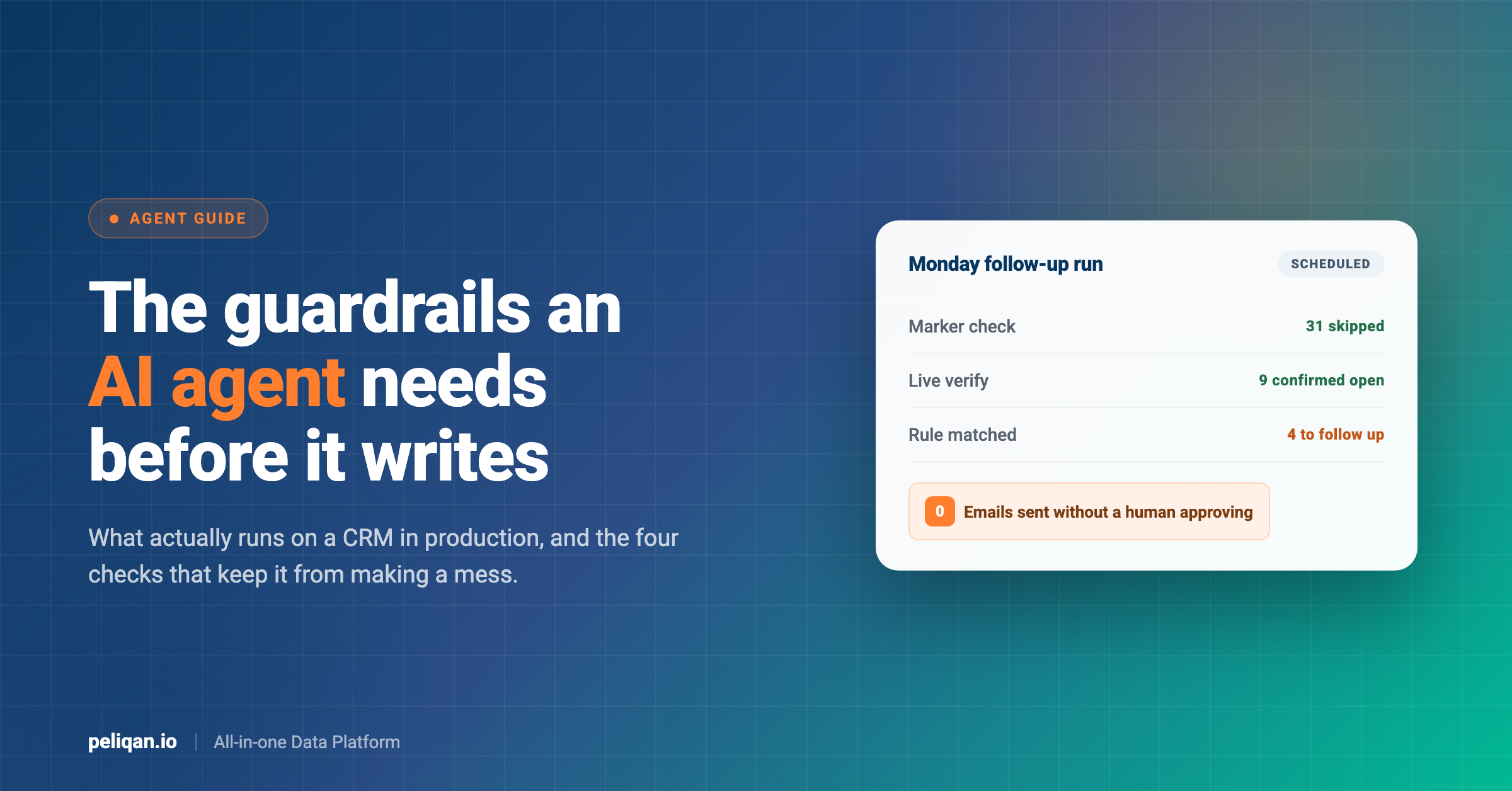





An AI agent on your CRM is a job that reads the CRM, decides what needs doing, and does it, without a person prompting each step. Most articles on the subject describe the promise. This one describes what is actually running in production: the four guardrails that keep scheduled agents from making a mess, the business rules teams encode, and the operations that still fail.
What a CRM AI agent actually is
Three things get called the same name, and separating them makes the rest of this easier.
A chatbot answers when spoken to. Someone asks which deals closed last month, it replies, the exchange ends. Useful, but nothing happens while nobody is typing.
A workflow rule fires on a trigger you defined in advance. Deal moves to won, create three tasks. Reliable and blind: it only handles the conditions somebody thought of, and it cannot look at a situation and decide it is unusual.
An agent sits between them. It runs on a schedule rather than a prompt, it reads whatever it needs to form a view, and it applies judgement to cases nobody enumerated. Ask a workflow rule to find deals that have gone quiet and you must define quiet. An agent can weigh the last activity date against the stage, the deal size and what the last email actually said.
That judgement is the point, and it is also the risk. A rule that misfires does one wrong thing predictably. An agentic AI left unsupervised does many wrong things creatively.
What CRM agents actually do in production
Peliqan’s usage data covers 712 tool calls tied to CRM work, and the pattern is narrower than the marketing suggests. Roughly a quarter of all calls on the busiest CRM connector are writes, which is unusual: these agents operate the CRM rather than just reporting on it. Four jobs account for most of that, plus a fifth that turns up across several accounts.
Logging emails and meetings onto the right record
A scheduled agent reads the day’s emails and meeting transcripts, works out which company and which deal each belongs to, and maintains one consolidated note per conversation. It adds new information, updates what changed, and deletes the superseded version rather than stacking near-duplicates.
This is the single biggest observed workload, and it is worth noticing why. Nobody enjoys CRM hygiene, so it is the first thing dropped in a busy week, which is why pipeline reviews so often start with someone reconstructing what happened from memory.
Follow-up that does not depend on anyone remembering
A recurring agent finds deals whose decision date has passed, checks the live record to confirm the situation has not already moved on, creates a follow-up task, and attaches a drafted email ready for a human to review and send.
Turning a signed quote into a won deal
When a quote comes back accepted, the agent matches it to the deal, sets the amount, marks it won, and creates the standard post-sale task list. Mechanical work, done the same way every time, that otherwise waits for whoever notices. The same agent can push the won amount back into finance through reverse ETL rather than leaving it for a monthly export.
Call transcript to CRM record
Paste a sales call transcript and the agent checks for an existing company, creates the company, contact and deal in the right pipeline stage, and leaves a note pointing back at the recording. In the account running this, it produced two errors across 38 calls, which is the cleanest write record in our data. The Teamleader MCP setup shows the connector side of it.
Project profitability and tracked time
The fourth job is quieter than the others and shows up across three separate accounts, which makes it more of a pattern than a single customer’s habit. Agents pull budget against actuals for every open project, break tracked hours down per person, and calculate gross margin per service line for the management pack.
What makes this an agent job rather than a report is where the numbers come from. Hours sit in the CRM, budgets sit in the project record, and the rates that turn one into the other often sit in a third place, so the calculation crosses boundaries a native report cannot. One team feeds the tracked-hours breakdown straight into the quote for the next piece of work.
One agent, end to end
Abstract descriptions of agents all sound the same, so here is a single run of the follow-up job described above, in the order it actually happens.
Monday, 07:00. The schedule fires. Nobody triggers it. The run happens whether or not the sales manager is in the office, which is the entire reason it catches the deals a busy week would bury. How often it should fire is its own decision, covered in the post on sync frequency.
It selects candidates from synced data. Open deals whose decision date has passed, in the pipelines that matter, excluding anything already marked as handled. This is a query rather than a judgement, and running it as plain SQL first is how you find out your definition of overdue returns 200 rows instead of nine.
It checks each candidate against the live CRM. Synced data is minutes to hours old, and a deal that closed on Friday afternoon should not receive a chase on Monday morning. One live read per candidate settles it, and this step is why the agent’s own notes so often read “fetch live deal before updating”.
It reads the deal’s notes for a marker. If the processed marker is there, the deal drops out. This is what makes the job safe to re-run, and it is the difference between an agent you can trigger twice by accident and one that quietly doubles every task.
Where the writing starts
It applies the rule and writes. The estimated closing date moves according to whichever lettered rule fits the situation, a follow-up task appears with a due date, and a draft email is attached. The agent records which rule it applied, so a manager reviewing the deal later can see the reasoning rather than guessing at it.
A person sends the email. The draft sits in the task. Someone reads it, edits the sentence that does not sound like them, and sends. The agent did the finding, the remembering and the drafting; the human did the part that carries their name.
The whole run touches perhaps forty deals and produces four tasks. That ratio is healthy. An agent generating work on most of the records it reads has a selection problem rather than an automation success.
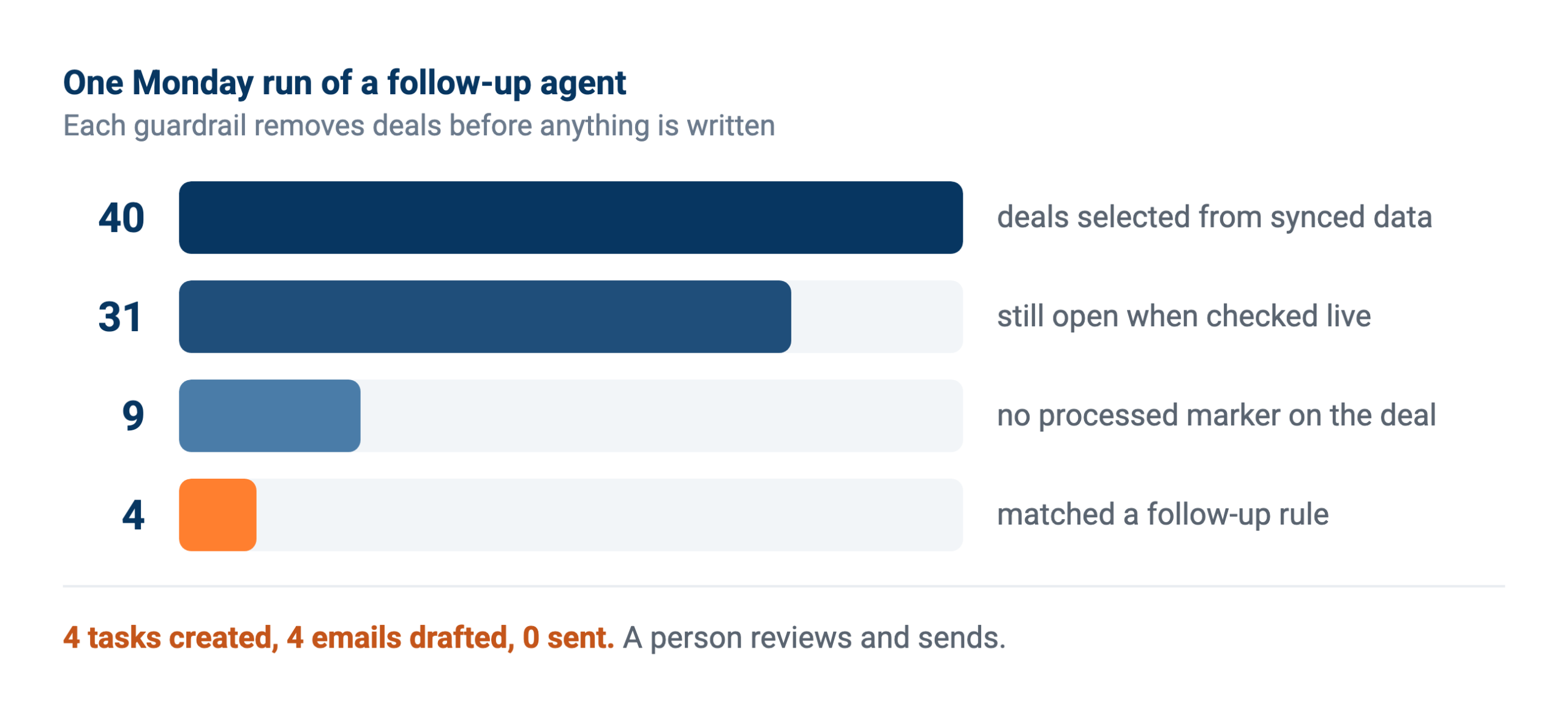
Forty deals in, four tasks out, nothing sent without a person. A run that writes to most of what it reads is selecting badly.
The four guardrails that make scheduled writes safe
Here is what the guides skip. Every CRM agent running reliably in production implements the same four protections, and none of them are optional once a job writes rather than reads. They are not sophisticated. They are just easy to leave out until the first duplicate mess.
1. A marker that says this record was already handled
Scheduled jobs re-run. The timer fires again, someone triggers it manually, a retry follows a timeout. Without a memory of what it already did, the second run repeats the first run’s writes and you get duplicate tasks, duplicate notes and duplicate emails.
The pattern in production is a marker note with a known phrase. One team uses a note reading OFFERTE VERWERKT, Dutch for quote processed, written onto the deal when the agent handles it. Before acting on any deal, the agent fetches its notes and looks for that marker. If it is there, it skips. One extra read per record removes the entire class of problem.
2. Verify the live record before acting on it
Agents that query synced data are fast, and synced data is by definition slightly behind. The gap matters when the next step is a write. The production intents are full of this: fetch the live deal before updating its closing date, confirm the current status before creating a follow-up task, list the pipeline’s actual phases before moving anything into one.
Read broadly from the copy, verify narrowly against the source, then act. Skipping the verification is how an agent creates a follow-up task for a deal that closed yesterday.
3. Search before you create
Creating a company or contact means first asking whether it already exists under a slightly different name, with a trailing space, or as a legacy entity. Agents doing this properly search on more than one field and only create when nothing plausible comes back. Cleaning duplicates afterwards costs far more than not making them.
4. A person approves anything that leaves the building
Internal writes such as notes and tasks can run unattended once the first three protections hold. Anything a customer sees should not. In the production data, every outbound email is drafted by the agent and sent by a person, and that division is why finance and sales teams tolerate the arrangement at all.
Encoding the rules your team already follows
The most interesting thing in the production data is not the automation, it is the specificity. These agents do not run on a vague instruction to chase deals. They run on lettered business rules a sales manager wrote down.
One team’s agent pushes a deal’s estimated closing date according to which rule applies: an open-ended follow-up moves the date to the reaction date plus three months, an unanswered follow-up gets a different treatment again. The agent’s own notes reference the rules by letter as it works, so anyone reviewing the record can see which rule fired.
That is the practical difference between an agent that survives and one that gets switched off. Vague instructions produce plausible-looking judgement calls nobody can audit. Explicit rules produce decisions a manager can check and correct, and the agent becomes an enforcement mechanism for a process the team already agreed on rather than a second opinion nobody asked for.
Writing those rules down is most of the work. If your team cannot state when a deal should be chased, an agent will not resolve the ambiguity for you.
The hard part is matching, not writing
Most of the difficulty in a CRM agent is not deciding what to do. It is working out which record the thing in front of it belongs to.
An email arrives from a personal address that is not on any contact record. A meeting transcript names a company by a shortened form nobody typed into the CRM. Or a quote references an entity that exists twice, once under the name it traded as three years ago. People resolve all of these in a second, using context the CRM does not store.
Agents doing this well in production share a habit: they search on several signals rather than one, and they refuse to guess. Email domain, company name, recent deals involving the same people, the person who forwarded it. When nothing matches with confidence, the right behaviour is to leave the item unfiled and flag it, not to attach it to the closest thing and move on.
That restraint is worth designing for explicitly. A misfiled note is worse than an unfiled one, because nobody goes looking for information that appears to already be somewhere. This is also where duplicate organisations do the most damage, and why data quality work pays off before agent work rather than after.
What still fails
Being specific about the failures is more useful than another benefits list, and the same usage data shows them clearly.
Stale identifiers
An agent reading from synced data picks up a record ID, then calls the live API with it and gets a 404 because the record moved or was merged since the last sync. This forces retry loops that inflate call counts and slow everything down. Verifying against the source before acting, as above, is the mitigation.
Operations the API will not accept
Reading is broadly reliable. Specific write operations are not, and it varies by system rather than by effort. On one CRM connector, marking tasks complete failed the overwhelming majority of the time and creating projects failed outright with a permissions error, while creating deals, notes and tasks worked fine. Test each operation you plan to depend on rather than assuming write access is uniform.
Generic API passthrough
Where an agent has to guess the shape of an API payload rather than calling a purpose-built operation, error rates climb sharply. Across connectors, the generic passthrough calls consistently showed several times the error rate of curated ones. Narrower tools beat a cleverer model here, and our post on writing back safely goes into why.
Permissions that are wider than the job
An agent with full CRM access to do one narrow task is a standing risk, and the fix is scoping rather than trust. Restricting what the agent can reach, ideally to a curated set of tables and operations, limits both the damage from a mistake and the surface anyone has to audit later. Peliqan’s permission model works at schema level, which is the level worth thinking at.
Before you let an agent write to your CRM
- Test every write operation you need: Support varies per object. Assume nothing works until you have seen it work in your own account.
- Decide what a re-run must not do: Then implement the marker that guarantees it. This is the cheapest insurance in the whole build.
- Draw the line at the customer: Internal records can be automated. Anything a customer receives gets a human sender.
- Scope the access: One narrow task does not need full CRM permissions, and narrowing it later is harder than starting narrow.
What to automate first, by team
The right first agent depends on who is drowning. Four common starting points, roughly in order of how quickly they pay back.
Sales operations: the hygiene jobs
Logging activity, updating stages, filling the fields that reporting depends on. This is where automation pays back fastest because the work is high volume, unloved and entirely internal, so the approval question barely arises. It is also the work whose absence quietly corrupts every forecast you produce.
Account executives: the memory jobs
Chasing deals that have gone quiet, preparing for a call by reading everything that has happened on the account, drafting the follow-up nobody got round to. An AE does not need an agent to sell. They need one to stop good deals dying of neglect while they work the loud ones. The Pipedrive MCP server exposes the reads and writes this needs.
Customer success: the handover jobs
Assembling everything known about an account into a brief a colleague can act on. In one team, a CS manager moving a book of roughly forty accounts had an agent read every deal, note and contact per client and produce a handover file, working across two languages. That is days of reading compressed into a review.
RevOps: the reconciliation jobs
Comparing the CRM against the systems that hold the truth about money and usage. Deals marked won with no matching invoice, customers paying for something the CRM says churned, forecast categories that disagree with the billing system. None of this is visible from inside the CRM alone, which is exactly why it stays undone, and our post on MCP for RevOps covers the pattern.
Knowing whether it is working
CRM agents get justified with time saved, which is the number nobody can defend in a review. Three measures survive scrutiny better.
Coverage. What share of deals that should have been chased actually were? Before an agent this is unknowable, which is rather the point. After one it is a query, and it usually reveals that the honest pre-automation number was well under half.
Acceptance rate on drafts. Of the emails and notes the agent produced, how many went out unedited, lightly edited or rewritten? A falling edit rate means the rules are converging on how your team actually works. A stubbornly high one means the instructions are too vague.
Rework. How often does someone have to undo something the agent did? This should trend to near zero within weeks. If it does not, the guardrails are missing rather than the model being weak.
One cost worth watching alongside these is call volume. Agents that explore rather than select can burn a surprising amount of a vendor’s API quota, and retry loops after failed calls make it worse. Reading from synced tables instead of live APIs keeps this predictable, and the post on API rate limits covers where the ceiling usually sits.
Native CRM agents or agents on your own data
Every major CRM now ships an agent feature, so the real question is not whether to use one but where it should sit. Two architectures, and they answer different questions.
An agent built into the CRM has the shortest path to the data it governs, inherits the platform’s permissions, and needs no integration work. It also cannot see anything outside that CRM, which matters more than it sounds, because the questions that make sales teams money usually cross a boundary. Whether a customer has paid, what they actually use, whether support is on fire. Answering those needs queries that span systems.
Agents on your own data
Working on synced data starts slower and answers the cross-system questions natively, because the CRM sits in the same data warehouse as finance, product and support. It is also the only option when the work spans two CRMs, which happens more often than vendors like to admit.
Most teams end up with both, and that is a reasonable outcome. Let the native agent handle what happens inside the CRM, and put anything spanning systems on your own data.
Real-world example: Only.nl
Only.nl unified reporting across more than 20 agencies running their own systems, rather than standardising everyone onto one CRM, and put the annual saving at around 200,000 euros. Read the full case study.
When an agent is the wrong answer
Three situations where the honest recommendation is not to build one.
The rule is genuinely fixed. If the condition never varies, a workflow rule inside the CRM is cheaper, faster and easier for the next person to understand. Deal marked won creates the same five tasks every time? That is not a judgement call, and dressing it up as one adds cost and a dependency.
Nobody can state the rule. If two managers disagree about when a deal counts as stalled, an agent will not settle it. It will pick one interpretation, apply it consistently, and produce an argument in three weeks. Write the rule down first, get it agreed, then automate it.
The underlying data is too poor. Where half the deals have no close date and organisations are duplicated freely, an agent amplifies the mess at speed. Fixing the data is unglamorous and it is the prerequisite, not an alternative.
Agencies and anyone running several CRMs
One case deserves separate mention, because native CRM agents cannot address it at all. Agencies, accountancy practices and groups run the same process across many client environments, sometimes on different platforms entirely, and a per-CRM agent means configuring and paying for the same logic repeatedly.
Writing the logic once against synced data and pointing it at each client’s tables changes the economics, and it is what multi-customer management exists for. It also means a fix to the rule reaches every client at once rather than being reapplied twenty times.
How to build your first one
Start with the job somebody already does every week. Not the most impressive automation, the most repeated one. If a person opens the same view every Monday and works down it, the rules already exist in their head and your job is transcription rather than invention.
Write the selection as a query before writing any agent. Which deals qualify? Run it and read the list. If it returns 200 rows, the rule is wrong, and you have learned that in an hour rather than after launch.
Ship it read-only first. For the first fortnight, have it report what it would have done rather than doing it. Almost every rule needs adjusting once you see it applied to real records, and this is the cheapest moment to find out.
Add writes one operation at a time. Notes first, since they are additive and easy to reverse. Then tasks. Then field updates. Each one gets the marker check before it goes live, and each one gets verified against the source first.
Route the output where people already are. An agent whose output lives in a tool nobody opens is a dashboard with extra steps. Alerts into Slack or email keep it in the flow of work.
How Peliqan fits
Peliqan syncs your CRM into a built-in data warehouse alongside 300+ other connectors, so an agent can compare deals against invoices, product usage or support tickets in one query rather than stitching APIs together. Connecting a source takes minutes.
Agents reach that data through the MCP server, which exposes curated read and write operations per connector rather than a generic passthrough, and that difference shows up directly in the error rates above. You can drive it from Claude, ChatGPT or Cursor, or build the agent in Peliqan and run it on a schedule.
The guardrails in this post are things you implement rather than things you switch on. Peliqan gives you the pieces: synced tables to select from, curated operations to write with, scheduling, alerting, and a security model worth reading before you grant anything write access.
Everything the agent touches stays traceable through automatic lineage, which matters the first time somebody asks why a closing date moved. The marker note, the verification step and the human approval are yours to design, and they are what separates an agent that survives from a demo.
One honest limit: write support varies by connector, because it varies by vendor API. We publish what each connector exposes rather than implying every operation works everywhere, and testing your specific operations remains step one.
Tell us which CRM job eats your team’s Monday and we will walk through what it looks like as a scheduled agent.