




CLI vs MCP is the wrong fight to pick as “which is better” – they win in different places. A direct CLI or SQL call is cheaper per operation and better for high-volume automated pipelines. MCP wins for authentication, multi-user access, governance and letting non-technical people use AI on data. This post shows the real cost difference and a simple rule for choosing.
There is a running argument in data teams this year, and it usually starts with a bill.
Someone connects an AI agent to their data through MCP, runs it across a pipeline, and the token cost comes back higher than expected. They point out – correctly – that the same operation as a direct command-line call would have cost a fraction of that. The MCP defenders point out – also correctly – that the CLI version can’t handle logins, permissions, or a non-technical colleague asking a question in plain language.
Both sides are right, and that is the whole point of the CLI vs MCP debate. It is not a contest with a winner; it is a choice between two tools that are good at different jobs. This post lays out the real numbers and a rule for picking.
CLI vs MCP: what each one actually is
A CLI call – or a direct SQL query, same idea – is a command you or a script send straight to the system. No middle layer. It is fast, cheap, and precise, and it assumes whoever sends it already knows exactly what to ask and has permission to ask it.
MCP (Model Context Protocol) is a standard layer between an AI agent and your data. The agent asks the MCP server what tools and tables exist, the server describes them, the agent picks one, and the server runs it. That back-and-forth is what lets an agent work things out on its own – and it is also what costs more, because describing the options to the model takes tokens.
The CLI vs MCP token math, honestly
Here is the cost difference at the centre of the argument.
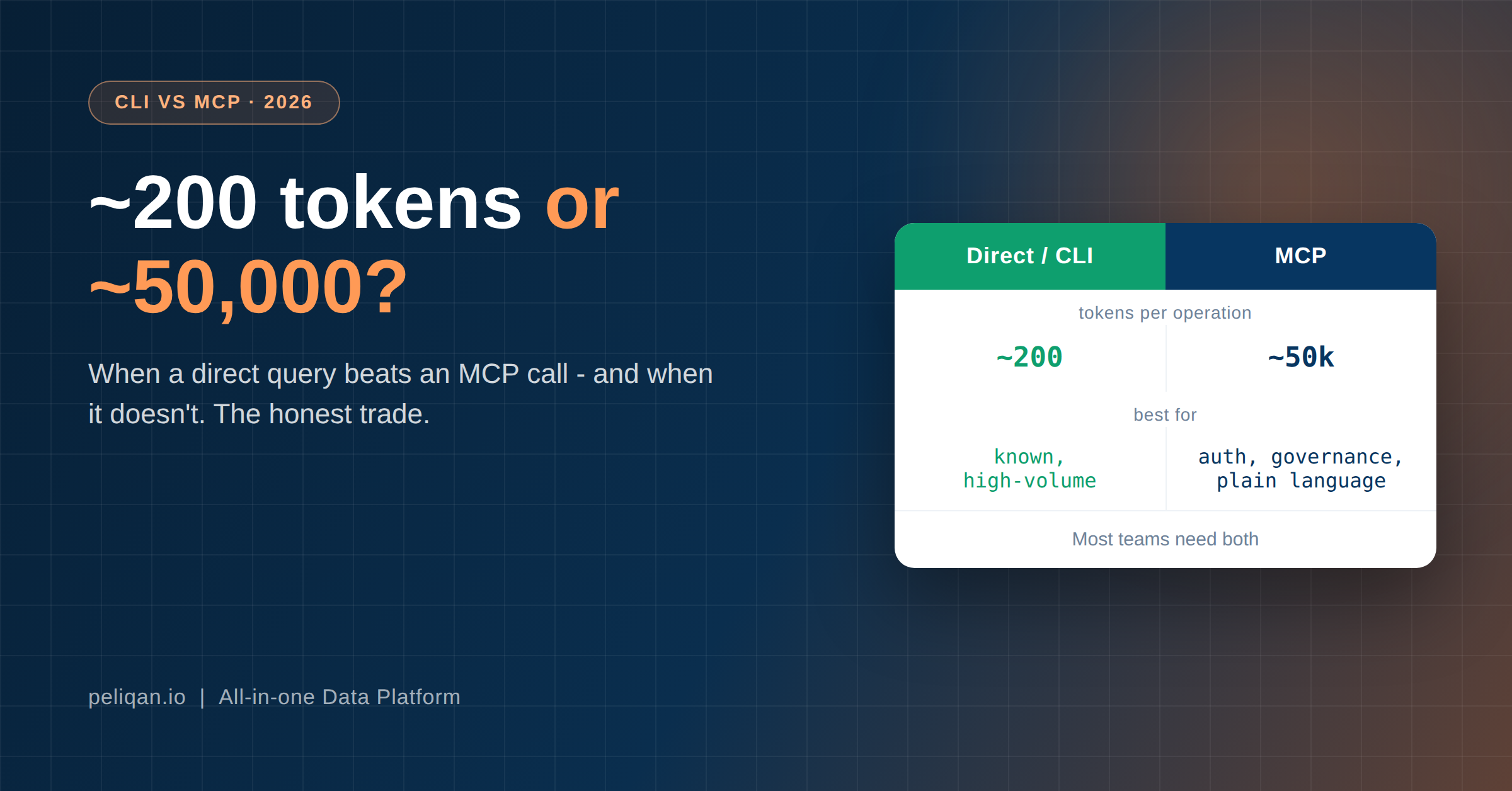
A direct CLI call for a known operation can cost on the order of a couple of hundred tokens – you are sending one specific command. An MCP operation, by contrast, has been observed to consume anywhere from roughly 32,000 to 82,000 tokens, because the agent loads tool descriptions, schema information and context before it acts. That is the range practitioners have reported, and the gap is real: two orders of magnitude.
What that costs in real money
At Claude Sonnet’s current API rate of 3 dollars per million input tokens, those numbers work out to roughly:
- Direct call, ~200 tokens: about 0.0006 dollars. Fractions of a cent.
- MCP operation, ~50,000 tokens: about 0.15 dollars.
One operation, the difference is trivial – fifteen cents is nothing. Run it 100,000 times in an automated pipeline and it is the difference between roughly 60 dollars and 15,000 dollars – the kind of gap we mapped for ingestion in the data pipeline pricing post. At pipeline scale, the token overhead stops being a rounding error and becomes the line item.
One caveat before going further: these are illustrative ranges, not a benchmark of any specific product. Your real figures depend on your schema size, how much context loads per call, and your caching. The point is the shape of the difference, not the exact cents – and later in this post, three corrections to even that shape.
When the direct call wins
Choose CLI or direct SQL when the operation is known and repeated at volume.
- Production pipelines. A nightly job on a set schedule that runs the same transformation on a million rows should not pay MCP overhead on every run. It already knows exactly what to do – there is nothing for an agent to figure out.
- High-frequency automated tasks. Anything running thousands of times where the operation never changes. The token cost multiplies with the frequency, and you get no benefit from the agent’s flexibility because flexibility is not needed.
- Tight token budgets. When cost per operation is the constraint, a direct call is the efficient choice, full stop.
The common thread: when you already know the exact query, wrapping it in an agent that rediscovers the query every time is paying for a decision that was already made.
When MCP wins
Choose MCP – the warehouse-first kind especially – when something other than raw efficiency matters, and for a lot of real work, something does.
- Authentication and multi-user access. Wiring up secure logins, per-user permissions and multi-tenant access is genuinely hard to do in raw CLI scripts. MCP handles it as part of the protocol, which is a real saving in engineering time and risk.
- Governance. When you need every action logged, permissions enforced per role, and an audit trail, a governed MCP server gives you that in one place. We went through the specifics in our MCP security post.
- Non-technical users. The person who asks “which customers are overdue?” in plain language cannot write the SQL. MCP is what turns their question into the right query. A CLI serves engineers; MCP serves everyone else.
- Exploratory, changing questions. When you do not know the query in advance – when the whole point is to let someone explore, as in managing pipelines from the terminal – the agent figuring it out is the feature you are paying for, not waste.
The common thread here is the mirror image: when the query is not known in advance, or the person asking cannot write it, the agent’s ability to work it out is worth the tokens.
The rule, in one line
Use a direct call when you already know the exact query and run it often. Use MCP when the query changes, the person asking cannot write it, or you need logins, permissions and an audit trail.
Most real data setups need both, and that is the answer the CLI vs MCP argument keeps missing. Your automated pipelines – the known, repeated, high-volume work – run as direct queries. Your human-facing and exploratory work – the plain-language questions, the ad-hoc investigation – runs through MCP. Same data warehouse underneath, two ways in, each used where it is cheapest for the job.
Three things the token argument gets wrong
The cost comparison above is the version everyone repeats, including us. It needs three corrections.
Non-determinism is the model’s, not the protocol’s. MCP gets blamed for agents that do different things on different runs. That variability is how language models work; it arrives with the model, not with the transport. Swap MCP for a CLI and the same agent still improvises. What changes the outcome is how tightly the tool constrains the job, not which protocol carried it.
A CLI agent loads context too. The 200-token figure is a script running a command someone already decided on. Point an agent at a CLI and it has to discover what tables exist, what the columns mean and which command to run, exactly as it would through MCP. The honest comparison is script versus agent, not CLI versus MCP. Where an agent is genuinely doing the thinking, the gap narrows sharply.
The context-bloat problem is being solved. Loading every tool definition upfront was the real cost driver, and it is going away. Anthropic’s tool search defers tool definitions and loads them on demand, cutting tool-definition tokens by more than 85%. Programmatic tool calling runs results through a sandbox so only the final answer reaches the model, cutting roughly 37% on multi-step work. Any post quoting a fixed MCP token overhead has a short shelf life, this one included.
None of that makes the cost question meaningless at pipeline scale. It does mean cost is a weaker reason to choose between them than it looked twelve months ago, which pushes the real decision somewhere else.
The question the argument keeps skipping
Both camps talk about how a model reaches your data. Neither talks about what it reaches through, and that decides more than the transport does.
An MCP server that wraps a vendor’s API and one that sits on your own synced data behave differently under load. A thin wrapper inherits every constraint of the API underneath it. The rate limits are the vendor’s rate limits. The payload shapes are whatever the vendor documented, or did not. If an operation is unreliable through the API, it stays unreliable through the MCP server, because nothing in between is doing any work.
We can put numbers on this, because we run both kinds. Across connectors, tools that expose a generic passthrough call, where the model infers the shape of the request, produced error rates of 44%, 64%, 89% and in one case 100% on those calls. The curated operations on the same connectors, built for a specific job with a known payload, worked reliably.
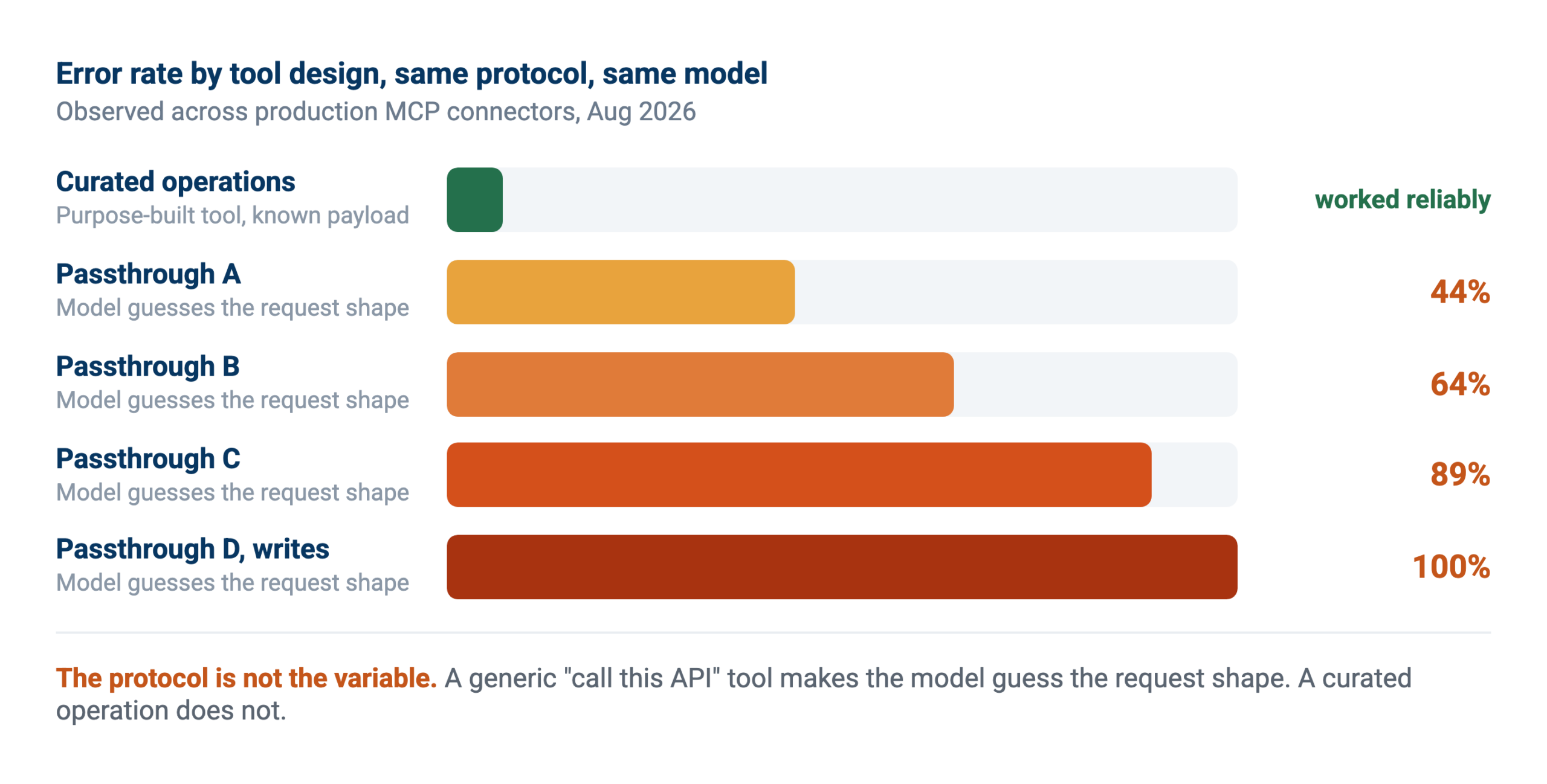
Three things travel with the thin-wrapper approach:
- Payload shape. A generic “call any endpoint” tool is powerful, because an agent can compose a request no one anticipated. It is also where most errors come from, since the model is inferring a shape rather than being handed one. Tool use examples help here, but a curated operation for a known job still starts from a better place.
- Inherited rate limits. An exploring agent burns a vendor’s quota quickly, and the scheduled syncs sharing that quota fail alongside it, which we went through in the post on API rate limits.
- Writes that vary by system. Creating a note might work while marking a task complete fails almost every time, on the same connector. Uniform write access is an assumption, not a fact.
The useful setup carries both: curated operations for the jobs you know, and a generic call underneath for everything you did not anticipate. The error rates are not an argument against the escape hatch. They are an argument for not making it the only door.
How to judge an MCP server before you connect it
Most of the MCP conversation is about the protocol. Almost none of it helps you evaluate a specific server, which is the decision you actually face. Five questions, roughly in order of how much they matter.
1. Are there curated operations, or only a generic call? A handful of named operations that map to real jobs is a good sign. If the only tool is “call this API endpoint”, the model infers every payload, and the error rates above are what that produces.
2. Where do reads come from? Live API calls inherit the vendor’s rate limits and pagination. Reads from synced tables do not. This is the single biggest difference in how the server behaves once more than one person uses it.
3. Which write operations actually work? Not whether writes are supported, which is a marketing answer, but which specific operations succeed in your own account. Support varies per object on the same connector, and the only way to know is to try each one you plan to depend on.
4. What happens when data is stale? A server reading from a copy needs to tell you how old that copy is. If nothing surfaces the sync time, every answer carries an invisible risk, and stale data fails silently rather than loudly.
5. Whose permissions apply? Ask whether access is scoped to the person asking or to a single service account shared by everyone. Per-user scoping is the difference between an assistant that respects your access model and one that quietly bypasses it.
Why warehouse-first changes the answer
When reads come from data already synced into a data warehouse rather than from a live API call, most of the failure modes above stop applying. Nothing has to infer a payload, because the model writes SQL against tables. No vendor quota gets exhausted, because the sync is one scheduled reader instead of an improvising one. Permissions sit at the data layer where you can check them.
It also makes cross-system questions possible at all. “Which customers with open deals have overdue invoices” spans two systems, so no single vendor’s MCP server answers it, however well built. Connecting two servers does not fix it either, since neither can join the other’s data. The honest limit is freshness: confirming whether an invoice was paid ten minutes ago needs the source, not a copy. The workable pattern is a split, with search and analysis against the synced copy and targeted live calls to confirm the few facts that must be current.
So there are two decisions here, not one. Which transport, which this post has covered. And what sits behind it, which decides whether the answers are worth having.
Where Peliqan sits on CLI vs MCP
Peliqan is built for exactly that split, because both paths sit on the same data warehouse. Your data lands once from 300+ connectors, and you reach it whichever way suits the task.
For automated, known work, you write SQL and Python transformations that run directly against the data warehouse on a schedule – no agent overhead, because none is needed.
For human-facing and exploratory work, the MCP server lets people ask in plain language, with permissions and logging built in.
Because the pricing is per connection rather than per token or per row, moving work between the two paths does not change your Peliqan bill – though your AI model API costs still follow whichever path you choose, so the token math above still matters for that part. The platform gives you both doors; which one a given job walks through is your call, and now an informed one.
If you want to see both paths on your own data, book a demo: run a known query directly, then ask the same question in plain language through MCP, and watch where each one makes sense.