




AI-ready data is data an AI system can reach, read and rely on without a human standing behind it vouching for the answer. Most definitions stop at quality and governance. This post covers the part they skip: where the answer actually comes from at the moment someone asks, and why that decides whether the answer is trustworthy.
Every definition of AI-ready data you will find says roughly the same four things. The data should be accurate. It should be governed. Its meaning should be documented. It should be fresh.
All true, and all describing data at rest. None of it describes what happens in the two seconds after someone types “which customers are overdue?” into a chat window.
That gap matters more than it sounds. A company can do the quality work, the cataloguing work and the governance work, connect an AI assistant, and still get answers that are confidently wrong. Not because the data was bad, but because of where the assistant went to get it.
We have production evidence on this. Across 5,374 real tool calls made by AI assistants against business systems over a two-week window, the pattern was consistent: between 55% and 96% of calls, depending on the connector, were SQL against a synced copy of the data rather than live calls to the source system. The setups that worked were the ones where that copy existed. This post is about why.
What is AI-ready data?
AI-ready data is data that an AI system can find, interpret and use correctly without a person preparing it first for that specific question.
The phrase gets used loosely, so it helps to separate it from two neighbours it often gets confused with.
Analytics-ready data is shaped for a known question. Someone decided in advance what the report needed, modelled the tables to fit, and the dashboard renders. The question was fixed before the data was prepared.
Training data is shaped for a model to learn from. It needs volume, representative coverage of edge cases, and labels. Most business teams are not doing this at all.
AI-ready data is shaped for questions nobody anticipated. That is the hard part. You cannot pre-model for a question you have not heard yet, so the data has to carry enough structure and context that a model can work out the answer on its own, and enough guardrails that it fails safely when it cannot.
The short version
Analytics-ready data answers the question you planned for. AI-ready data has to answer the question you did not. That difference is why cleaning your data is necessary but nowhere near sufficient.
Why clean data is not the same as AI-ready data
Clean data is a prerequisite. It is not the finish line, and treating it as one is the most common way this goes wrong.
A perfectly clean customer table with no duplicates, no nulls in the key fields and consistent formatting is still not AI-ready if the model cannot tell what “status = 3” means, cannot tell whether the row was synced this morning or last March, and cannot tell whether the person asking is allowed to see it.
Cleanliness is a property of the values. AI readiness is a property of the whole path between the question and the answer. Four things have to hold along that path.
- The model can reach the data without exhausting the source system or timing out.
- The model can interpret the data, because column meanings and relationships are documented somewhere machine-readable.
- The model knows how current the data is, so a stale answer can be caught rather than trusted.
- The access is scoped to the person asking, not to whatever credentials the integration happened to be given.
Break any one of those and the answer is unreliable even when every value in the table is correct. Good data quality practice gets you the values. The rest of this post is about the other three.
The question every definition skips: where does the answer come from?
When someone asks an AI assistant a question about business data, the answer arrives from one of two places. Almost nobody writing about AI-ready data says which, and it changes everything downstream.
Option one, a live API call. The assistant calls the source system’s API in the moment, gets back JSON, and reasons over it.
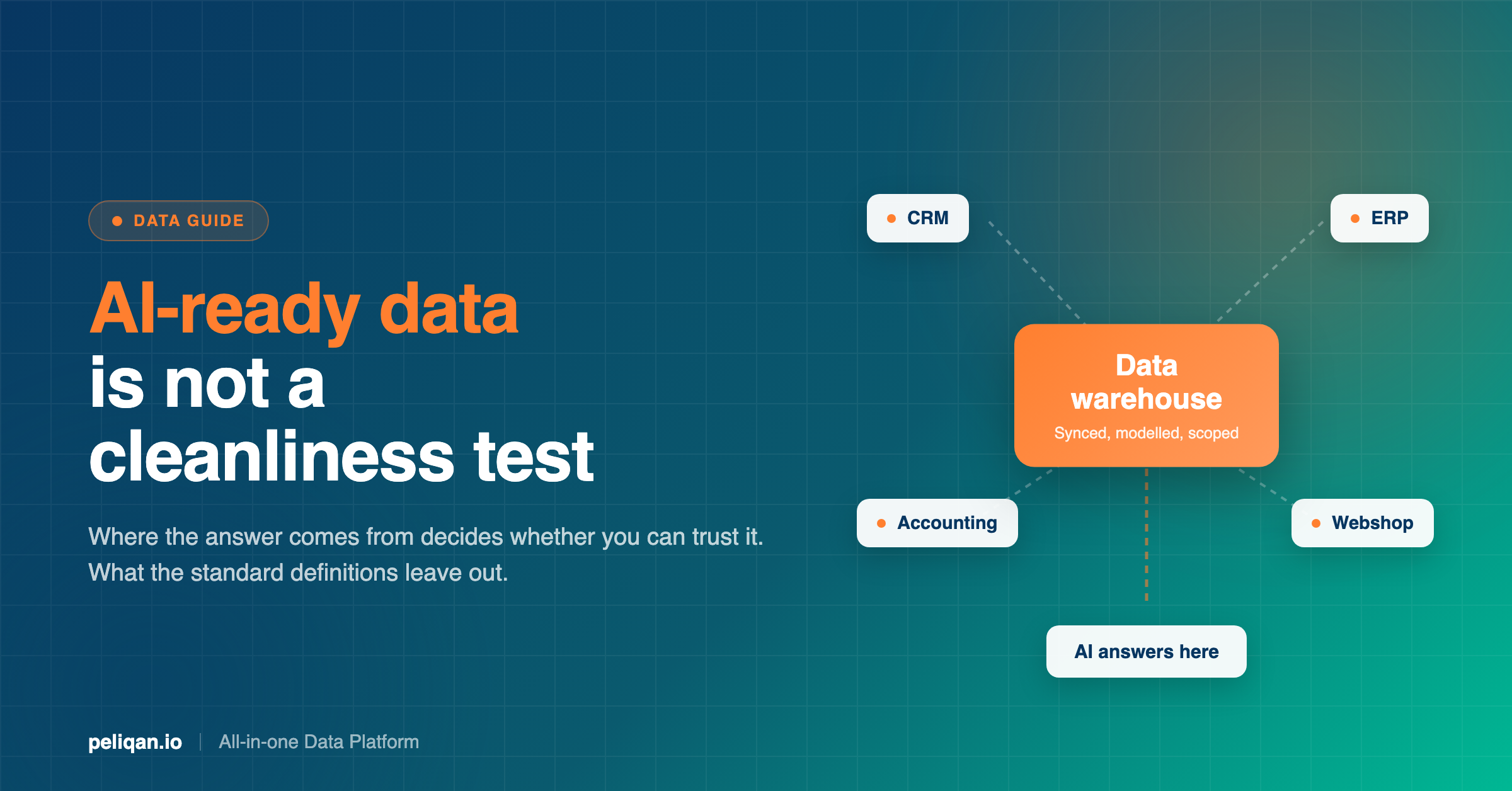
Option two, a synced copy. The data was already pulled into a data warehouse on a schedule. The assistant writes SQL against tables.
These sound like implementation trivia. They are not. They produce different reliability, different failure modes and different answers to questions that span more than one system.
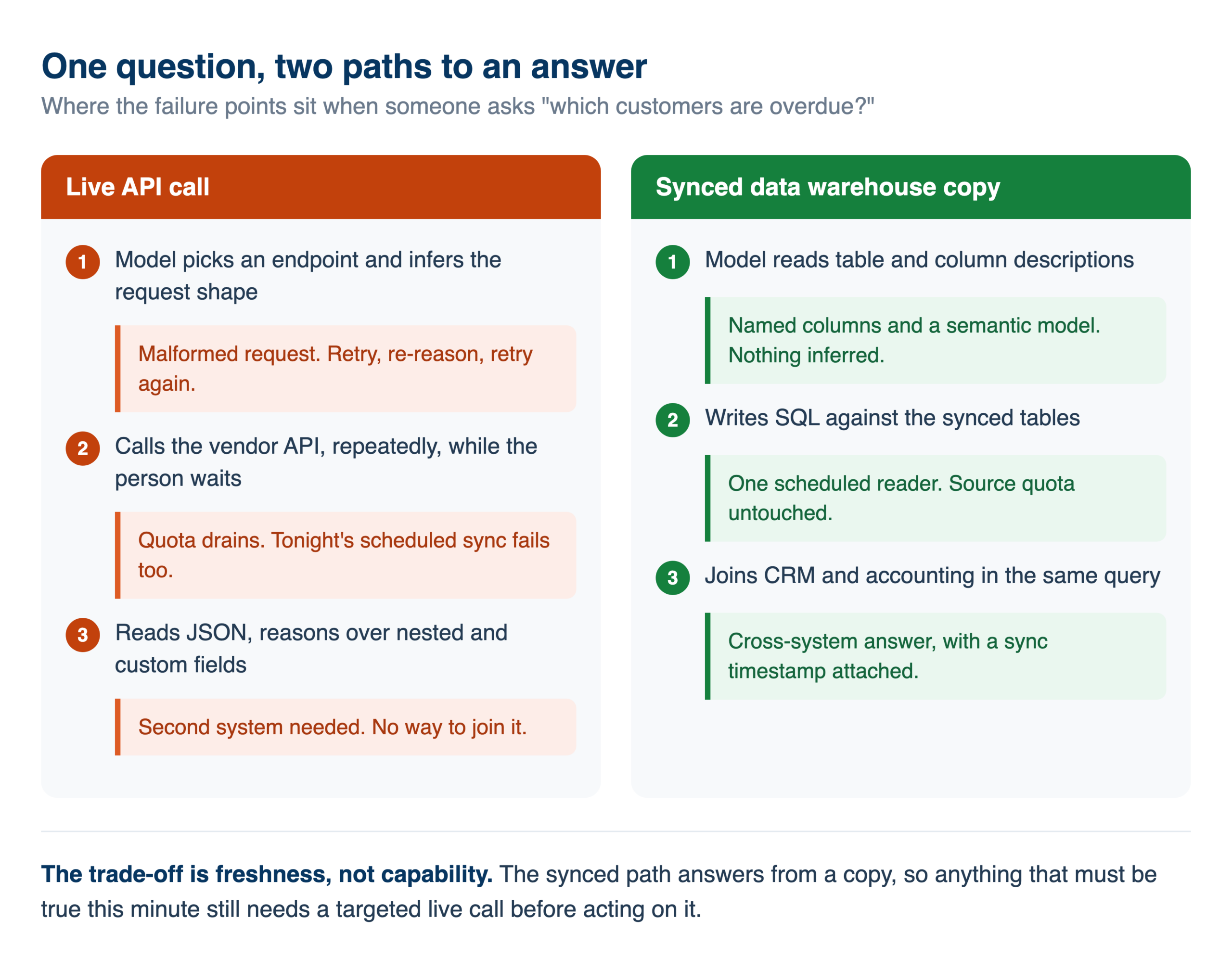
What the live-call path inherits
An assistant calling the source API directly inherits every constraint that API has, and it inherits them at the worst possible moment, which is while a person is waiting for an answer.
Rate limits become your rate limits. An exploring agent is not a well-behaved integration. It makes a call, reads the result, decides it needs a different call, and repeats. A single curious question can produce dozens of requests. If your scheduled syncs share that quota, they fail alongside it, which is the failure mode we mapped in detail in the guide to API rate limits.
Payload shapes become the model’s problem. Business APIs are inconsistent. Fields are optional in practice but required in the docs, nesting differs by endpoint, and custom fields carry names nobody outside the company recognises. When a tool hands the model a generic “call this endpoint” capability, the model has to infer the request shape. In our production data, tools built that way produced error rates of 44%, 64%, 89% and in one case 100% on those calls. Purpose-built operations on the same connectors, where the payload was known in advance, worked reliably.
Cross-system questions become impossible. “Which customers with open deals have overdue invoices” spans a CRM and an accounting system. No single vendor’s API answers it. Connecting two of them does not fix it either, because neither can join the other’s data.
What the synced-copy path changes
When the data has already landed in a data warehouse, most of those failure modes stop applying, for structural reasons rather than clever engineering.
There is no payload to infer, because the model writes SQL against tables with named columns. There is no vendor quota to exhaust during a conversation, because the sync is one scheduled reader rather than an improvising one. Queries run on your data warehouse, so they do not burn your API quota. And cross-system questions become ordinary joins, because both systems are sitting in the same place.
This is the part of AI readiness that the standard definitions leave out entirely, and it is the part that decides whether the other work pays off.
The honest limit of a synced copy
- Freshness has a floor. A copy is as current as its last sync. Confirming whether an invoice was paid ten minutes ago needs the source, not a copy.
- Writes still go live. Reading from a copy is safe; creating a task or an invoice reaches the real system, with all of that system’s rules.
- The workable pattern is a split. Search and analysis against the synced copy, targeted live calls to confirm the few facts that must be current before acting.
The five properties of AI-ready data
Most lists of AI-ready data attributes have four entries. The fifth is the one that separates a system that demos well from one that survives contact with a real team.
1. Accurate and complete enough for the job
Not perfect. Enough. Deduplicated entities, consistent keys across systems so records can be joined, and no silently missing periods. The bar is set by the question, not by an abstract standard, and chasing perfection here is where a lot of readiness programmes stall before delivering anything.
2. Traceable origin and freshness
An answer without a timestamp is a guess wearing a suit. The system needs to know when each table last synced and where each field came from, and it needs to be able to say so. Automatic lineage matters here for a reason people underrate: when a number looks wrong, the argument that follows is settled by knowing where it came from, not by re-running the query.
3. Meaning a machine can read
A column called `stat_cd` with values 1 through 5 is meaningless to a model, and describing it in a wiki no machine reads does not help. Meaning has to live where the model can reach it: table and column descriptions, documented relationships, and a semantic model that maps business terms to the underlying fields. This is the single highest-leverage piece of work for most teams, and the most commonly skipped.
4. Access scoped to the person asking
The question “which customers are overdue?” should return different results for a regional account manager than for the CFO. If your AI setup runs everything through one shared service account, it does not. It quietly returns everything to everyone, and nobody notices until they do.
Worth being precise about how this is usually implemented, because it is easy to assume a product feature exists where there is none. Permissions in Peliqan are set at the schema level through Groups, with Admin, Member and Viewer roles. There is no row-level security screen. Row-level scoping for an AI agent is built by giving the agent a set of views that each carry a permission column, and applying the filter in the API handler that sits between the chat interface and the data. It works well, and it is something you build rather than something you switch on.
5. Reachable without breaking the source
This is the one the other definitions omit. Data can be accurate, governed, documented and fresh, and still fail in production because the path the AI uses to reach it falls over under real usage.
A definition of AI-ready data that does not mention rate limits, payload shapes or where the query executes is describing a filing cabinet, not a working system.
What actually breaks when data is not AI-ready
These are the failure modes worth recognising early, because each one looks like something else at first.
The confidently wrong answer. The model returns a number, formatted well, with an explanation. The number is wrong, because a join was ambiguous or a status code meant something other than what it assumed. Nothing in the output signals low confidence. This is the expensive one, and it is a data-context failure rather than a model failure.
The silent staleness failure. Everything works, the answers are plausible, and the underlying table stopped syncing eleven days ago. Loud failures get fixed. Silent ones get quoted in board meetings. Data quality monitoring with alerting is the difference here.
The quota collapse. Someone explores a question at length on Tuesday afternoon and the nightly sync fails, because both were drawing on the same API quota. The AI usage and the pipeline failure look unrelated to whoever is on call.
The permissions surprise. A member of staff asks a broad question and gets an answer covering data they should never have seen. Usually discovered by accident, and usually months in.
The write that half-worked. An agent creates a record successfully and fails to update the related one, leaving the system in a state no human workflow would produce. Write support varies per object even within a single connector, which is why writeback is worth testing operation by operation rather than assuming.
What people actually ask AI about business data
Readiness requirements are easier to judge against real questions than against a checklist. The 5,374 production calls behind this post carried a self-reported intent for each one, which makes the pattern visible rather than assumed.
Two jobs dominate, and each one sets a different bar.
Replacing a manual export. Every single connector in the sample showed someone displacing an Excel export, a CSV upload or a sequence of clicks through a vendor UI. This is the universal story, and it sets a harsher completeness bar than a dashboard does. A report someone currently builds by hand includes the exceptions they know to include. If the synced data is missing a status, a custom field or a subsidiary, the AI version is quietly wrong in exactly the place the manual version was careful.
Reconciling two systems against each other. This was the most repeated job across every connector in the sample: a ledger against a margin workbook, a webshop against invoices against bank transactions, an ERP against advertising and analytics data. It is worth sitting with what that implies. Reconciliation is cross-system by definition, so it cannot be done through any single vendor’s API, however good that API is. The most common thing people want from AI on business data is the thing a single-source integration structurally cannot do.
A third pattern is easy to miss and changes the readiness work. People ask in their own language. The sample carries Dutch, French, German, Italian and Spanish questions, including domain terms with no clean English equivalent. When someone asks in Dutch about a concept your schema stores under an English column name, the model is doing a translation and a mapping at once. That makes the semantic layer more load-bearing, not less, and it is a good argument for documenting business terms in the language the team actually uses.
Management reporting and finance dashboards accounted for roughly 40% of calls on one accounting connector across seven separate accounts, which is a reasonable signal about where the value lands first.
AI-ready data and data governance are not the same thing
The two get used interchangeably and they answer different questions.
Governance answers who may use a dataset, under what rules, and with what accountability. It is largely a question about people and policy, and good governance practice is worth having on its own terms.
AI readiness answers whether a machine can use the data correctly, right now, without a person mediating. A perfectly governed catalogue that no agent can query is well governed and not AI-ready. A fast, well-modelled data warehouse with no access scoping is closer to AI-ready and a genuine risk.
They overlap at property four in the list above, and only there. Treating a governance programme as though it delivers AI readiness is a common and expensive substitution, because governance work tends to produce documentation for humans while readiness needs structure for machines.
How to make your data AI-ready
In the order that gets you working results soonest, rather than the order that looks tidiest on a slide.
Land the data somewhere you control
Before anything else, get the systems that matter into one place on a schedule. This single step removes rate limits, payload inconsistency and cross-system joins from the problem in one move, and it is the prerequisite for everything below. Choosing a sync frequency is a real decision, not a default: match it to how fast the underlying data actually changes.
Document meaning where a machine can read it
Table descriptions, column descriptions, and the handful of business definitions your team argues about. If “active customer” means three different things in three systems, write down which one the AI should use. This is unglamorous and it is the highest-return work on the list.
Model the joins in advance
Do not make the model rediscover how your CRM keys to your accounting system on every question. Build the joined views once with SQL or Python transformations and let the AI query those instead of raw source tables. Fewer degrees of freedom means fewer confident mistakes.
Decide access before you connect anything
Decide who sees what while the setup is small, because retrofitting scoping onto a system people already use is painful. If different people need different slices, build the views and the filtering layer now.
Instrument it
Freshness checks with alerts, and a log of what was asked and what ran. Peliqan logs AI queries and writeback actions, which is what turns “the AI said something odd last week” from an unanswerable question into a five-minute lookup. The same instinct applies to agentic pipelines generally.
Start narrow
One team, a handful of well-modelled tables, questions the team already asks. Broad access to everything on day one produces impressive demos and unreliable answers. Narrow scope produces answers people trust, which is what earns the next expansion.
Real-world example: OdooExperts
Consolidating reporting across many separate client environments is the same problem in a harder form: the data has to be unified and consistently modelled before anything sitting on top of it can be trusted. Read the full case study.
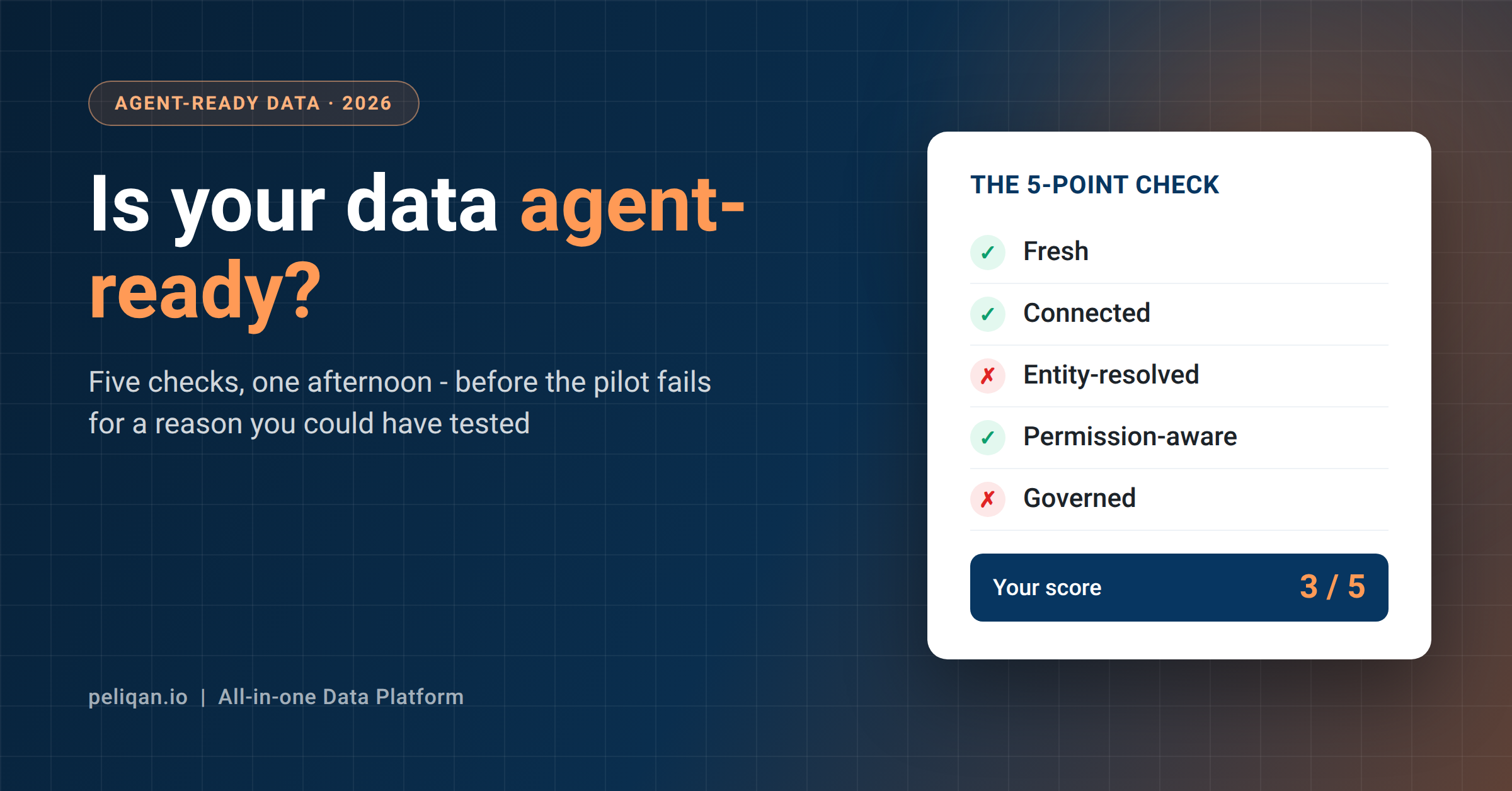
How to tell whether your data is AI-ready
Six questions. If you cannot answer one of them quickly, that is where the work is.
Can you say when each table last updated? Not whether the pipeline is green. The actual timestamp, visible to whoever reads the answer.
Would two different people get different answers to the same question? If not, you have one shared account rather than scoped access.
Is a business term like “active customer” defined anywhere a machine can read? A wiki page does not count.
Can you answer a question spanning two systems? If not, your data has not landed anywhere common yet.
Does heavy AI usage affect your pipelines? If exploring can break a sync, reads are hitting live APIs.
Can you see what the AI actually ran? Without a log, the first disagreement about a number has no way to be settled.
Where Peliqan fits
Peliqan is a data platform built around the assumption that data has to land somewhere before AI can be trusted with it.
Data from 300+ connectors syncs into a built-in data warehouse running Postgres and Trino. That is the synced copy the whole argument above depends on, and it is why questions can span systems that have no knowledge of each other.
On top of that, the MCP server lets people ask questions in plain language from Claude, ChatGPT or another AI client. For SaaS sources those questions run as SQL against the data warehouse copy, so they do not consume the source system’s API quota. Writes are a separate path: AI can act on your apps through writeback, and support varies per system, which is worth verifying per operation rather than assuming.
Governance sits at the platform level rather than being bolted on. Permissions are managed through Groups at the schema level, AI queries and writeback actions are logged, and the platform is SOC 2 Type II certified, ISO 27001:2022 certified, GDPR compliant and EU-hosted. Historical change tracking uses SCD Type 2, so “what did this look like last quarter” is answerable rather than lost.
If you are weighing how an AI assistant should reach your data in the first place, the comparison of CLI and MCP approaches covers that decision.
The question after it is which server to connect, since they differ more than the protocol suggests. That is the subject of the guide to choosing an MCP server.
The takeaway
AI-ready data is not a cleanliness standard. It is a property of the entire path between a question and an answer, and the standard definitions describe only the first half of that path.
The half they skip is where the answer comes from at the moment it is asked. Data sitting in a data warehouse you control, documented well enough for a model to interpret, scoped to the person asking and logged after the fact, produces answers you can act on. The same data reachable only through live API calls produces answers that work in a demo and degrade the moment more than one person uses the system.
The five properties above are worth auditing against honestly. Most teams find they have done the first two and skipped the last three.
If you want to see what this looks like on your own systems, book a demo and ask a question that spans two of them. That one question tends to settle whether your data is AI-ready faster than any checklist.