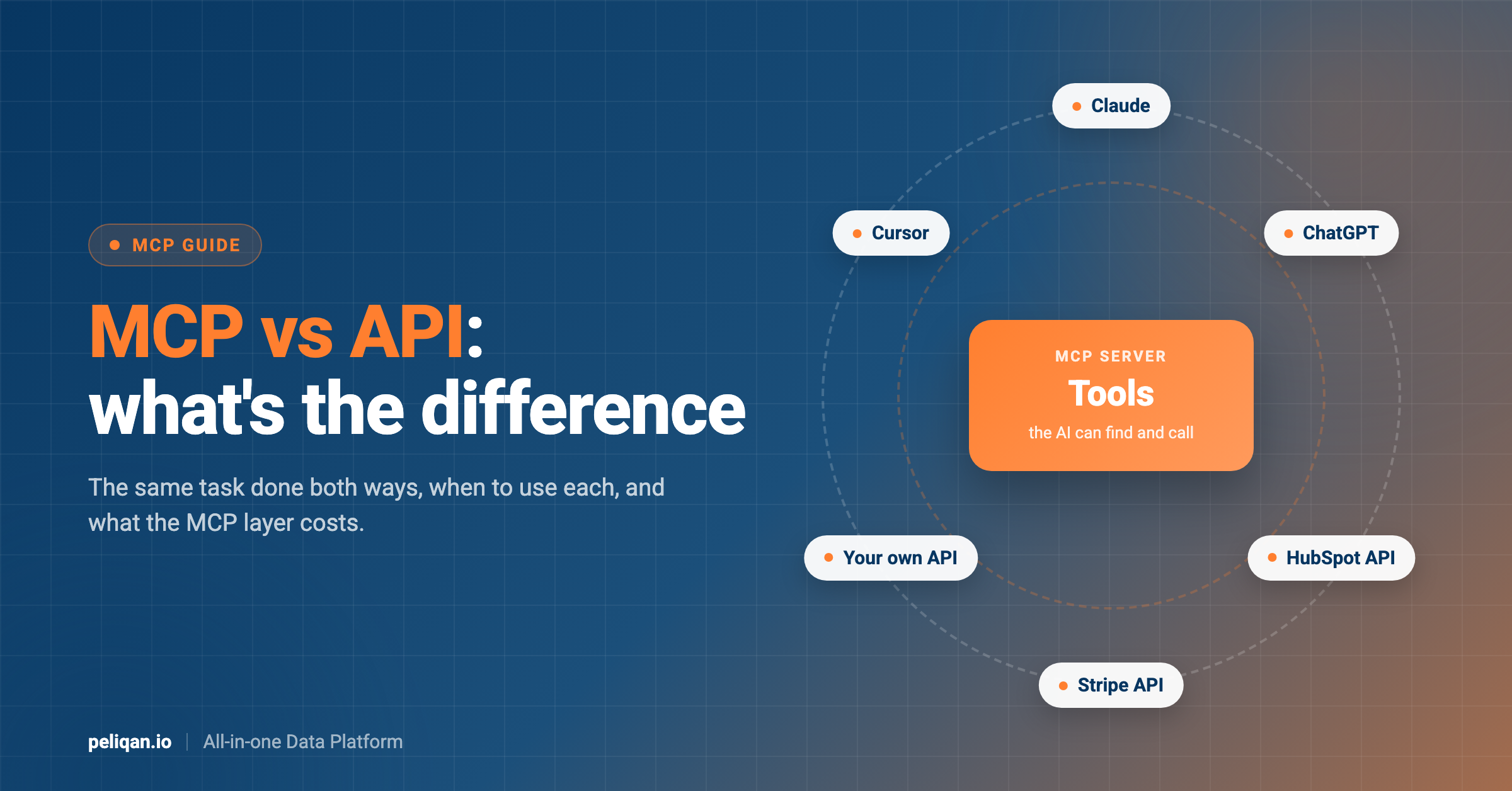





MCP vs API comes down to who is doing the work. An API lets one program talk to another, and a developer writes the code that calls it. MCP (Model Context Protocol) is a standard way for an AI assistant to find tools and use them by itself, and those tools usually call APIs underneath. MCP does not replace APIs. It sits on top of them.
This guide explains both in plain words, runs the same task through each one, and shows when to use an API directly, when MCP is the better choice, and what it costs to put MCP on top of an API.
MCP vs API: the short answer
- An API is a set of fixed requests an app accepts, like “give me all open invoices”. A developer reads the documentation and writes code that sends those requests.
- MCP is a protocol that lets an AI assistant such as Claude or ChatGPT ask a server “what can you do?”, read the answer, and then call the right tool on its own.
- They work together. Most MCP servers are a layer over one or more APIs. The API does the work. MCP makes that work usable by an AI without someone writing code for every request.
What is an API?
API stands for application programming interface. It is the list of requests an app accepts from other software, plus the format of the answers it sends back. When your accounting tool shows payments from Stripe, it is calling Stripe’s API behind the scenes.
APIs are built for developers. Each request is exact: a specific address, specific parameters, a key to prove who you are. The API does exactly what the code asks, the same way every time. That makes APIs predictable and fast, but someone has to write and maintain the code for every job. If you build software that other companies connect to, our API checklist covers what a good API needs.
What is MCP?
MCP, the Model Context Protocol, is an open standard for connecting AI assistants to outside tools and data. It was introduced by Anthropic and is now supported by Claude, ChatGPT, Cursor, Microsoft Copilot and many other AI apps. If you use Claude, the connectors you add are MCP servers, as explained in our guide to the best Claude connectors.
MCP has three parts, as described in the MCP architecture docs:
- The host: the AI app you use, like Claude Desktop.
- The client: a small part of the host that keeps a connection to one MCP server.
- The server: a program that offers tools and data to the AI, for example a server for your CRM.
A server can offer three kinds of things. Tools are actions the AI can call, like “list open invoices”. Resources are data the app can attach as context, like a file. Prompts are ready-made instructions a user can pick, like a slash command.
The key difference from an API is discovery. When an AI connects, it asks the server for its list of tools. Each tool comes with a name, a plain description of what it does, and the inputs it needs. The AI reads that list and decides which tool to call, based on your question. The MCP tools specification defines exactly how that list looks.
Difference between MCP and API: the same task, done both ways
Here is one realistic question: “Which customers with an open deal in HubSpot have an overdue invoice in Stripe?”
With APIs
A developer writes code that calls two APIs. Here is the Stripe part, fetching open invoices, based on the Stripe invoices API:
curl -G https://api.stripe.com/v1/invoices \
  -u "sk_test_YOUR_KEY:" \
  -d status=open \
  -d limit=100
This returns up to 100 open invoices. Stripe has no “overdue” status, so the code must compare each invoice’s due date with today. If there are more than 100, the code has to ask for the next page, and repeat until it has them all.
Then the code does the same for HubSpot, searching for deals that are still open through the HubSpot CRM search API:
curl https://api.hubapi.com/crm/objects/2026-09/deals/search \
  --request POST \
  --header "authorization: Bearer YOUR_ACCESS_TOKEN" \
  --header "Content-Type: application/json" \
  --data '{"filterGroups":[{"filters":[{"propertyName":"dealstage",
    "operator":"NOT_IN","values":["closedwon","closedlost"]}]}],
    "limit":200}'
Put the two calls side by side and the extra work is easy to see:
- Two logins: Stripe uses a secret key, HubSpot uses an access token. Each has to be created, stored safely and renewed.
- Two formats: Stripe takes a simple GET request with parameters. HubSpot takes a POST request with a JSON body of filters.
- Two ways of paging: Stripe returns up to 100 results and uses a “starting_after” value for the next page. HubSpot returns up to 200 and uses an “after” value.
- Two sets of limits: HubSpot’s search endpoints allow five requests per second and at most 10,000 results per search.
- No shared key: a HubSpot deal does not contain the customer’s email, so the code needs another call to find each deal’s company or contact, then match those to Stripe customers by email or name.
The “closedwon” and “closedlost” values are the stage names in HubSpot’s default pipeline. A company with its own pipelines has to change them, which is one more thing the code has to know about.
The code also has to slow down when either API says “too many requests”. Our guide to API rate limits explains why that happens quickly.
The result is reliable and repeatable. But it is a small software project, and it answers only this one question.
With MCP
With MCP servers for HubSpot and Stripe connected, you type the question in plain language. The AI asks each server for its tools. A simplified tool from that list looks like this:
{
  "name": "list_open_invoices",
  "description": "List unpaid invoices. Use for questions about overdue payments.",
  "inputSchema": {
    "type": "object",
    "properties": { "overdue_only": { "type": "boolean" } }
  }
}
This is an example in the format the MCP specification uses, not a real Stripe tool. The description is written for the AI, not for a developer. The AI reads it, sees that it fits your question, calls it, then calls a deals tool on the HubSpot server and combines the two answers.
Nobody wrote code for this question. The next question, for example “which of those customers opened a support ticket this month?”, works the same way. The trade-off is that the AI decides the steps, so results can vary, and combining two large lists inside a chat is not as exact as a database join.
MCP vs API comparison table
When to use an API directly
Use an API when you know exactly what needs to happen and it needs to happen the same way every time:
- Scheduled syncs: copying new orders into your ERP every night.
- Payments and money movement: anything where a wrong step costs real money.
- App-to-app automation: “when a deal is won, create a project”.
- High volume: thousands of calls a day, where the cost and speed of an AI in the loop do not make sense.
- Your own product: features inside your app that must behave the same for every user.
For quick lookups a developer runs by hand, a direct query or command line can also beat an MCP call. We compare those options in CLI vs MCP.
When MCP is the better choice
MCP helps most when the question is not known in advance:
- Exploring data: “Why did revenue drop in August?” leads to follow-up questions nobody could plan for.
- Tasks across several tools: reading a ticket, checking the customer’s invoices and drafting a reply.
- People who do not write code: finance, sales or support teams asking questions in plain language.
- One setup for many AI apps: the same MCP server works in Claude, ChatGPT, Cursor and other clients, instead of a separate integration for each.
MCP server vs API: how they work together
Not every MCP server needs a web API. Some read files on your computer or query a database directly. But servers for business apps like a CRM or an accounting tool almost always call that app’s API, because that is the only way in.
Most MCP servers do not replace an app’s API. They call it. The MCP server turns a few useful API requests into tools with clear descriptions, handles the login, and returns answers in a form the AI can read. For the full background, see our Claude MCP guide.
That layer is useful, but it is not free. Three costs are worth knowing before you build or pick an MCP server.
What the MCP layer costs
- Rate limits still apply: every tool call that reaches the app counts against its API limits. An AI that retries or pages through data can use them up faster than a person would. Our MCP rate limits guide covers how to stay within them.
- Tools take up space: the AI reads every tool description before it answers. A server with hundreds of tools, one per API endpoint, fills the AI’s context and makes it pick the wrong tool more often. A small set of well-described tools works better.
- The server needs securing: an MCP server holds access to your apps. Who can connect, and what they can do, has to be set up as carefully as for any API.
This is also the honest answer to “can I just convert my API into an MCP server?”. You can, and tools exist that generate one tool per endpoint automatically. But a copy of the API is rarely what an AI needs. The best MCP servers group requests into tasks, like “find overdue invoices”, instead of mirroring every endpoint, so the AI has fewer, clearer tools to choose from.
Security: what changes and what does not
With an API, access usually depends on a key stored in code or a config file. Anyone who has the key has the access, and keys tend to get shared, copied and forgotten.
Remote MCP servers usually use OAuth instead: the user signs in and approves access, and the AI gets a token tied to that person. The MCP authorization specification builds on OAuth 2.1 for this. Good MCP servers also limit what each tool can do, so a read-only question never needs write access.
What does not change: if you give an AI access to a powerful account, it can do powerful things, through an API or through MCP. Start with read-only access and add write actions one at a time. Our guide to MCP security settings lists what to configure in production.
Where Peliqan fits
Peliqan sits between the two. It connects to each app’s API for you, then offers one MCP server so your AI can use all of those apps at once. It works in two layers.
How the Peliqan MCP server works
Because questions run on a synced copy, it is worth knowing how fresh that copy is. You set the sync schedule per connection, from near real-time to daily. Our guide to sync frequency explains how to choose.
For the HubSpot and Stripe question above, that means one SQL query across both apps instead of two APIs, two logins and matching code. Our post on cross-source MCP queries shows how that works.
If you want to turn your own internal API into an MCP tool, Peliqan’s MCP server template lets you add tools as short Python functions. The steps are in the guide to building a custom MCP server.
To connect the standard server to Claude, ChatGPT or Copilot, follow the Peliqan MCP server setup.
For how writeback is controlled, see writeback with MCP.
API vs MCP: which should you use?
MCP and APIs are not competing. They solve different problems, and most real setups use both.
- Use an API when the job is fixed, repeated, high volume, or has to be exactly the same every time.
- Use MCP when people or AI agents need to ask open questions and work across several tools without new code for each question.
- Use both in most cases: APIs do the reliable work underneath, and MCP makes that work available to AI in a safe, standard way.
If your questions span many business apps, the Peliqan MCP page shows which apps one MCP server can reach and the kinds of questions it answers.