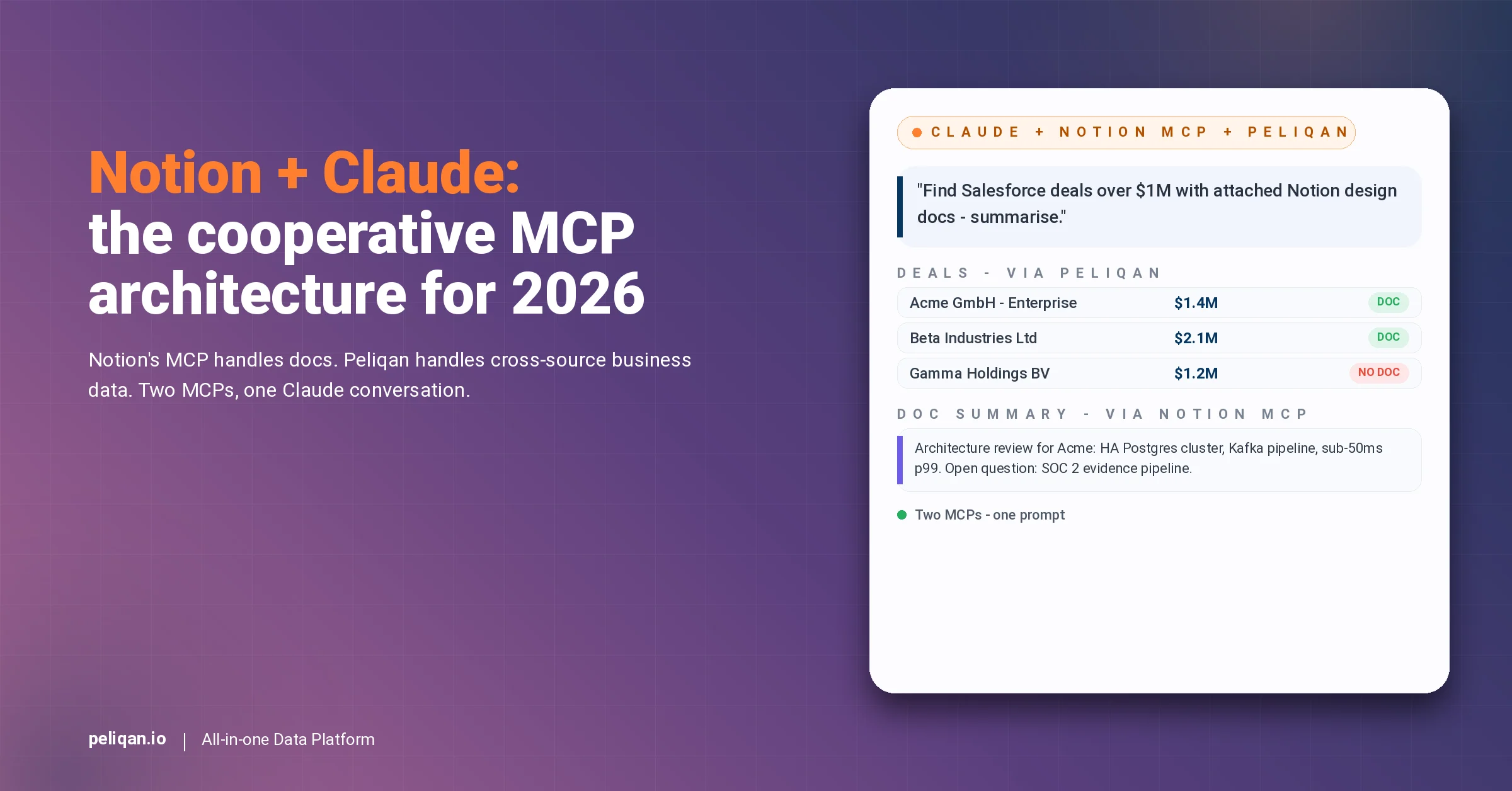





Try this Monday morning question on your current AI stack: “Show me every Salesforce deal worth more than $1 million where the customer has a Notion architecture-review doc attached, summarise the most recent doc, and flag any open concerns.” Most AI agents can answer half the question.
Notion’s own MCP server retrieves the doc beautifully but cannot see Salesforce pipeline. Composio’s or Pipedream’s Salesforce MCP returns the deals but cannot read Notion blocks. The cross-source query that product, RevOps, and engineering leaders actually want requires both layers working together.
This blog is different from every other notion mcp guide you will find. Specifically, it does not position against Notion’s official MCP server. Notion’s MCP is excellent for in-Notion workflows. Instead, the post explains how the Peliqan warehouse-first MCP sits alongside Notion’s MCP – one handles document retrieval, the other joins your business data – so Claude can answer questions that touch both worlds.
If you came here searching “notion mcp”, this is the cooperative architecture you actually need. Furthermore, the five killer use cases below show what becomes possible once Notion’s MCP and a warehouse-first MCP run side by side.
Why this matters in 2026
Three forces have converged on Notion-led teams in 2026. Firstly, Notion shipped its official hosted MCP server in 2025, evolving from a downloadable repo into a one-click OAuth integration. Consequently, the in-Notion AI experience is mature and well-documented.
Secondly, the cross-source RevOps questions that touch Notion docs plus business data have become weekly rather than occasional. Specifically, product roadmaps need to join with revenue, design docs need to join with deal value, and OKR pages need to join with engineering throughput.
Finally, EU AI Act enforcement is live with fines up to €35M or 7% of global turnover for ungoverned AI. Notably, this raises the bar on which MCP architecture EU teams adopt – especially when the AI agent reads both knowledge docs and customer-personal data.
What Notion is, and why the official MCP server matters
Notion at a glance: the 30M-user knowledge layer
Notion at a glance
Why Notion’s official MCP is the right starting point
Notion’s hosted MCP server is well-built. Specifically, it handles OAuth elegantly, exposes page and block retrieval, supports database queries with filter and sort, and ships with creating + updating pages and database rows. As such, the in-Notion experience is exactly what a knowledge-worker AI agent needs.
Importantly, this blog does not argue against Notion’s MCP. The official Notion MCP is excellent for in-Notion workflows – drafting docs, summarising meeting notes, querying a Notion database. By contrast, the question this blog answers is what happens when your AI agent needs to join Notion data with everything else in your stack.
Why connecting Notion to Claude across your business data is harder than it looks
Six constraints every cross-source Notion AI project hits
Where Notion’s MCP runs out of road
Pulling a single Notion page is straightforward. Indeed, the official Notion MCP handles that elegantly. The harder problem is everything that crosses Notion plus a system of record – a CRM, a payments platform, an ERP, a support tool.
Specifically, an AI agent that wants to answer “which design docs are attached to deals over $1M” needs both Notion document retrieval AND Salesforce pipeline data in the same prompt. Notion’s MCP cannot reach Salesforce. By contrast, a Salesforce wrapper MCP cannot read Notion blocks. The architecture that solves both is two MCPs cooperating.
The real cost of fragmented Notion + business-data reporting
What slow cross-source reporting costs a Notion-led team
The hidden cost is not the slow report itself. Rather, it is the operating model that builds up around it – the weekly status meetings that exist to manually cross-reference, the audit-prep crunch that consumes weeks. By contrast, cross-source AI that joins Notion with business data turns those workflows into single-prompt answers.
6 ways to connect Notion to Claude
1. Notion’s official MCP server (start here)
Notion shipped its hosted MCP server in 2025 as the official integration. The platform handles OAuth in a one-click flow, exposes page and block CRUD, supports database queries with filter and sort, and ships with creating and updating pages. Furthermore, the recent Notion API 2025-09-03 migration introduces data sources as the primary abstraction for databases, with 91% more token efficiency on database operations. The open-source repo at makenotion/notion-mcp-server is available for teams that prefer to self-host.
For any in-Notion workflow – drafting docs, summarising meetings, querying a database, updating a project page – Notion’s MCP is excellent and should be your default.
Best for: In-Notion knowledge-worker AI workflows. The other methods below are about extending Claude to data outside Notion that needs to join with Notion documents.
2. Direct REST API with custom Python
Any developer can authenticate against the Notion REST API and walk pages, blocks, and databases. However, the 3-rps rate limit is unforgiving for heavy AI workloads. Specifically, recursive block traversal eats through the budget quickly, and any cross-source join logic has to be hand-rolled.
Building a maintainable layer takes weeks of engineering before the first AI prompt arrives.
Best for: Teams with in-house data engineering and a narrow set of fixed extracts.
3. Community GitHub Notion MCP servers
Several community MCP servers wrap the Notion API as MCP tools alongside the official server. Notably, repos like makenotion/notion-mcp-server (the official open-source repo), suekou/mcp-notion-server, and forks expose CRUD operations on pages, blocks, and databases. These are useful as starting points and self-hostable.
However, like Notion’s hosted MCP, they stay inside Notion by design. As a result, cross-source joins with non-Notion systems are not in scope.
Best for: Engineering teams self-hosting an MCP for compliance or customisation reasons.
4. Composio and Pipedream Notion integrations
Composio’s Notion integration and Pipedream MCP both expose Notion actions across their broader catalogs. Specifically, they shine for event-driven workflows like “when a Notion page is created in this database, post to Slack and create a HubSpot deal”. Both are US-hosted by default.
Neither is an analytical platform – no warehouse beneath, no cross-source SQL. Furthermore, the structural compliance gap matters for EU buyers under GDPR.
Best for: Event-driven automation where Notion is one step in a workflow chain.
5. Zapier MCP and Make.com Notion integration
Zapier MCP and Make.com both wrap Notion alongside hundreds of other apps. Naturally, these excel at lightweight automation – propagating a Notion page change to other tools, syncing a Notion database to a Google Sheet. Zapier MCP in particular is task-quota-capped, which limits how aggressively an AI workload can run.
Neither stores Notion data in a warehouse. Likewise, cross-source SQL with non-Notion systems is not in scope.
Best for: No-code teams running lightweight cross-app automation around Notion.
6. Warehouse-first MCP platform (Peliqan) – alongside Notion’s MCP
Peliqan is the warehouse-first MCP that sits alongside Notion’s official MCP – not as a replacement. Specifically, Notion’s MCP retrieves the document; Peliqan’s MCP joins the rest of your business data. Together, they let Claude answer cross-source questions neither could handle alone.
The Peliqan layer syncs your business data (Salesforce, Stripe, HubSpot, Exact Online, Teamleader, MEWS, Zendesk, Mixpanel, and 240+ other connectors) into a managed EU-hosted Postgres + Trino warehouse. Furthermore, Claude writes real Postgres SQL with full JOINs across the business stack and combines that with Notion document retrieval through Notion’s own MCP. Writeback flows back through reverse ETL with a full audit log. EU-hosted, SOC 2 Type II, GDPR-native.
Best for: Teams running Notion as the knowledge layer AND needing cross-source AI on business data. See the Notion connector.
Comparison: 6 ways to connect Notion to AI
| Method | Writeback to blocks | Cross-source SQL | Warehouse | EU hosting | Rate-limit handling | Audit log |
|---|---|---|---|---|---|---|
| Notion official MCP | Native, excellent | No (Notion-only) | No | Enterprise option | Notion-managed | In-Notion |
| Direct API + Python | Custom-built | Hand-rolled | Hand-rolled | Depends on host | Hand-rolled | DIY |
| Community GitHub MCPs | Yes | No | No | Self-host | DIY | DIY |
| Composio / Pipedream Notion | Per-action | No | No | US-default | Generic | Workflow logs |
| Zapier / Make.com | Per-action | No | No | US-default | Task-quota-capped | Zap history |
| Peliqan (alongside Notion MCP) | Via reverse ETL + audit | SQL across 250+ apps | Postgres + Trino | EU, SOC 2 Type II | Cached, no live-API lock | Prompt-to-API trail |
The Notion entities that matter most for cross-source AI
| Notion entity | What it powers | Cross-source AI use case |
|---|---|---|
| Pages | Documents, wikis, runbooks | RAG retrieval triggered by CRM or ticket context |
| Databases | Structured records (roadmap, OKRs, projects) | Roadmap vs revenue, OKRs vs deal value |
| Blocks | Recursive content tree of pages | Section-level summarisation, evidence retrieval |
| Properties | Database schema (status, owner, tags) | Cross-source joining on tags or status fields |
| Users + Members | Workspace identity layer | Doc-to-rep mapping, accountability tracking |
| Comments | Inline discussion on pages and blocks | Sentiment analysis, open-question detection |
| Relations + Rollups | Cross-database links inside Notion | Multi-database analytics in one query |
Decision framework: where Notion’s MCP alone is enough vs where you need Peliqan alongside
Match the architecture to the actual question
The cross-source playbook: 5 Notion + Claude workflows that need both MCPs
The temptation is to use Notion’s MCP for documents and stop there. However, the highest-leverage workflows in 2026 are the ones that join Notion knowledge with business data. Five workflows repeat across teams running this cooperative architecture.
1. Deals plus design docs: matching Salesforce pipeline to Notion architecture reviews
“Find Salesforce deals over $1M where the customer has an attached Notion architecture-review doc, summarise the latest doc, and flag any open concerns.” Specifically, this requires Salesforce pipeline (via warehouse-first MCP) plus Notion document retrieval (via Notion’s MCP) in the same prompt.
Notably, the warehouse query returns the matching deals; the Notion MCP fetches the document; Claude summarises the doc with the deal context inline. Cross-source joins in Peliqan handle the deal-side aggregation.
2. Engineering OKRs + GitHub throughput
“For every engineering OKR page in Notion, join with the GitHub PR throughput for the relevant repo over the last quarter, and surface OKRs whose throughput trend does not match the stated ambition.” Importantly, the Notion OKR pages live as a database with linked properties; GitHub PR data lives in the warehouse via a separate connector.
The cross-source join becomes one query that closes the gap engineering managers manually stitch every quarter.
3. Customer-success runbook retrieval triggered by ticket category
“When a Zendesk ticket arrives tagged ‘enterprise-onboarding’, retrieve the matching Notion runbook page and surface the relevant section to the CS agent inside Claude.” Specifically, this needs Zendesk ticket data (via Peliqan warehouse) plus Notion document retrieval (via Notion’s MCP).
Furthermore, building AI agents in Peliqan covers the implementation pattern for this workflow.
4. Product roadmap versus revenue impact
“For every roadmap item in our Notion roadmap database, calculate the Stripe MRR impact for customers on the relevant plan or feature, and rank roadmap items by revenue addressable.” Notably, Notion holds the roadmap; Stripe holds the MRR; the cross-source join surfaces the answer product teams normally argue about in planning meetings.
5. Compliance evidence: Notion policy docs + audit-log evidence
“For our SOC 2 audit prep, find every Notion policy page tagged ‘security-control’, join with the audit-log evidence from our systems showing those controls were exercised in the last quarter.” Specifically, Notion holds the policy docs; the warehouse holds the audit-log evidence; Claude produces the compliance package in one prompt.
Reverse ETL in Peliqan records the writeback audit trail that satisfies the SOC 2 evidence requirement when AI mutations are involved.
How Peliqan handles Notion alongside Notion’s MCP
What you get with Peliqan running alongside Notion’s MCP
Why the cooperative architecture wins
Two MCPs running side by side beat one MCP trying to do everything. Specifically, Notion’s MCP is purpose-built for the Notion data model – the block tree, the property-based databases, the OAuth flow. By contrast, the warehouse-first MCP is purpose-built for cross-source analytical SQL across the business stack. As a result, Claude calls whichever MCP is right for the part of the question being answered, often within a single conversation.
Furthermore, the main MCP hub covers the cross-source architecture across the connector catalog.
Likewise, the general Claude MCP overview walks through how MCP composition works end-to-end, including the pattern of two MCPs cooperating in a single Claude conversation.
Where Notion + Peliqan fits in the broader EU stack
For EU teams running Notion plus EU business systems, the cooperative pattern extends naturally. Notion holds the knowledge; the warehouse-first MCP holds the business data; Claude composes across both layers in real time.
Likewise, the Composio vs Pipedream vs Peliqan comparison covers the broader architectural side-by-side for buyers comparing MCP options across categories.
Implementation primitives that power the cross-source workflows
Materialized tables show how to stage business data once and serve it to Claude in milliseconds – critical for the conversational latency a product or RevOps leader expects in a meeting.
Additionally, multi-customer management covers the fan-out architecture for consultancies running Notion plus business data across multiple client environments.
For engineering teams building their own
For engineering teams that prefer to roll their own MCP layer on top of business data, the build MCP server guide covers the protocol details. However, for most Notion-led teams, the Peliqan-managed connector running alongside Notion’s MCP is the faster path. Specifically, the rate-limit handling, the cross-source joins, and the audit log all ship pre-wired.
Moreover, the Notion AI page shows the live agent patterns for cross-source workflows that combine Notion knowledge with business data.
What product, RevOps, and engineering leaders should do this quarter
Three steps turn a Notion + Claude conversation from a slide into an operating model.
Firstly, install Notion’s official MCP server if you have not already – it is the default and it is excellent. Pair it with Claude Desktop or your preferred MCP client for in-Notion workflows.
Secondly, pick one cross-source question that has been stuck between docs and business data for a quarter – design docs versus deals, OKRs versus throughput, runbooks versus tickets – and prove it can be answered by combining Notion’s MCP with a warehouse-first MCP.
Thirdly, audit your current AI tooling against EU GDPR and EU AI Act requirements. Any wrapper without an audit log is a future risk. Any US-default MCP serving EU customer data is a future compliance gap that becomes harder to fix as the AI footprint grows.
Ultimately, the most defensible Notion AI architecture in 2026 is the cooperative one. Notion’s MCP wins inside Notion; a warehouse-first MCP wins across business data. As such, run both, let Claude compose across them, and unlock the cross-source questions that neither layer can answer alone.