




AI writeback is the ability of an AI agent to update your business systems – create an invoice, move a deal, send a reminder – instead of only reading from them. This post covers when to allow it, the five requirements for doing it safely, and the operations that should stay read-only no matter what a vendor tells you.
Every AI agent demo ends the same way. The agent finds the problem – eight overdue invoices, a deal stuck in negotiation, a customer about to churn. Everyone nods.
Then a human opens the ERP and does the actual work.
The agent described the work. It didn’t do it. That gap is where most of the value of AI agents sits – and it is also where all of the risk sits. A wrong answer to a question costs you minutes. A wrong write to your ledger costs you an audit.
So the writeback question deserves a better answer than “yes” or “never”. This post gives you one: when write access makes sense, what to require before you enable it, and where the line stays fixed.
Read-only agents produce to-do lists
A read-only agent is genuinely useful. Answers in seconds instead of exports and pivot tables, and if the setup is right, accurate ones – we covered what accuracy takes in our post on the context layer.
But look at what happens after each answer. The agent finds eight overdue invoices over 30 days. Now someone sends eight reminders, updates eight payment records, creates eight follow-up tasks. The insight arrived in seconds; the work still takes an hour.
At Airbyte’s launch in May, CEO Michel Tricot made the point simply: agents that only read can describe work, while agents that write can actually do it. It was a product pitch, but the observation stands. A read-only agent is a faster way to build a to-do list.
What AI writeback looks like in practice
Concrete, boring, valuable operations:
- Update the payment status in Exact Online after a bank match, instead of flagging it for someone else to update.
- Send the payment reminder, and log that it was sent.
- Move the deal stage in Teamleader or your CRM when the signed quote comes in.
- Create the follow-up task, assigned to the right owner, with the context attached.
- Update the contact record everywhere it lives, not just where the agent found it.
The pattern in every useful case is the same: the agent closes the loop it opened. And the market is moving this way fast – Salesforce shipped MCP support in Agentforce so agents can edit pipeline at scale, and Gartner forecasts that by 2028, a third of interactions with generative AI services will run through autonomous agents completing tasks.
Why teams hesitate – and why they’re right to
The risk of writes is not the same risk as reads, just bigger. It is a different shape.
First, the asymmetry. A wrong read wastes minutes. A wrong write posts to the wrong GL account, emails a customer something untrue, or overwrites data you needed. Reads fail privately; writes fail in your systems of record.
Second, the speed. Snowflake’s security team describes it well: agents compress the time between interpretation and action. A human pauses, asks a colleague, decides not to proceed. An agent retrieves, writes and triggers the next step in seconds. A bad loop makes 400 bad writes before anyone looks up.
Third, the trust math. One bad write ends the project internally. Nobody remembers the fifty good ones.
None of this argues against AI writeback. It argues for conditions.
The five requirements for safe AI writeback
If you cannot check all five, stay read-only. That is not a compromise – read-only agents are still useful. It is just not the destination.
1. Scoped permissions, per agent
The agent gets write access to specific operations on specific tables – “update payment status on invoices” – never “access to the ERP”. Read-only is the default; every write operation is opt-in. A useful mental model: the agent’s effective permission is the intersection of what the agent may do and what the requesting user may do. If the user can’t delete records, the agent acting for them can’t either.
2. Validation before the API
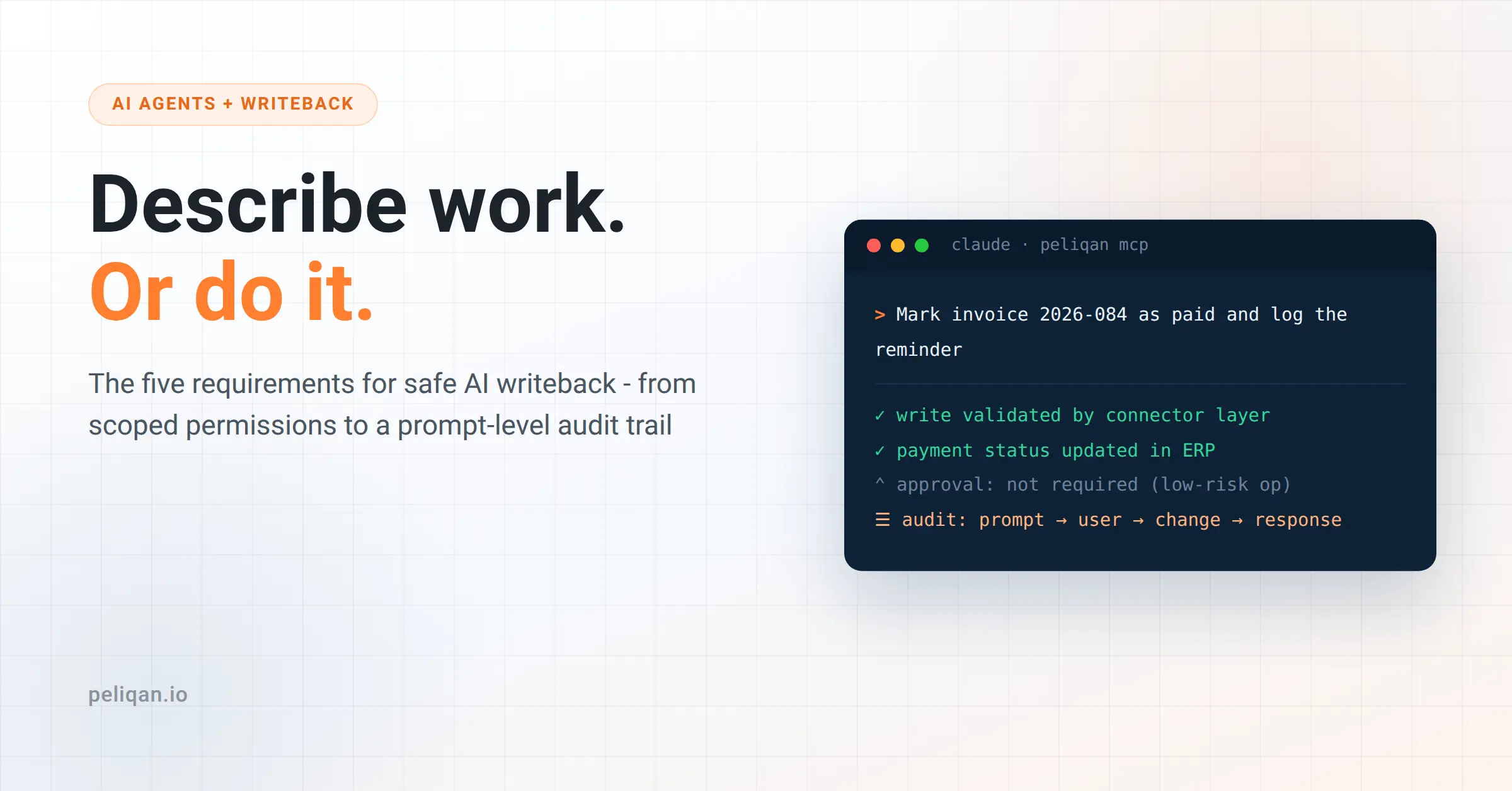
The agent should never talk to your ERP’s raw API. Writes route through a connector layer that checks the payload first – required fields, valid values, sane amounts – so a malformed update is rejected before it reaches the ledger. The same discipline you apply to data quality on the way in applies to agent writes on the way out.
3. An audit trail that answers one question
Which prompt caused this change? If your logs cannot answer that, you have logs, not an audit trail.
A real trail captures four things per write: the originating prompt, the authorizing user, the data before and after, and the destination system’s response. Stored immutably, somewhere the agent itself cannot touch.
4. Approval gates where they matter
Not everything needs a human. Notes, tasks and drafts can flow automatically. Payments, bulk updates and deletions get an approval step. Multi-party approval for agent actions is now appearing in vendor security suites – Snowflake announced theirs at Summit in June – but the principle costs nothing: if a junior employee would need sign-off for the action, so does the agent.
5. A reversibility plan
Before enabling any write operation, answer one question: how do we undo 50 of these? If the answer is “manually, one by one”, that operation stays read-only or gated. Reversibility is what turns an incident into an inconvenience.
What stays read-only
Some operations should not get write access at any maturity level: payroll runs, tax filings, bank transfers, mass deletions, anything legally binding or irreversible.
This is not caution for its own sake. It is blast radius against value. The value of automating a bank transfer is seconds saved; the blast radius is your company. The math never works.
A staged path that works
Teams that get AI writeback right almost always follow the same sequence:
- Stage 1: read-only, 30 days. Measure the to-do lists the agent produces. They are your business case for stage 2.
- Stage 2: low-risk writes. Notes, tasks, drafts – things a wrong version of merely annoys.
- Stage 3: business writes with approval. Invoices, deal stages, contact updates – the agent proposes, a human clicks confirm. Wire up alerts on write volume so a runaway loop pages someone.
- Stage 4: automation for proven operations. When an operation has months of clean approval history, drop the gate for that operation only.
Don’t skip stages. Each one builds the log history that justifies the next – and the log history is what you show the skeptic in the room.
How we approach this at Peliqan
Peliqan supports full writeback across its 300+ connectors, built around the five requirements above.
Writes route through the connector layer, not the raw API, so malformed updates are rejected before they reach your live system. Role-based permissions scope read, write or both per agent, down to column-level masking for sensitive fields.
Every write flows through reverse ETL with a prompt-to-API audit log: the originating prompt, the authorizing user, the data, and the destination response, per change. When someone asks “which prompt caused this”, the answer is one query.
Fit, honestly stated: this is built for teams putting AI on their ERP, CRM and accounting stack who want AI writeback with a paper trail from day one. If your writes live entirely inside one vendor’s walled garden, that vendor’s native agent tooling may serve you fine. The full picture is on our MCP page.
And if you’d rather start hands-on, the docs cover building AI agents with write access step by step.
Write access is earned, not enabled
The point of AI agents is closing loops, not producing reports about open ones. But AI writeback is not a feature you switch on – it is a capability you grow into, one operation at a time, with the evidence to show for it.
Start read-only. Measure the to-do lists. Enable the first low-risk write with a log behind it, and expand from there.
If you want to see AI writeback with an audit trail on your own data, book a demo: update one record from a prompt, then read the log entry it produced. That is the whole test.