




Sync frequency is how often you copy data from a source into your warehouse. Set it too low and your AI agent answers from stale data; set it too high everywhere and you pay for freshness nobody needs. This post explains how to pick the right frequency per source, in plain terms, with a simple rule you can apply today.
Here is a failure that leaves no error message.
An AI agent is asked “which invoices are overdue?” It queries the warehouse, gets a clean answer, and lists eight invoices. Three of them were paid this morning. But this morning’s payments haven’t synced yet, so the agent doesn’t know. It sends three reminders to customers who already paid.
Nothing broke. No alert fired. The sync ran fine – it just ran last night. The data was old, the agent couldn’t tell, and a customer got an annoying email because of it.
This is what sync frequency controls, and why it matters more now than it used to. A human reading a day-old report knows to double-check before sending a reminder. An agent doesn’t. It trusts whatever the warehouse says, so the freshness of that data becomes your problem to get right.
What sync frequency actually is
Every connector copies data from a source – your CRM, your accounting system – into your data warehouse on a schedule. Sync frequency is that schedule. Run it every 15 minutes and the warehouse is at most 15 minutes behind the source. Run it once a day and it can be up to 24 hours behind.
The instinct is to sync everything as often as possible. Resist it. Frequent syncing has real costs, and most of your data does not need it – the trick is matching the schedule to the question, source by source.
The rule: match freshness to the decision
For each source, ask one question: how old can this data be before someone acts on the wrong version of it?
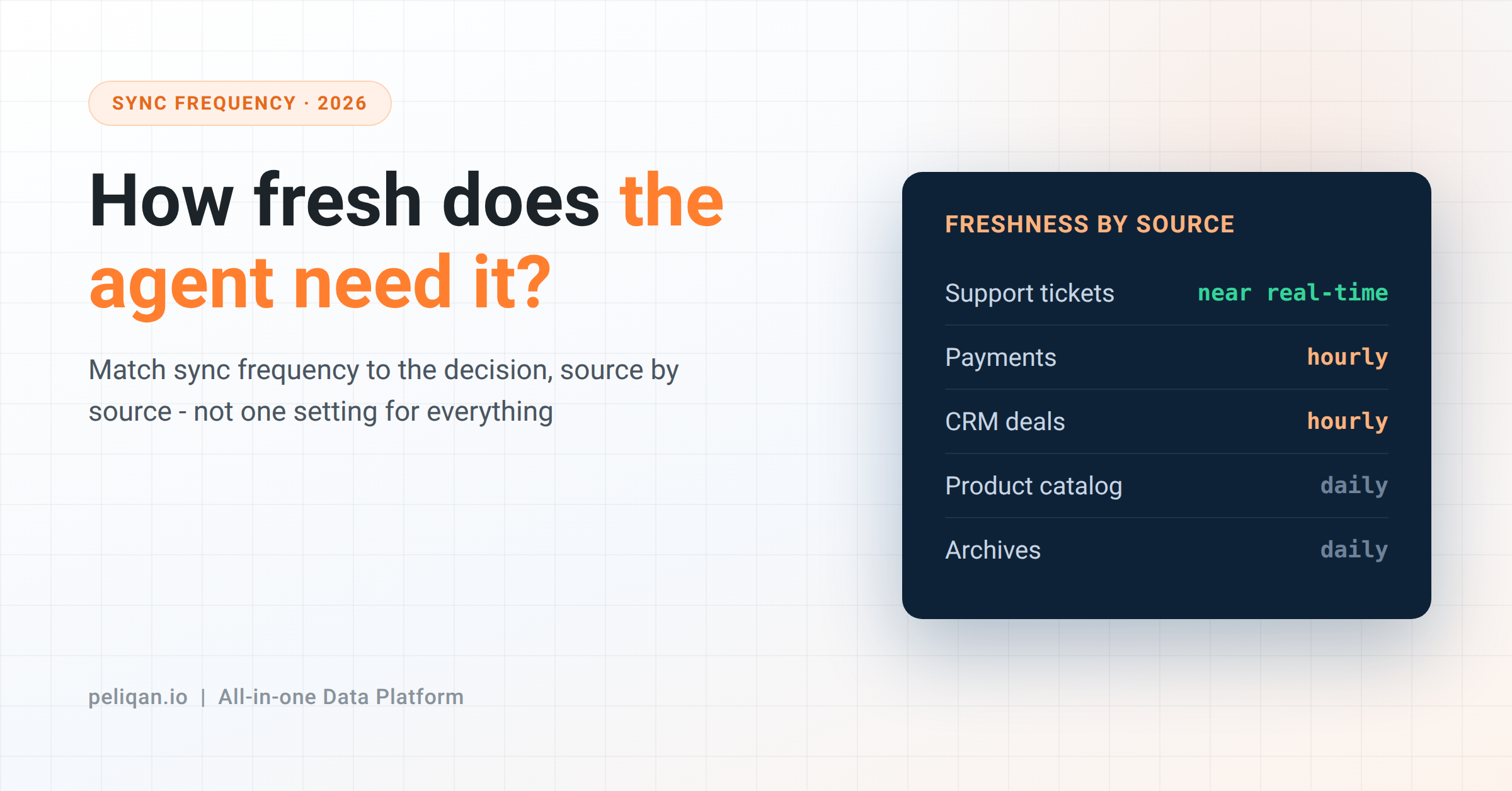
That answer, not a default setting, is your sync frequency. A few examples of how it plays out:
- Support tickets driving same-day replies: minutes matter. A ticket that synced two hours ago may already be resolved, and an agent acting on it looks foolish or worse – freshness is check 1 in the agent-ready data checklist.
- Payments and invoices: if an agent sends reminders or reconciles cash, it needs today’s payments, not yesterday’s – so at least hourly during business hours.
- CRM deal stages: for most teams, a few hours late is fine. Deals don’t move minute to minute, whichever CRM among the 300+ connectors you sync from.
- Product catalogs, company records, historical archives: daily is plenty. A customer’s founding year does not change between breakfast and lunch.
Notice the pattern: freshness need tracks how fast someone acts on the data, not how important the data feels. Revenue figures feel important, but if nobody makes a minute-by-minute decision on them, they don’t need minute-by-minute syncing.
Why not just sync everything every minute?
Three real costs, and they all pull the same direction.
First, money. On many data tools, more frequent syncing means a bigger bill, because their pricing counts activity. We went through exactly how that works in the data pipeline pricing post – the short version is that a 15-minute sync on every table can cost many times what a mixed schedule costs.
Second, load on the source. Every sync makes API calls to the source system, and those systems have rate limits. Hammering your accounting software every minute for data that changes twice a day wastes that budget and can slow down the syncs that genuinely need to be fast.
Third, no benefit. Syncing a table every minute when it changes once a day means 1,439 syncs that copy nothing new. You pay for all of them and gain nothing.
There is also a fourth option for some sources: skip the copy entirely. For databases and warehouses, a federated query can read the source live at question time, so “how fresh” stops being a scheduling question at all.
Full sync versus incremental sync
One more piece worth understanding, because it changes the math.
A full sync copies the entire table every time. An incremental sync copies only the rows that changed since the last run. The difference is enormous: on a million-row table where two hundred rows changed, a full sync moves a million rows and an incremental sync moves two hundred – the same efficiency that keeps a connected source cheap to refresh often.
Incremental syncing is what makes frequent updates affordable. If your tool reloads the whole table on every run, frequent syncing gets expensive fast, and you end up rationing freshness to control cost. With incremental syncing, running often is cheap because each run is small – so you get to set frequency based on the decision, which is where it should be based.
A practical way to set this up
- List your sources and the questions each one answers. Write next to each: how old can this be before someone acts on the wrong version?
- Sort into three buckets. Near real-time for the few sources that drive immediate action, hourly for the operational middle, daily for everything else. Most sources land in “daily”, and that’s correct.
- Confirm your syncs are incremental, so that frequent updates on the few hot sources stay cheap.
- Revisit when behavior changes, not on a calendar. The day someone starts making same-day decisions on a source, that source moves up a bucket – the same reason accuracy depends on the context around your data, not just its speed.
How this works in Peliqan
In Peliqan, sync frequency is a setting on each connection, not a cost lever you have to ration. You choose per source from near real-time, every 15 minutes, hourly, daily, or a custom schedule, with near real-time available for most object types. The same warehouse then serves your MCP agents.
Syncs are incremental by default – only new and changed records move after the first load – and schema changes like a new or renamed column are detected and handled automatically, so a frequent schedule doesn’t turn into a maintenance job. Because pricing is based on connections rather than rows synced, moving a hot source to a faster schedule doesn’t change your bill.
All of it feeds the built-in warehouse your AI agents query, so the freshness you set per source is exactly the freshness the agent works from. The one judgment call the platform can’t make for you is the important one: how fresh each source needs to be. That depends on how your team acts on it.
If you want to see your own sources on the right schedules, book a demo: connect a fast-moving source and a slow one, set each to a sensible frequency, and ask an agent a question that depends on the fast one being current.