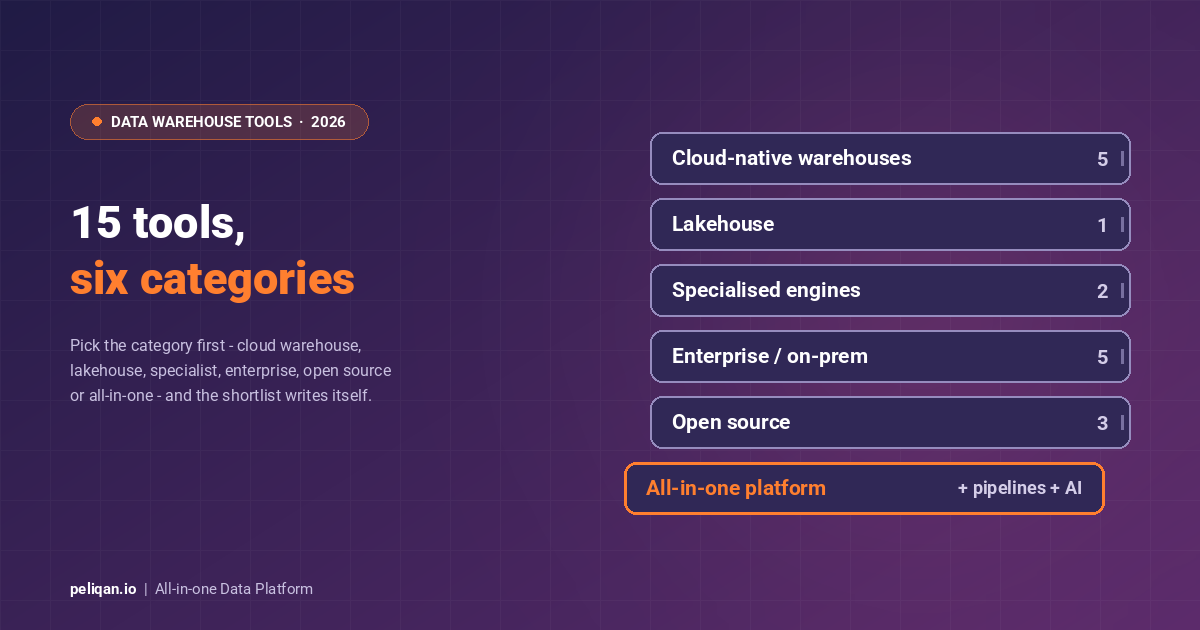





Choosing from the long list of data warehouse tools is harder in 2026 than ever, because the category now spans cloud-native warehouses, lakehouses, enterprise systems, and all-in-one platforms that each suit a different team. This guide compares the top 15 data warehouse tools by category, with an honest read on strengths, trade-offs, and pricing models, plus a framework to pick the right one for your stack.
A data warehouse sits at the centre of every serious analytics, BI, and AI initiative. Get the platform right and queries are fast, data is trusted, and AI agents have clean entities to reason on. Get it wrong and you inherit runaway compute bills or a system your team cannot use. The first step is knowing which category you actually need, because a cloud-native warehouse, a lakehouse, and an in-memory enterprise system are not interchangeable.
What to look for in a data warehouse tool
A data warehouse tool collects, stores, and serves large volumes of structured and semi-structured data from many sources for analysis. Before comparing products, weigh these factors. For the underlying concepts, our guide to data warehouses covers the fundamentals.
Selection criteria that matter in 2026
- Scalability: can it handle today’s volume and scale elastically as you grow, without downtime?
- Performance: fast query processing and concurrency for many users at once.
- Ease of use: the learning curve, the interface, and how quickly a team gets productive.
- Integration: compatibility with your sources, BI tools, and pipelines through pre-built connectors.
- Cost behaviour: not just the headline rate but how cost moves as storage, compute, and queries grow.
- Security and compliance: whether it meets your data residency and regulatory needs.
- Deployment model: cloud, on-premises, or hybrid, and how much control each gives you.
- AI readiness: whether the platform can serve governed data to AI agents and assistants cleanly.
The categories of data warehouse tools
The 15 tools below fall into six groups. Identify your category first, then shortlist within it. This avoids comparing a serverless cloud warehouse against an in-memory enterprise system as if they were the same purchase.
Cloud-native data warehouses
1. Snowflake
Snowflake is a cloud-native warehouse that separates storage and compute, so you scale and pay for each independently. Familiar SQL and an ultra-scalable architecture make it a strong fit for organisations with growing datasets, and it has native support for semi-structured data like JSON and Avro. Zero-copy cloning, Time Travel, and the data sharing marketplace remain its most distinctive features, and Cortex adds native AI functions on warehouse data.
Pricing model: consumption credits at roughly $2-4 per credit depending on edition, plus $23-40 per TB per month storage. Powerful, but the median enterprise contract runs close to six figures annually and forecasting takes discipline. Best for: multi-cloud organisations with growing datasets and a team that can manage credit consumption.
Trade-off: pricing gets complex on large deployments and compute cost climbs quickly under heavy use. If you are weighing it against an all-in-one approach, see our Peliqan vs Snowflake comparison.
You can also feed Snowflake from other systems using the Peliqan Snowflake connector.
2. Google BigQuery
BigQuery is a serverless warehouse with pay-per-use billing that eliminates infrastructure management. It handles massive datasets with fast query speeds and ships built-in machine learning (BigQuery ML) and generative AI features, so you can run advanced analytics without moving data. Peliqan connects through its BigQuery connector for import and transformation.
Pricing model: $6.25 per TiB scanned on demand plus about $0.02 per GB per month storage, with reserved slots from around $2,000 per month for committed capacity. Best for: GCP-committed teams and event-heavy workloads where serverless scaling beats provisioned compute.
Trade-off: pay-per-query plus separate storage billing can become expensive without monitoring, and a runaway dashboard that scans terabytes on every refresh will show up on the invoice.
3. Amazon Redshift
Redshift is a fully managed, petabyte-scale warehouse built for the AWS ecosystem, with automatic concurrency scaling for hundreds of simultaneous queries. RA3 nodes separate compute from storage, Redshift Serverless removes cluster management, and Spectrum queries data in S3 directly. It is cost-efficient for analysing large datasets already in AWS and familiar to AWS users. The Peliqan Redshift connector bridges it to other tools.
Pricing model: on-demand from about $0.25 per node hour, with reserved instances cutting up to 75% for predictable workloads, one of the most forecastable cost profiles among cloud warehouses. Best for: AWS-native shops with S3, Glue, and Lambda already in the stack.
Trade-off: it may need tuning for peak performance, and it is strongest when you are already committed to AWS.
4. Microsoft Azure Synapse and Microsoft Fabric
Azure Synapse unifies data warehousing and big data analytics inside Azure. Microsoft has since folded analytics into Microsoft Fabric, a unified platform that combines warehousing, data engineering, and Power BI under one umbrella, now the default conversation for Microsoft-centric teams. Fabric’s OneLake gives every workload a common data foundation on open Delta format.
Pricing model: Synapse dedicated pools bill by DWU (roughly $1,200 to $30,000+ per month) with serverless at $5 per TB processed; Fabric bills by capacity units (F-SKUs), with reserved capacity around 40% cheaper than pay-as-you-go. Best for: Microsoft-first enterprises that want warehousing, engineering, and Power BI on one contract.
Trade-off: the breadth brings a steeper learning curve, and cost depends on the mix of Azure and Fabric services you use. For teams comparing a single Microsoft stack against an independent platform, our Peliqan vs Fabric breakdown is a useful reference.
Lakehouse platforms
5. Databricks
Databricks pioneered the lakehouse, blending warehouse and data lake capabilities on the open Delta Lake format. In 2026 it is widely seen as one of Snowflake’s main competitors, having invested heavily in SQL performance, BI integrations, and agentic AI frameworks. Unity Catalog provides governance and lineage across workloads, and organisations building AI or unifying data engineering and analytics often choose it as a warehouse alternative.
Pricing model: Databricks Units from roughly $0.07 to $0.55 per DBU-hour by workload type, plus the underlying cloud infrastructure; moderate usage commonly lands between $50K and $200K+ per year. Best for: ML-heavy and streaming teams that want engineering and analytics on one platform.
Trade-off: the platform is powerful but broad, and getting full value usually requires data engineering skill rather than a pure SQL analyst team.
New-wave and specialised tools
6. ClickHouse
ClickHouse is an open-source columnar database built for extreme real-time analytical performance and high-concurrency dashboards, consistently leading open benchmarks through vectorized execution and aggressive compression. Free to self-host, with ClickHouse Cloud as the managed option.
Pricing model: free self-hosted (you pay servers and engineers); managed cloud from roughly $0.50 per hour of compute. Best for: engineering teams that want maximum performance per dollar and can own replication, sharding, and backups. Trade-off: operational complexity, and fewer built-in governance and transformation features than the major cloud warehouses.
7. Firebolt
Firebolt targets sub-second analytics on large datasets through sparse, aggregate, and join indexes that prune data aggressively. It suits teams whose primary requirement is raw query speed for customer-facing analytics, where a five-second dashboard load kills the product experience.
Pricing model: engine-based pay-per-use, billed on the compute engines you run. Best for: embedded and customer-facing analytics with strict latency budgets. Trade-off: a smaller ecosystem than Snowflake or BigQuery, with fewer third-party integrations and community resources.
Enterprise and on-premises warehouses
8. Teradata
Teradata is an enterprise-grade warehouse for mission-critical deployments, with strong security, high availability, and an MPP architecture that still holds up on the largest mixed workloads. VantageCloud brings the platform to cloud object storage with open table format support while keeping the hybrid options regulated industries need.
Pricing model: enterprise licensing and cloud compute from around $4.80 per hour, with block storage priced per TB per year. Best for: large enterprises with hybrid requirements and proven-reliability needs. Trade-off: higher cost than cloud-native options and a complex setup that needs significant IT expertise.
9. Oracle Autonomous Data Warehouse
Oracle Autonomous Data Warehouse offers self-driving warehousing with automated tuning, patching, and scaling in Oracle Cloud, using machine learning for workload optimisation. The automation genuinely simplifies day-to-day warehouse operations for Oracle-committed teams.
Pricing model: OCPU-hour plus storage billing inside Oracle Cloud, with license-included and bring-your-own-license options. Best for: organisations already running Oracle applications and databases. Trade-off: potential vendor lock-in and fewer customisation options than open-source alternatives.
10. IBM Db2 Warehouse
Db2 Warehouse is a secure, reliable warehouse built to integrate with IBM’s analytics ecosystem, with advanced governance and the scale to handle complex queries on demanding workloads. Recent updates added native Apache Iceberg, Parquet, and ORC support with data sharing into watsonx.data.
Pricing model: enterprise licensing, typically negotiated as part of a wider IBM agreement. Best for: IBM-committed enterprises and regulated industries needing hybrid deployment. Trade-off: it rewards familiarity with IBM technologies and risks lock-in if you lean on the wider IBM stack.
11. SAP HANA
SAP HANA is an in-memory platform for real-time analytics, tightly integrated with SAP applications and optimised for high-speed processing of transaction data. For organisations invested in SAP, it is the natural analytical companion, and SAP’s Business Data Cloud strategy builds on it.
Pricing model: SAP licensing, typically bundled with the wider SAP estate; in-memory capacity drives cost. Best for: SAP-centric enterprises needing real-time analytics on transactional data. Trade-off: higher cost than cloud options and most valuable inside the SAP ecosystem.
12. OpenText Vertica
Vertica (now part of OpenText) is a high-performance columnar warehouse for complex analytical workloads, using advanced compression to query large historical datasets efficiently. Eon Mode separates compute and storage for cloud deployments, and it excels at trend analysis over big volumes of historical data.
Pricing model: volume-based enterprise licensing, with a free Community Edition up to 1TB. Best for: high-compression historical analytics with cloud and on-prem flexibility. Trade-off: it needs significant technical expertise and is not built for real-time analytics.
Open-source databases used as warehouses
13. PostgreSQL
PostgreSQL is a powerful open-source relational database that can serve as a cost-effective warehouse for teams with the in-house skill to run it. It pairs a rich feature set for data management with a large, active community, and columnar extensions push it further into analytics.
Peliqan can, for example, pull PostgreSQL data into Google Sheets with a one-click connector.
Pricing model: free open source; managed Postgres services run roughly $50-200 per month at small scale. Best for: startups, proofs of concept, and small analytical workloads on a familiar engine. Trade-off: it requires in-house expertise to maintain, and scales less easily than purpose-built cloud warehouses.
14. MariaDB
MariaDB is another open-source relational database used for warehousing, with a familiar SQL interface and high-availability features. ColumnStore adds columnar analytical capabilities, making it a workable option for teams already invested in the MySQL ecosystem.
Pricing model: free open source with paid enterprise support subscriptions. Best for: MySQL-ecosystem teams that want a cost-effective analytical extension. Trade-off: like PostgreSQL, it needs in-house expertise and scales less readily than cloud-native warehouses.
15. Cloudera
Cloudera is an open data platform offering a flexible, customisable warehouse that handles diverse data formats across the Hadoop ecosystem. It remains a cost-effective alternative to some proprietary options for teams that want to build a data warehouse with full control over infrastructure and formats.
Pricing model: subscription licensing on top of your infrastructure. Best for: hybrid estates with existing Hadoop investments and strict control requirements. Trade-off: a steeper learning curve and in-house expertise needed for deployment and maintenance.
A note on terminology: NoSQL services like Amazon DynamoDB and multi-model databases like MarkLogic sometimes appear on warehouse lists. They are excellent operational databases, but they are not true analytical warehouses, so treat them as complements rather than direct substitutes for the platforms above.
All-in-one data platforms
The platforms above each cover storage and query. Most teams still need ingestion, transformation, and activation around them, which means stitching together several vendors. All-in-one platforms collapse that stack into one product, which is why teams without a dedicated data engineer increasingly start here.
Peliqan
Peliqan is an all-in-one data platform built for rapid deployment. It connects to your business applications, loads data into a built-in Postgres and Trino warehouse or your own Snowflake and BigQuery, and lets you explore it in a spreadsheet UI with SQL.
It also supports data activation: API publishing, alerts, scheduled reports, and syncs back into business apps.
The activation layer includes full reverse ETL for pushing warehouse data back into operational systems.
A native MCP server exposes the same governed data to AI agents, covered on the Peliqan MCP page.
Where Peliqan fits
Best for: business teams, consultancies, and SaaS companies that want a warehouse plus pipelines without hiring a data engineer.
Strengths: a built-in warehouse, 300+ pre-built connectors with custom connectors delivered within 2 weeks, low-code Python and SQL, and analysis in a familiar UI or your own BI tool. SOC 2 Type II, ISO 27001, GDPR, HIPAA, and CCPA certified, EU-hosted on AWS Frankfurt.
Consideration: transformations use SQL and low-code Python, so some technical familiarity helps, and it is not built for petabyte-scale streaming.
The 2026 shift: warehouses as the AI data layer
The biggest change in the category is that the warehouse is becoming the data layer that AI agents reason on. Buyers now weigh whether a platform can expose governed, well-modelled data to assistants through capabilities like text-to-SQL, automatic vectorising for retrieval-augmented generation, and a Model Context Protocol gateway. Clean transformations and trustworthy entities matter more when an agent, not just a dashboard, is the consumer.
This is reshaping selection criteria. A warehouse that is fast but opaque to AI tooling is a weaker 2026 choice than one that surfaces governed data and supports exploration and analysis for both humans and agents. The major cloud warehouses are adding native AI features, and all-in-one platforms are building the AI layer in by default.
Data warehouse tools compared
Integration capability is where many warehouse decisions are won or lost, because the platform has to fit your BI tools, pipelines, and wider ecosystem. This table summarises how the leading tools connect.
Data warehouse tools pricing
Exact figures change often, so the pricing model matters more than any single rate. Cloud-native warehouses like Snowflake, BigQuery, Redshift, and Fabric use pay-per-use models that bill storage and compute or queries separately, which scales with usage but can be hard to predict. Enterprise systems like Teradata, Oracle, and IBM Db2 require upfront licensing and a vendor quote. Open-source options like PostgreSQL, MariaDB, and Cloudera are free to download but carry infrastructure and maintenance costs.
All-in-one platforms take a different route. Peliqan uses fixed monthly plans with a 14-day free trial, so cost stays predictable and is not tied to row volume. See Peliqan’s pricing for current tiers.
Whichever you choose, factor in the cost of the data integration tools needed to move data in, plus support, which is bundled with managed cloud services but often community-based for open-source options.
Data warehouse tools in the real world
Features only matter once you see them applied. Industries from retail to healthcare to finance use warehouses to unify scattered systems, then point BI and AI at the result. Our roundup of data warehouse examples covers industry-specific use cases, success stories, and how AI and machine learning are being folded into modern warehouses.
Real-world example: CIC Hospitality
CIC Hospitality unified fragmented data from 50+ sources into one warehouse and now produces real-time, board-level reports, saving 40+ hours per month that used to go into manual Excel consolidation. Read the full case study.
How to choose the right data warehouse tool
Start with your category, then weigh five factors: data volume and complexity, your existing cloud ecosystem, in-house technical expertise, budget and cost model, and security and compliance needs. A team deep in AWS will lean toward Redshift, a Microsoft estate toward Fabric, and an AI-first engineering team toward Databricks. Documentation and support quality, available in the Peliqan docs, also separate a smooth rollout from a stalled one.
If you have dedicated data engineers and specialised scale needs, a best-of-breed cloud warehouse or lakehouse gives the most control. If you want fewer moving parts and faster time to trusted numbers, an all-in-one platform that bundles the warehouse, pipelines, and activation will get you there with less overhead. Match the tool to your team and use case, and the rest of the stack becomes far easier to build.