




HubSpot MCP connects your CRM to AI assistants like Claude, Cursor, and ChatGPT through the Model Context Protocol – letting you manage contacts, update deals, summarize tickets, and explore your sales pipeline using natural language instead of clicking through menus.
HubSpot ended 2025 with 288,706 paying customers across 135+ countries and $3.1 billion in annual revenue. It holds 38% of the marketing automation market and is the fastest-growing major CRM by customer count. With that kind of adoption, HubSpot’s decision to build an official MCP server isn’t just a nice feature – it’s a signal that CRM-connected AI is going mainstream.
And HubSpot didn’t just build one MCP server – they built two. A remote server that connects any MCP-compatible AI tool to your CRM data, and a local developer server that helps you build apps and CMS content on HubSpot’s platform. Both went generally available in early 2026.
This guide covers how HubSpot’s official MCP servers work, walks through setup for Claude Desktop, Cursor, and Claude Code, explains authentication and security, explores practical use cases for sales, marketing, and service teams, and shows when CRM data alone isn’t enough – and what to do about it.
What is HubSpot MCP?
MCP (Model Context Protocol) is an open standard that lets AI assistants securely connect to external systems through a unified interface. Instead of copying CRM data into prompts or building custom API integrations, MCP provides a standardized bridge between your AI tool and HubSpot.
HubSpot MCP in plain terms
MCP adds a natural language layer on top of HubSpot’s APIs. Instead of writing code to make API calls or navigating through HubSpot’s interface, your AI assistant handles the translation. Ask “What’s the latest update on the Acme Inc deal?” and the MCP server fetches the relevant deal record, associated contacts, and recent activities – then your AI summarizes it in plain English.
Why HubSpot and MCP matter together in 2026
HubSpot isn’t just a CRM anymore – it’s the operating system for hundreds of thousands of go-to-market teams. The platform now spans marketing, sales, service, content, and operations hubs. With Anthropic’s MCP specification becoming the standard way AI tools connect to external systems, the combination unlocks something genuinely new: AI agents that can work with your live customer data, not just general knowledge.
Consider what this means practically. A sales rep can ask Claude “Summarize all deals in the decision-maker stage with value over $10,000” and get an instant answer pulled from their actual pipeline. A support manager can ask “What are the five most recent tickets from our enterprise customers?” and get context they’d normally spend ten minutes clicking through HubSpot to find. A marketing manager can ask “Show me which campaigns are associated with our top-performing deals this quarter” and get attribution insights without building a custom report.
HubSpot’s MCP server works with any HubSpot tier, including the free CRM. That means even small teams can start using AI-powered CRM workflows without upgrading their plan.
HubSpot’s official MCP servers
HubSpot offers two distinct MCP servers, each designed for a different audience and use case.
Remote MCP server (CRM access)
The remote HubSpot MCP server graduated from beta to general availability on April 13, 2026. It’s a HubSpot-hosted server at mcp.hubspot.com that connects any MCP-compatible AI client to your CRM data over a secure, authenticated connection.
Remote MCP server – data access
The authentication model is important. HubSpot uses OAuth 2.1 with PKCE (Proof Key for Code Exchange), which means each user authenticates individually and the server respects their existing HubSpot permissions. A sales rep can only query deals they have access to. An admin sees everything. No special configuration needed – it inherits your existing access controls.
HubSpot also explicitly blocks access to custom sensitive data properties, including Personal Health Information and other forms of highly sensitive data. This is a deliberate design choice for compliance.
Developer MCP server (local)
The developer MCP server is a CLI-based tool for developers building apps, UI extensions, and CMS content on HubSpot’s platform. It’s not for querying CRM data – it’s for accelerating development workflows.
Developer MCP server capabilities
Setup requires HubSpot CLI version 8.2.0+ and Developer Platform v2025.2. Run hs mcp setup and follow the prompts to select which agentic tools to enable. The server runs locally and authenticates through your CLI session.
Community HubSpot MCP servers
Before HubSpot launched its official servers, the community built several alternatives. These are still useful for specific use cases.
baryhuang/mcp-hubspot adds built-in vector storage and caching to overcome HubSpot API limitations. This is valuable for teams hitting rate limits or needing faster response times for repeated queries. The caching layer means your AI agent doesn’t need to re-fetch data it recently accessed.
shinzo-labs/hubspot-mcp provides a clean MCP implementation for the HubSpot API with a standardized interface for accessing and managing CRM data. It’s a lightweight option if you want more control over the server configuration than HubSpot’s hosted solution provides.
SanketSKasar/HubSpot-MCP-Server implements all 21 MCP protocol endpoints with multi-transport support (HTTP, Streamable HTTP, STDIO). It’s the most complete community implementation in terms of protocol coverage.
The official HubSpot MCP server source code is also available on GitHub for reference. For most users, HubSpot’s hosted remote server is the right choice – it’s maintained by HubSpot, handles authentication automatically, and respects existing permissions. Community servers make sense when you need caching, custom data transformations, or tighter integration with specific workflows.
Setting up HubSpot MCP
The remote MCP server is the easiest to set up since HubSpot hosts it. Here’s how to connect it to your AI tools.
Remote MCP server with Claude Desktop
First, create a user-level MCP auth app in your HubSpot developer account with read scopes for the CRM objects you want to access. Then add the server to your Claude Desktop configuration:
{
  "mcpServers": {
    "hubspot": {
      "url": "https://mcp.hubspot.com/sse",
      "headers": {
        "Authorization": "Bearer YOUR_OAUTH_TOKEN"
      }
    }
  }
}
The exact authentication flow depends on your MCP client. Claude Desktop and Cursor both support OAuth 2.1 flows natively, so you may be prompted to authenticate through your browser when first connecting. The HubSpot account admin needs to connect first to allow other users in the account to authenticate afterward.
Cursor and VS Code configuration
Cursor reads MCP configuration from .cursor/mcp.json. The same server URL and authentication method apply. For VS Code with Copilot agent mode, add the MCP server through the extensions settings panel. Both IDEs support the OAuth flow that HubSpot requires.
Developer MCP server setup
For the local developer server, install or update the HubSpot CLI to version 8.2.0+:
npm install -g @hubspot/cli@latest
hs mcp setup
Follow the prompts to select which agentic tools to enable. The setup command generates the MCP configuration for your preferred IDE automatically. For teams building custom MCP servers that extend HubSpot’s capabilities with additional business logic, the MCP specification provides Python and TypeScript SDKs.
Practical use cases by team
Here’s how teams are actually using HubSpot MCP in their daily workflows.
Sales teams
The most immediate impact is on deal management. Adding a deal to HubSpot typically takes about 17 clicks and two and a half minutes. With MCP, a rep can speak a 7-second update and have the deal created automatically. But it goes beyond data entry.
Ask your AI assistant “Summarize all deals in the decision-maker-bought-in stage with value over $1,000” and get an instant pipeline snapshot. Ask “What’s the latest activity on the Acme Inc deal?” and get a summary of calls, emails, and meetings without opening a single HubSpot tab. Ask “Create a follow-up task for the Johnson deal – call next Tuesday to discuss pricing” and it’s done.
For lead qualification, AI agents can cross-reference contact properties, engagement history, and deal stage data to score leads dynamically. Instead of relying on static lead scoring rules, the AI can factor in recency of interactions, company size, and data quality signals to prioritize outreach.
Marketing teams
The GA release added read-only access to marketing content – blog posts, landing pages, site pages, campaigns, and marketing events. This means marketing teams can ask questions like “Which campaigns are associated with our highest-value deals this quarter?” or “Show me all blog posts published in the last 30 days with their page performance.”
For campaign attribution, the AI can analyze complex multi-touch journeys across geographies and roles, assigning credit beyond simplistic last-touch models. Combined with data lineage tracking, you can trace exactly which marketing touches contributed to pipeline.
Service teams
Service managers can ask “What are the five most recent tickets from our enterprise customers?” or “Summarize the last five tickets created for Alex Smith” and get instant context. When a customer calls in, the AI can pull their full history – deals, tickets, recent interactions, product subscriptions – and present it in a concise brief.
For proactive service, AI agents can monitor ticket patterns and flag accounts showing early churn signals – reduced engagement, canceled meetings, or increasing support requests. This turns reactive support into preventive customer success.
RevOps and reporting
RevOps teams can explore CRM data conversationally without building custom reports. “How many contacts does each segment have?” or “What’s our average deal cycle length by source?” gets answered in seconds. The AI can also validate data quality – “Check if our sales reps are consistently filling in the serial number property” – and flag inconsistencies across the pipeline.
Example workflows
To make HubSpot MCP tangible, here are three workflows that show how teams combine MCP capabilities in practice.
Morning pipeline review
A sales director opens Claude Desktop and asks: “Give me a summary of all deals that moved stages yesterday, any deals at risk of slipping past their close date this week, and the top five deals by value in the negotiation stage.” The MCP server pulls deal records, filters by stage change dates and close dates, sorts by value, and the AI presents a briefing in 30 seconds. No dashboards to build, no filters to configure – just a question and an answer grounded in live CRM data.
Customer onboarding check
A customer success manager asks: “For all deals that closed in the last 14 days, show me which ones have onboarding tasks created and which ones don’t.” The AI queries deals by close date, checks for associated task records with “onboarding” in the subject, and flags the gaps. The CSM can then say “Create onboarding tasks for the three missing ones with a due date of next Friday” and the MCP server writes them directly to HubSpot.
Campaign-to-pipeline attribution
A marketing manager asks: “Which campaigns are associated with deals that closed this quarter, and what’s the total deal value per campaign?” The AI reads campaign associations from deal records, aggregates values, and presents a ranked attribution table. This replaces a custom report that would take 30 minutes to build in HubSpot’s reporting tools – and can be re-run with a slight variation (“now show me the same for last quarter”) instantly.
Troubleshooting common issues
OAuth authentication failures
If your MCP client can’t authenticate with HubSpot, verify that your MCP auth app has the correct OAuth scopes for the CRM objects you’re trying to access. The account admin must connect first before other users can authenticate. Check that your app is using OAuth 2.1 with PKCE – older OAuth flows won’t work with HubSpot’s MCP server.
Missing records in AI responses
If the AI returns fewer records than expected, remember that permission inheritance means each user only sees records they have access to in HubSpot. A sales rep with territory-based restrictions will get different results than an admin. Also verify that your OAuth scopes include read access to the specific object types you’re querying.
Rate limit errors
MCP requests count against your HubSpot API rate limits. Free tier accounts have lower limits than paid tiers. If you’re hitting rate limits during heavy AI usage, consider the community baryhuang/mcp-hubspot server with its built-in caching layer, or batch your queries during off-peak hours. For production workloads with high query volumes, a data platform approach avoids rate limits entirely since the data is already synced to a warehouse.
Write operations not reflecting
If the AI confirms a write operation but you don’t see the change in HubSpot, check that your OAuth app has write scopes for that object type. Also verify that HubSpot workflows triggered by the record change haven’t modified it further. Give it a few seconds for HubSpot’s UI to refresh – the API processes writes faster than the interface updates.
Authentication and security
HubSpot’s MCP security model is built around several layers of protection.
Security architecture
This is a significant advantage over community MCP servers where you manage credentials and access control yourself. HubSpot’s hosted server means no database credentials in config files, no connection strings to secure, and no custom permission logic to maintain.
Limitations to keep in mind
- CRM-only scope: The MCP server accesses HubSpot data exclusively – it can’t join CRM data with data from your database, e-commerce platform, or accounting system
- No custom object support yet: As of GA, the server works with standard HubSpot objects only – custom objects are not yet exposed via MCP
- Marketing content is read-only: You can read blog posts, landing pages, and campaigns but cannot create or modify them through MCP
- Rate limits apply: MCP requests count against your HubSpot API rate limits, which vary by subscription tier
- No sensitive data access: Custom sensitive data properties are blocked by design, which may limit use cases in healthcare or financial services
- AI interpretation errors: The AI may misinterpret CRM data or generate incorrect updates – always review write operations on critical records
When CRM data alone isn’t enough
HubSpot MCP excels at CRM-centric questions. But real business decisions rarely depend on CRM data in isolation.
A revenue operations manager asking “What’s the true cost of acquiring our enterprise customers?” needs data from HubSpot (deals, campaign attribution), from Shopify or their e-commerce platform (order values, fulfillment costs), from their accounting system (actual ad spend, payroll), and from their application database (product usage, feature adoption). HubSpot MCP can answer the CRM portion, but it can’t pull in the rest.
The same problem surfaces for customer 360 views. Your CRM holds contact records and deal stages, but product usage data lives in your application database, support interactions might be in a separate ticketing system, and billing data sits in your accounting tool. An AI agent connected only to HubSpot sees a partial picture – useful, but incomplete for the kinds of holistic questions that drive strategic decisions.
This is the fundamental limitation of connecting MCP directly to individual systems. You end up with separate AI conversations for each data source – one for your CRM, one for your database, one for your e-commerce platform – with no way to run cross-source queries that combine them into unified answers.
There’s also the governance question. When AI agents write directly to your CRM, there’s no transformation layer ensuring data consistency, no audit trail beyond HubSpot’s native logging, and no way to enforce business rules that span multiple systems. For teams managing customer data across regulated industries, these gaps become compliance risks.
The unified approach – Peliqan as your HubSpot MCP layer
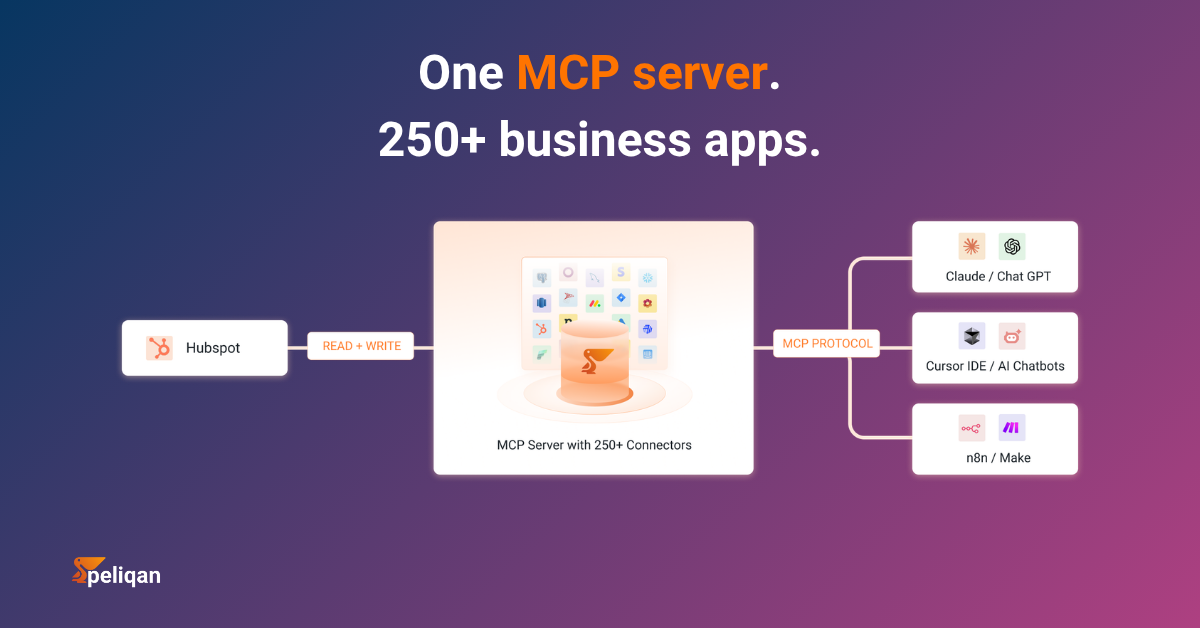
Instead of connecting AI directly to HubSpot, you can route everything through a data platform that syncs, transforms, and governs your data before exposing it via MCP. This is the approach Peliqan takes with HubSpot and 250+ other connectors.
How Peliqan’s MCP architecture works with HubSpot
pip install mcp-server-peliqan) exposes the governed warehouse to AI agentsThe AI agent never connects directly to HubSpot. Instead, it queries Peliqan’s warehouse where your HubSpot data has been synced, cleaned, and combined with data from every other connected source. When you ask “What’s the lifetime value of customers acquired through our Q1 email campaign?”, the query can join HubSpot campaign data with Shopify order data and accounting records – all in one answer.
Peliqan’s MCP server also supports full writeback across all connected sources. An AI agent can not only query your data but push updates back to HubSpot (and other systems) through governed reverse ETL connectors – with transformation rules ensuring data consistency.
Real-world example: CIC Hospitality
CIC Hospitality consolidated 50+ data sources through Peliqan, saving 40+ hours per month on board report automation. Their CRM data, booking systems, and financial tools all flow through one governed warehouse – with AI agents, dashboards, and reverse ETL reading from the same layer. Read the full case study.
Peliqan is SOC 2 Type II certified, ISO 27001 compliant, GDPR-ready, and EU-hosted. For teams that also need BI dashboards alongside AI access, Peliqan connects to Power BI, Metabase, Looker Studio, and other visualization tools – all reading from the same warehouse your AI agents use.
Comparison: HubSpot MCP vs. unified data platform
Decision framework
Which approach fits your situation
- If your questions are CRM-only: Use HubSpot’s official remote MCP server. It’s free, fast to set up, and maintained by HubSpot with built-in security.
- If you’re building on HubSpot’s developer platform: Add the developer MCP server for AI-assisted app scaffolding, docs lookup, and deployment.
- If you hit API rate limits: Consider the community baryhuang/mcp-hubspot server with its built-in caching layer for faster repeated queries.
- If your AI agents need data from HubSpot plus other sources: Use a data platform like Peliqan that syncs all sources into one warehouse and exposes it via a single MCP server.
- If you need governance, compliance, and audit trails: Route through a governed layer that adds data quality checks, lineage, and access controls beyond what HubSpot natively provides.
- If you want both AI access and BI dashboards: Peliqan’s warehouse serves both AI agents and traditional BI tools from one source of truth.
Getting started
For HubSpot-only AI workflows, start with the official remote MCP server. Create an MCP auth app in your HubSpot developer account, configure your AI client to connect to mcp.hubspot.com, and start querying your CRM in natural language. It takes 15-30 minutes and works with every HubSpot tier.
If your data lives across multiple systems and you need governed, cross-source access for AI agents, try Peliqan free – it connects your HubSpot instance alongside every other data source, syncs everything into one warehouse, and exposes it all through a single MCP server. Setup takes under two hours, and you get BI, AI, and reverse ETL from the same platform.