
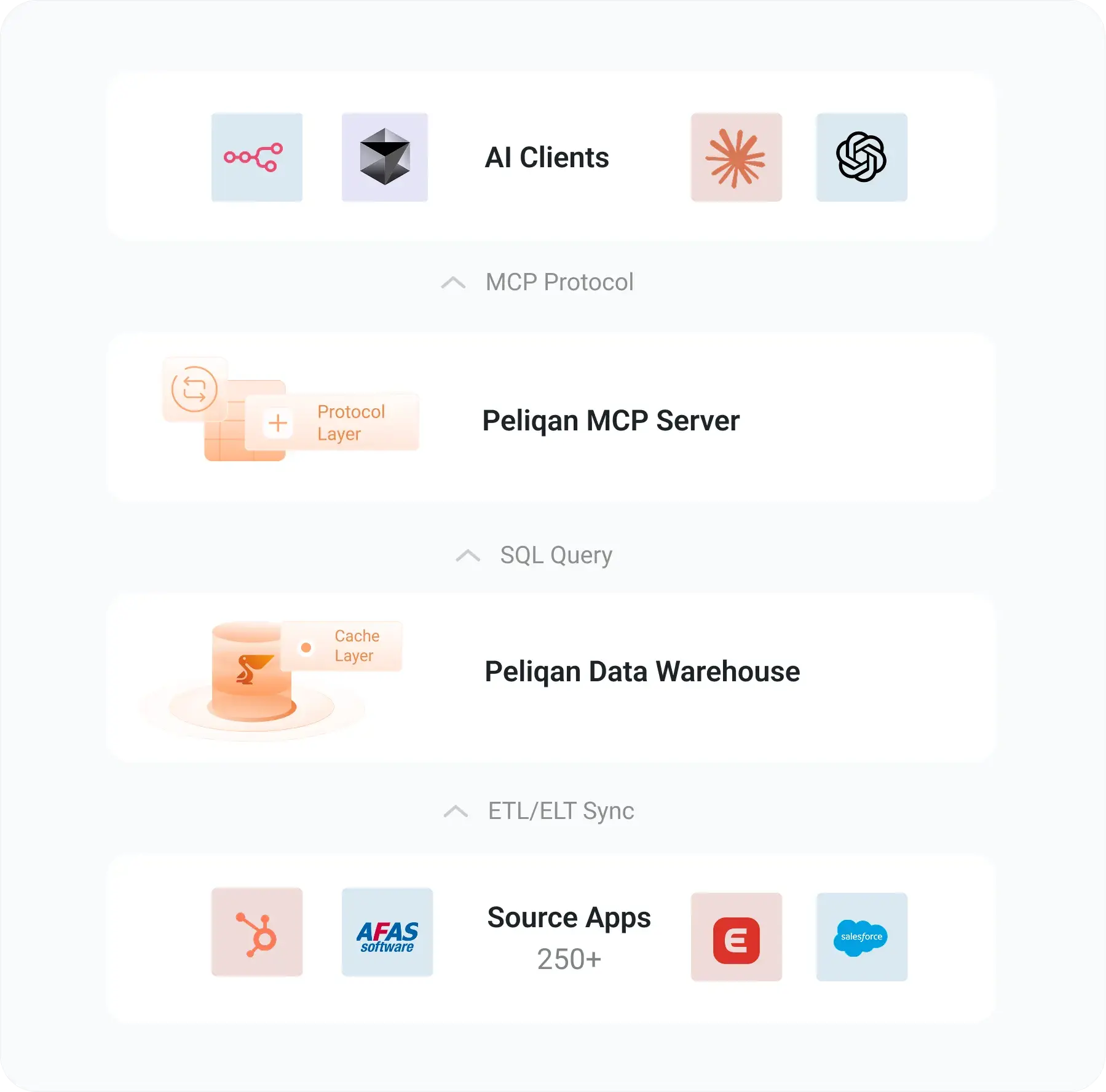
Postgres MCP connects your PostgreSQL database to AI assistants like Claude, Cursor, and ChatGPT through the Model Context Protocol – letting you query schemas, optimize indexes, and explore data using plain English instead of writing SQL from scratch.
PostgreSQL is the world’s most popular database among developers. In the 2025 Stack Overflow Developer Survey, 55.6% of respondents reported using Postgres – ahead of MySQL (40.5%) and every other database engine. With that kind of adoption, it was only a matter of time before the MCP ecosystem caught up.
And it has. There are now at least six production-grade Postgres MCP servers, ranging from Anthropic’s original (now archived) reference implementation to full-featured tools with index tuning, natural language agents, and multi-database support. The landscape moves fast, and choosing the right server for your setup matters more than most tutorials let on.
This guide covers every major Postgres MCP server available in 2026, walks through setup for Claude Desktop, Cursor, and Claude Code, explains the security issues you need to know about, and shows when a direct database connection isn’t enough – and what to do instead.
What is Postgres MCP?
MCP (Model Context Protocol) is an open standard created by Anthropic that lets AI applications connect to external data sources and tools through a unified interface. Think of it as a standardized bridge: the AI assistant on one side, your database on the other, with a well-defined protocol handling the communication.
Postgres MCP in plain terms
A Postgres MCP server is a lightweight process that sits between your AI tool and your database. It reads your schema – tables, columns, primary keys, foreign keys, indexes, constraints – and makes that context available to the language model through MCP. When you ask a question like “which customers placed orders last month but haven’t ordered since,” the AI uses that schema context to generate and execute the right SQL.
Why Postgres and MCP matter together in 2026
PostgreSQL’s dominance keeps growing. Beyond the Stack Overflow survey numbers, over 73,000 companies now run PostgreSQL in production according to 6sense’s 2026 tracking data. The serverless PostgreSQL market alone is projected to reach $2.19 billion in 2026, growing at 28.1% year-over-year. Postgres isn’t just popular – it’s the default choice for new projects.
At the same time, MCP has become the standard way to connect AI assistants to external tools. Anthropic open-sourced the MCP specification in November 2024, and every major AI coding environment – Claude Desktop, Claude Code, Cursor, Windsurf, VS Code with Copilot – now supports it natively. The result is a natural pairing: the most-used database with the most-adopted AI integration standard.
For developers, this means you can stop context-switching between your AI assistant and a database client. Instead of copying schema information into a prompt, the MCP server provides that context automatically. Instead of manually running generated SQL in pgAdmin or psql, the AI can execute it directly and interpret the results. For DBAs, it means AI-assisted performance tuning, index recommendations, and health monitoring – all through conversational interfaces.
The Postgres MCP server landscape
The ecosystem has matured quickly. Here are the major Postgres MCP servers available in 2026, each with different strengths and trade-offs.
Official reference server (archived)
Anthropic’s original @modelcontextprotocol/server-postgres was one of the first MCP servers published. It provided basic read-only query access and schema introspection. However, Anthropic archived it on May 29, 2025 and moved it to the modelcontextprotocol/servers-archived repository.
Security warning – SQL injection in the original server
Datadog Security Labs discovered a SQL injection vulnerability that allows attackers to bypass the read-only restriction. By injecting COMMIT; DROP TABLE users; into a query, an attacker could execute arbitrary write operations. The npm package (v0.6.2, still seeing 21,000+ weekly downloads) remains unpatched. If you’re using @modelcontextprotocol/server-postgres, switch to an actively maintained alternative immediately. The patched fork by Zed Industries (@zeddotdev/postgres-context-server v0.1.4) fixes this specific vulnerability.
The original server is simple to set up (a single npx command) and still appears in most tutorials. But given the known vulnerability and archived status, it should only be used for local development databases where data loss is not a concern.
Postgres MCP Pro by Crystal DBA
With 2,400+ GitHub stars, Postgres MCP Pro is the most popular actively maintained Postgres MCP server. It’s built for the full development lifecycle – from initial coding through production tuning.
Postgres MCP Pro capabilities
Postgres MCP Pro uses psycopg3 with async I/O for high-performance connections. It also includes an experimental index tuning feature that leverages LLM-driven optimization – the server proposes index configurations, then uses hypopg to predict their performance impact before you create anything.
pgEdge Postgres MCP server
pgEdge’s implementation stands out for its natural language agent – a CLI and web UI that lets you query databases using plain English without even opening an AI coding tool. The server works with any standard PostgreSQL 14+, including community Postgres, Amazon RDS, Aurora, and Cloud SQL.
pgEdge MCP tools
pgEdge also supports multi-database connections from a single MCP server instance – useful when you need to query across dev, staging, and production environments. Security features include TLS support, user and token authentication, and read-only enforcement.
Other notable Postgres MCP servers
AWS Labs Aurora Postgres MCP is purpose-built for Amazon Aurora PostgreSQL clusters. It requires the RDS Data API to be enabled and integrates natively with AWS IAM for authentication. If your Postgres runs on Aurora, this is the most straightforward option.
MCP-PostgreSQL-Ops provides 30+ extension-independent tools focused on operations and monitoring. It covers performance analysis, table bloat detection, autovacuum monitoring, and schema introspection for PostgreSQL 12-18. Think of it as a DBA-focused MCP server.
HenkDz/postgresql-mcp-server consolidates 46 individual tools into 17 intelligent, multi-purpose tools. It covers schema management, data migration, query building, and debugging in a single package – good for developers who want an all-in-one solution.
Setting up Postgres MCP
Setup varies by server, but the pattern is the same: install the server, configure your AI client to use it, and provide a database connection string. Here are configs for the most popular options.
Postgres MCP Pro with Claude Desktop
Install via pip (recommended) or Docker. Then add the server to your Claude Desktop configuration:
{
  "mcpServers": {
    "postgres-mcp-pro": {
      "command": "uvx",
      "args": [
        "postgres-mcp",
        "--access-mode=unrestricted",
        "--connection-url",
        "postgresql://user:password@localhost:5432/mydb"
      ]
    }
  }
}
Set --access-mode=unrestricted for full read/write access during development, or --access-mode=restricted for read-only access in production environments. The server also supports Docker deployment for isolated environments:
docker run -i --rm \
  crystaldba/postgres-mcp \
  --access-mode=restricted \
  --connection-url postgresql://user:password@host:5432/mydb
pgEdge with Cursor
Clone and build the pgEdge server, then add it to your Cursor MCP settings (accessible via Cmd+Shift+P > MCP Settings):
{
  "mcpServers": {
    "pgedge-postgres": {
      "command": "node",
      "args": ["/path/to/pgedge-postgres-mcp/build/index.js"],
      "env": {
        "DATABASE_URL": "postgresql://user:password@localhost:5432/mydb"
      }
    }
  }
}
For multi-database setups, pgEdge supports additional connection strings through environment variables – one server instance can manage connections to multiple Postgres instances.
Claude Code configuration
Claude Code reads MCP configuration from .mcp.json in your project root or ~/.claude/mcp.json globally. The same JSON structure applies – just place it in the right file. For building custom MCP servers tailored to your specific schema or business logic, the MCP specification provides a straightforward Python or TypeScript SDK.
Quick-start with npx (development only)
The fastest way to try Postgres MCP is still the original npm package, but use it only for local, disposable databases:
{
  "mcpServers": {
    "postgres": {
      "command": "npx",
      "args": [
        "-y",
        "@modelcontextprotocol/server-postgres",
        "postgresql://user:password@localhost:5432/mydb"
      ]
    }
  }
}
This works for a quick proof of concept. But for anything beyond a throwaway local database, switch to Postgres MCP Pro or pgEdge – they’re more capable and don’t carry the known SQL injection vulnerability.
Security considerations
Connecting an AI assistant to a live database introduces real risks. The SQL injection vulnerability in Anthropic’s original server is a cautionary tale, but it’s not the only concern.
Credential management
Never hardcode database credentials in MCP configuration files that get committed to version control. Use environment variables or a secrets manager. Most Postgres MCP servers support DATABASE_URL as an environment variable – use it.
Read-only users
Create a dedicated read-only PostgreSQL role for your MCP server. Even if the server enforces read-only mode at the application layer, a database-level restriction provides defense in depth:
CREATE ROLE mcp_readonly WITH LOGIN PASSWORD 'secure_password';
GRANT CONNECT ON DATABASE mydb TO mcp_readonly;
GRANT USAGE ON SCHEMA public TO mcp_readonly;
GRANT SELECT ON ALL TABLES IN SCHEMA public TO mcp_readonly;
ALTER DEFAULT PRIVILEGES IN SCHEMA public
  GRANT SELECT ON TABLES TO mcp_readonly;
Network isolation
Run MCP servers in the same network as your database to avoid exposing database ports to the internet. For cloud deployments, use VPC peering or private endpoints. Enable SSL/TLS in your connection strings (?sslmode=require) for any non-local connections.
Query validation
Some MCP servers (like Postgres MCP Pro) validate queries before execution. But no validation layer is perfect – the Datadog vulnerability proved that. Layer your defenses: application-level read-only mode, database-level role restrictions, and network isolation working together.
Common use cases
Here’s how teams are actually using Postgres MCP in their daily workflows.
Developer workflow acceleration
Instead of switching between your IDE and a database client, you can ask your AI assistant directly: “Show me the schema for the orders table and its relationships” or “Write a query to find customers who signed up last quarter but never placed an order.” The MCP server provides the schema context that makes these queries accurate without you manually describing your database structure.
This is especially valuable for developers joining a new codebase. Rather than digging through migration files or ER diagrams, you can explore the database conversationally – “What tables reference the users table?” or “Show me all columns in the payments schema with their types and constraints.”
DBA performance tuning
Postgres MCP Pro’s index tuning and health analysis features turn AI assistants into database tuning partners. You can ask for a full health check, and the server will analyze buffer cache hit ratios, vacuum health, connection utilization, replication lag, and sequence limits – then surface the issues that need attention.
The experimental index tuning feature is particularly interesting: it proposes index configurations based on your workload, then uses hypopg to simulate their performance impact without creating real indexes. This lets you validate improvements before applying them in production.
Data exploration and ad hoc analysis
Non-technical team members can query production data through conversational interfaces. A product manager asking “What’s the average time between signup and first purchase, broken down by acquisition channel?” gets an answer without writing SQL or filing a ticket with the data team. Combined with data lineage tracking, you can trace exactly where each data point originates.
Schema migration and documentation
Use Postgres MCP to generate migration scripts, compare schemas across environments, or auto-document your database structure. The pgEdge server’s multi-database support makes it easy to ask “What’s different between the dev and staging schemas?” and get a concrete answer.
Automation and workflow integration
Postgres MCP servers can also be integrated into automation platforms. Tools like n8n and Make support MCP connections, meaning you can build workflows where AI agents query your database as part of larger automation pipelines – monitoring for anomalies, generating daily summaries, or triggering alerts based on data conditions. The combination of MCP with workflow automation opens up use cases that go beyond interactive querying into scheduled, event-driven data operations.
Troubleshooting common issues
When things go wrong with Postgres MCP, here are the most common culprits and fixes.
Connection refused errors
If the MCP server can’t connect to your database, check the basics: is the PostgreSQL service running? Is the connection string correct (host, port, database name, credentials)? For remote databases, verify that your pg_hba.conf allows connections from the MCP server’s IP address. Cloud-hosted databases often require SSL – add ?sslmode=require to your connection string.
Schema not appearing in AI context
Some servers cache schema information on startup. If you’ve recently altered tables or added new ones, restart the MCP server process. Postgres MCP Pro supports dynamic schema refresh, but the original reference server does not.
Slow query responses
Large result sets can cause timeouts. Most AI clients have a response size limit, and MCP servers typically impose row limits on queries. If you’re getting timeouts, try adding LIMIT clauses to your queries or ask the AI to aggregate data rather than return raw rows. For truly large datasets, consider materializing frequently queried views into summary tables.
Permission denied on pg_stat_statements
Performance analysis tools in Postgres MCP Pro and MCP-PostgreSQL-Ops rely on pg_stat_statements. If you see permission errors, make sure the extension is installed and your MCP database role has access:
CREATE EXTENSION IF NOT EXISTS pg_stat_statements;
GRANT pg_read_all_stats TO mcp_readonly;
Limitations to keep in mind
- Single database scope: Each Postgres MCP server connects to one database (pgEdge supports multiple, but each is still queried independently)
- No cross-source joins: You can’t join Postgres data with data from Salesforce, Shopify, or any other system through a direct MCP connection
- Schema complexity limits: Databases with hundreds of tables can exceed the AI’s context window, leading to incomplete schema understanding
- No built-in governance: Direct database MCP connections don’t provide data lineage, quality monitoring, or access audit trails
- Credential exposure risk: Connection strings with passwords must be stored somewhere the MCP server can read them
- AI-generated SQL errors: The AI can and will generate incorrect queries. Always review SQL before executing on production data
When one database isn’t enough
Direct Postgres MCP works well when your data lives in a single database. But real-world analytics rarely stop at one source.
A typical business might run PostgreSQL for its application database, HubSpot for CRM, Shopify for e-commerce, and Exact Online for accounting. Asking “What’s the lifetime value of customers acquired through our last email campaign?” requires joining data across all four systems. No Postgres MCP server can answer that question because the data doesn’t all live in Postgres.
This is where the “just connect MCP to my database” approach breaks down. You end up with separate MCP servers for each data source, each with its own connection, its own schema context, and no way to run cross-source queries. The AI assistant can query each system independently but can’t combine the results into a unified answer.
There’s also the governance gap. When AI agents query production databases directly, there’s no semantic layer defining what “revenue” means across systems, no data quality checks before the AI sees the data, and no audit trail of what was queried. For teams dealing with financial data, customer PII, or regulated industries, these gaps aren’t optional – they’re compliance requirements.
The managed alternative – Peliqan as your Postgres MCP layer
Instead of connecting AI directly to your database, you can route everything through a data platform that syncs, governs, and exposes your data via MCP. This is the approach Peliqan takes with PostgreSQL and 250+ other connectors.
How Peliqan’s MCP architecture works
pip install mcp-server-peliqan) exposes the governed warehouse to AI agentsThe AI agent never connects directly to your Postgres instance. Instead, it queries Peliqan’s warehouse where your Postgres data has been synced, cleaned, and combined with data from every other connected source. Cross-source queries work because all data lives in one governed warehouse.
For teams that also need BI dashboards alongside AI access, Peliqan connects to Power BI, Metabase, Looker Studio, and other visualization tools – all reading from the same warehouse. Your dashboards and AI agents always work with the same data, governed by the same quality checks and access controls.
Real-world example: CIC Hospitality
CIC Hospitality consolidated 50+ data sources through Peliqan, saving 40+ hours per month on board report automation. Rather than connecting separate MCP servers to each source, all data flows through one governed warehouse – with AI agents, dashboards, and reverse ETL all reading from the same layer. Read the full case study.
Peliqan is SOC 2 Type II certified, ISO 27001 compliant, GDPR-ready, and EU-hosted. The MCP server supports both read and write operations (full writeback) across all connected sources – so an AI agent can not only query your data but also push updates back to source systems through Peliqan’s connectors.
Comparison: direct Postgres MCP vs. managed approach
Decision framework
Which approach fits your situation
- If you’re a solo developer exploring a local database: Use Postgres MCP Pro with restricted access mode. It’s fast, free, and gives you index tuning as a bonus.
- If you need multi-database support across environments: pgEdge’s MCP server handles dev/staging/production from one instance with proper auth and TLS.
- If you run Postgres on Aurora: Use the AWS Labs MCP server for native IAM integration and RDS Data API support.
- If your AI agents need data from more than just Postgres: Use a data platform like Peliqan that syncs all sources into one warehouse and exposes it via a single MCP server.
- If you need governance, compliance, and audit trails: Direct database MCP connections don’t provide these. Route through a governed layer like Peliqan instead.
- If you want both AI access and BI dashboards from the same data: Peliqan’s warehouse serves both AI agents and traditional BI tools from one source of truth.
Getting started
For a direct Postgres MCP connection, start with Postgres MCP Pro – it’s the most actively maintained, has the largest community, and provides the best combination of safety features and DBA-grade tooling. Install it, point it at a development database, and start exploring.
If your data lives across multiple systems and you need governed, cross-source access for AI agents, try Peliqan free – it connects your Postgres instance alongside every other data source, syncs everything into one warehouse, and exposes it all through a single MCP server. Setup takes under two hours, and you get BI, AI, and reverse ETL from the same platform.