




Shopify MCP connects AI assistants to live e-commerce data using the Model Context Protocol, an open standard that lets AI agents search products, manage carts, track orders, and even run store operations through natural language. This guide covers the full Shopify MCP ecosystem, setup instructions for every server type, and how to unlock cross-source e-commerce intelligence with a data warehouse approach.
Shopify powers roughly 26% of all e-commerce websites globally and nearly 29% of the US market. With 4.8 million active storefronts generating over $14.6 billion in sales during Black Friday-Cyber Monday 2025 alone, there is an enormous amount of commerce data flowing through the platform every second. The question for 2026 is no longer whether AI will interact with that data, it is how.
The answer, increasingly, is MCP. Shopify has gone all-in on the Model Context Protocol, shipping native MCP endpoints on every store, open-sourcing a developer AI toolkit, and building an entirely new interactive UI layer for AI-powered shopping. If you run a Shopify store, build Shopify apps, or manage e-commerce data for analytics, understanding how MCP connects AI to your tools is no longer optional.
What is the Model Context Protocol (MCP)?
MCP is an open standard, originally developed by Anthropic in late 2024, that defines how AI applications connect to external data sources and tools. Think of it as a universal adapter between AI models and the systems they need to interact with. Instead of building custom integrations for every AI assistant, you expose your data through an MCP server, and any MCP-compatible client (Claude, ChatGPT, Cursor, or a custom agent) can connect to it immediately.
The protocol has four moving parts: the MCP host (the AI application that sends requests), the MCP client (a lightweight protocol layer inside the host that speaks JSON-RPC to the server), the MCP server (the service that exposes data and actions, in this case Shopify store data like products, carts, orders, and customers), and the transport (communication over STDIO locally or Streamable HTTP remotely, with JSON-RPC as the message format). If you prefer to see those four parts drawn out, our MCP architecture diagram shows the client, the protocol and the systems on one page, including where the trust boundary sits.
The protocol has been adopted by Google, Microsoft, OpenAI, and now Shopify, making it the de facto standard for connecting AI to external tools. For a deeper look at the fundamentals, see our guide on the Model Context Protocol.
Why Shopify is betting on MCP
Shopify’s commitment to MCP reflects a fundamental shift in how commerce works. In 2026, the primary user of many storefronts is no longer a human browsing a screen, it is an AI agent with a purchase mandate. ChatGPT, Perplexity, Google AI Mode, and Microsoft Copilot all have live shopping integrations. Customers are asking AI assistants to find products, compare prices, and complete purchases on their behalf.
The numbers back this up. Shopify’s cumulative gross merchandise volume has surpassed $1.6 trillion, with revenue projected to exceed $12 billion in 2026 according to DemandSage market analysis. To capture the next wave of growth, Shopify needs its merchants’ stores to be discoverable and transactable by AI agents, not just human browsers. MCP is the infrastructure that makes that possible.
Since mid-2025, Shopify has shipped three distinct MCP integrations: a Storefront MCP server on every store, a Customer Accounts MCP server for order management, and a Dev MCP server for developers building Shopify apps with AI assistance. Combined with an active open-source community building admin-level MCP servers, the ecosystem is maturing rapidly.
Shopify’s MCP ecosystem: four server types
Understanding the Shopify MCP landscape starts with knowing which server does what. There are four distinct categories, each serving a different audience and use case.
1. Storefront MCP server (built-in, no auth required)
Every Shopify store automatically exposes a Storefront MCP endpoint at https://{shop}.myshopify.com/api/mcp. No API keys, no custom app setup, no authentication required. This is Shopify’s consumer-facing MCP implementation, designed for AI shopping agents. It provides four core capabilities: product discovery through natural-language search with recommendations, cart management including creating carts and adding or removing items, store information covering policies, shipping, returns, and FAQs, and order management for tracking status and processing returns. As of the Winter 2026 Edition, every Hydrogen storefront on Oxygen became an AI agent endpoint by default, with the /api/mcp route live whether you configured it or not.
2. Customer Accounts MCP server
A companion to the Storefront server, the Customer Accounts MCP server helps authenticated customers interact with their account data through AI. This covers order tracking, return management, and account information access. Together with the Storefront server, it enables end-to-end AI-powered shopping experiences.
3. Dev MCP server (Shopify AI Toolkit)
On April 9, 2026, Shopify open-sourced the Shopify AI Toolkit, a Dev MCP server that connects coding tools like Claude Code and Cursor directly to Shopify’s Admin API documentation and GraphQL schemas. This is not for shopping, it is for building. Developers use it to search Shopify docs, validate GraphQL queries, and execute store operations through natural language.
4. Community and admin MCP servers
The open-source community has built several MCP servers that connect to the Shopify Admin GraphQL API for full store management. The most popular is shopify-mcp by GeLi2001 (169 stars, 31 tools), which provides complete CRUD operations for products, customers, orders, metafields, inventory, and tags. Unlike the Storefront server, these require API authentication and provide admin-level access to store data.
How to set up Shopify Storefront MCP
The Storefront MCP requires zero setup from the merchant side. Every Shopify store already has the endpoint active. To connect an AI agent, point your MCP client to your store’s endpoint:
https://{your-store}.myshopify.com/api/mcpNo API keys are needed. The server exposes read-only tools for product search, cart operations, and policy queries. This is ideal for building customer-facing AI shopping assistants that help visitors find products and complete purchases. For developers building these assistants, Shopify provides a full tutorial in its developer documentation.
How to set up the community admin MCP server
For store management tasks (creating products, processing orders, managing customers) you need an admin-level MCP server. The shopify-mcp package is the most comprehensive option with 31 tools covering the full Shopify Admin API. You need Node.js v18 or higher and a Shopify custom app with the appropriate API scopes. For apps created after January 2026, you use OAuth client credentials (Client ID and Client Secret) from the Dev Dashboard. For legacy apps, a static access token (shpat_) works as well.
Add the following to your Claude Desktop config file (on macOS at ~/Library/Application Support/Claude/claude_desktop_config.json):
{
  "mcpServers": {
    "shopify": {
      "command": "npx",
      "args": [
        "shopify-mcp",
        "--clientId", "YOUR_CLIENT_ID",
        "--clientSecret", "YOUR_CLIENT_SECRET",
        "--domain", "your-store.myshopify.com"
      ]
    }
  }
}
For legacy apps using a static access token, replace the client credentials arguments with "--accessToken", "YOUR_ACCESS_TOKEN". In Claude Code, you can add the MCP server with a single terminal command:
claude mcp add shopify -- npx shopify-mcp \
  --clientId YOUR_CLIENT_ID \
  --clientSecret YOUR_CLIENT_SECRET \
  --domain your-store.myshopify.com
For Cursor, open Settings, navigate to Tools and MCP, and add a new MCP server with this configuration:
{
  "mcpServers": {
    "shopify": {
      "command": "npx",
      "args": ["-y", "shopify-mcp",
        "--clientId", "YOUR_CLIENT_ID",
        "--clientSecret", "YOUR_CLIENT_SECRET",
        "--domain", "your-store.myshopify.com"]
    }
  }
}
Once configured, the AI assistant gains access to all 31 tools for managing products (create, update, delete, variants and options), customers (CRUD, merge, address management), orders (lookup, cancel, fulfill, refund), metafields, inventory quantities, and tags.
How to set up Shopify Dev MCP (AI Toolkit)
The Dev MCP is Shopify’s official developer assistant. It does not manage store data directly, instead it gives your coding AI access to Shopify’s documentation, API schemas, and query validation. For Claude Code, run one command:
claude mcp add --transport stdio shopify-dev-mcp -- npx -y @shopify/dev-mcp@latestThis connects Claude Code to all seven tools in the AI Toolkit: searching Shopify docs, exploring the Admin API schema, validating GraphQL queries, and executing store operations. For store operations, you also authenticate via shopify auth login with your Partner account. For Cursor, add this to your MCP server configuration:
{
  "mcpServers": {
    "shopify-dev-mcp": {
      "command": "npx",
      "args": ["-y", "@shopify/dev-mcp@latest"]
    }
  }
}
One privacy note: the Shopify AI Toolkit sends code validated through the toolkit to Shopify’s servers during validation. If this is a concern, opt out by setting OPT_OUT_INSTRUMENTATION=true in your environment variables before running the server.
What you can do with Shopify MCP
The combination of Shopify’s MCP servers unlocks capabilities across the entire e-commerce workflow. Merchants can build AI shopping assistants that help customers find products, manage carts, and check out through natural language. Store operators can ask Claude to check inventory levels, create draft orders for phone sales, process refunds, merge duplicate customers, or bulk-update product tags. Developers use the Dev MCP to search documentation, validate GraphQL queries against live schemas, and build apps faster. And data teams can query Shopify with natural language through a data-warehouse-backed MCP server for cross-source analytics combining Shopify with CRM, ERP, and marketing data.
The admin MCP server alone provides 31 tools. Product management covers full CRUD with variant and option handling. Customer management includes lookups, merging duplicate records, and address management. Order management spans smart lookup (by order name, numeric ID, or full GID) to cancellation, fulfillment, and refund processing. Metafields, inventory quantities, and tags round out the toolkit.
Example workflows: Shopify MCP in practice
Workflow 1: automated inventory monitoring
A store operator connects the admin MCP server to Claude and asks: “Which products have fewer than 10 units in stock and had more than 50 sales last month?” The AI uses the get-products tool with inventory filters, cross-references recent order data via get-orders, and returns a prioritized reorder list with suggested quantities based on sales velocity. What used to require exporting CSVs and running spreadsheet formulas happens in a single conversation.
Workflow 2: customer service escalation
A support agent uses Claude with the admin MCP to handle a complaint: “Customer #6276879810626 says they received the wrong item. Find their most recent order and start a return.” The AI calls get-customer-by-id, then get-customer-orders to find the order, and can initiate a refund with refund-create including the correct restock type. The lookup-and-action sequence that takes 5-10 minutes in the admin panel happens in seconds.
Workflow 3: cross-source revenue analysis
A data analyst connects Shopify through Peliqan alongside Google Ads and HubSpot data and asks: “What is the customer acquisition cost by marketing channel for customers who made repeat purchases?” The Peliqan MCP server runs a SQL query that joins Shopify order data with Google Ads spend and HubSpot attribution, something no Shopify-only MCP server can answer because the data spans three different systems. This is the power of the data-warehouse-backed approach.
MCP UI: interactive shopping in chat
One of Shopify’s most distinctive contributions to the MCP ecosystem is MCP UI, a protocol extension that lets MCP servers return interactive UI components alongside text responses. Instead of an AI assistant describing a product with plain text, the Shopify MCP server can return a carousel of product cards with images, prices, and “Add to cart” buttons that the user interacts with directly in the chat interface. When a customer asks “Show me blue sneakers under $100,” the response includes swipeable product cards, size selectors, and one-click purchase buttons, all rendered within the chat window.
Comparing Shopify MCP server types
Limitations and challenges
Known limitations of Shopify MCP in 2026
- Storefront MCP is read-only for catalog data: you cannot create or update products through the Storefront endpoint, it is designed for shopping, not store management.
- Admin MCP servers require careful scoping: granting write access to products, orders, and customers means a misconfigured AI agent could delete inventory or cancel orders. The risks worth planning for, and the control that closes each one, are set out in our MCP security diagram.
- No cross-source context: Shopify MCP servers only expose Shopify data, so combining Shopify orders with Google Ads spend or CRM data needs a different approach.
- Rate limiting applies: all MCP servers interact with the Shopify API underneath, so standard API rate limits (2 requests/second for REST, 50 points/second for GraphQL) still apply.
- Token economics at scale: every AI query against your MCP server consumes tokens, so high-traffic stores need caching strategies to manage costs.
- UCP transition underway: Shopify is migrating catalog tools to the Universal Commerce Protocol (UCP), with new endpoints effective May 30, 2026, so expect breaking changes.
Troubleshooting common issues
If your Shopify MCP server is not responding or producing errors, work through these checks. For authentication failures with client credentials (post-January 2026 apps), verify that your Client ID and Client Secret are from the Dev Dashboard, not the legacy admin panel. If you see “SHOPIFY_ACCESS_TOKEN environment variable is required,” make sure you are using the shopify-mcp package, not shopify-mcp-server, which is a different package with different requirements.
For missing tools or incomplete responses, check that your custom app has the correct API scopes: product operations require read_products and write_products, order operations need read_orders and write_orders, and customer tools require read_customers and write_customers. Missing scopes cause silent failures where the tool exists but returns empty or error responses. For rate-limit (429) errors, implement backoff or reduce query frequency, since the GraphQL Admin API allows 50 cost points per second. If the Storefront MCP returns no products, check that your products are published to the Online Store sales channel. To debug in Claude Desktop, check the logs:
tail -n 20 -f ~/Library/Logs/Claude/mcp*.logThe multi-source problem
Shopify MCP servers give AI agents direct access to one thing: Shopify data. That is powerful for store operations and customer-facing shopping, but real e-commerce intelligence requires more. Customer lifetime value calculations need Shopify orders combined with marketing attribution data. Inventory forecasting needs Shopify sales velocity combined with supplier lead times from your ERP. Revenue reporting needs Shopify transactions reconciled with payment processor data and accounting records.
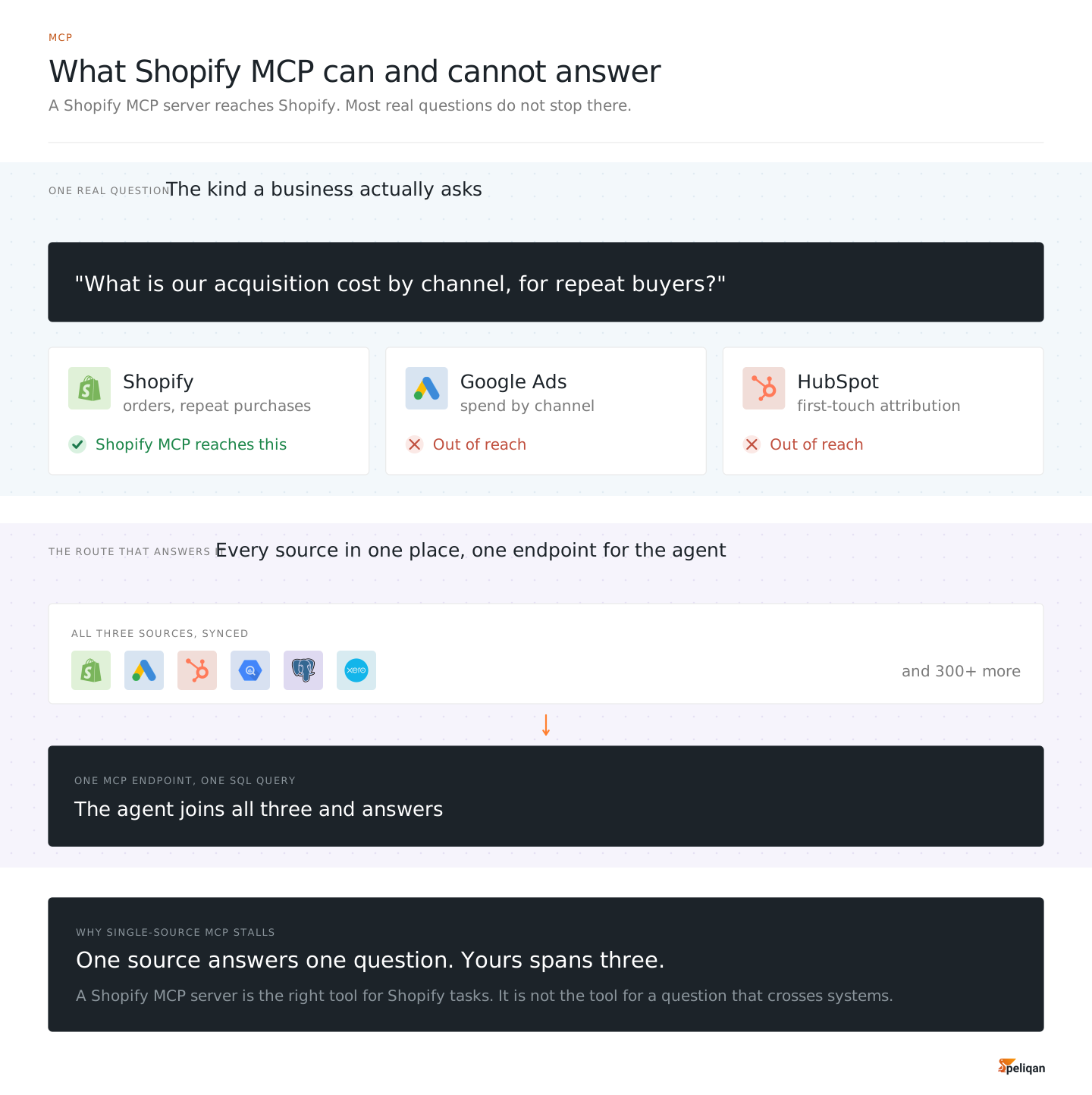
A Shopify MCP server reaches Shopify. The question most teams actually ask needs three systems. See the full set in our infographics library.
This is the same challenge that appears with every single-source MCP server, the same one we covered for Snowflake MCP: the AI agent can only work with the data it can see. When that data lives across Shopify, your CRM, your ERP, your ad platforms, and your accounting system, a Shopify-only MCP connection leaves the AI working with incomplete context.
There are only a handful of ways to close that gap, and they are worth knowing by name before you pick a tool. Our data integration patterns diagram lays out the six shapes every integration takes, including where live query through MCP fits against aggregation into a data warehouse.
The data warehouse approach: connect Shopify to AI through Peliqan
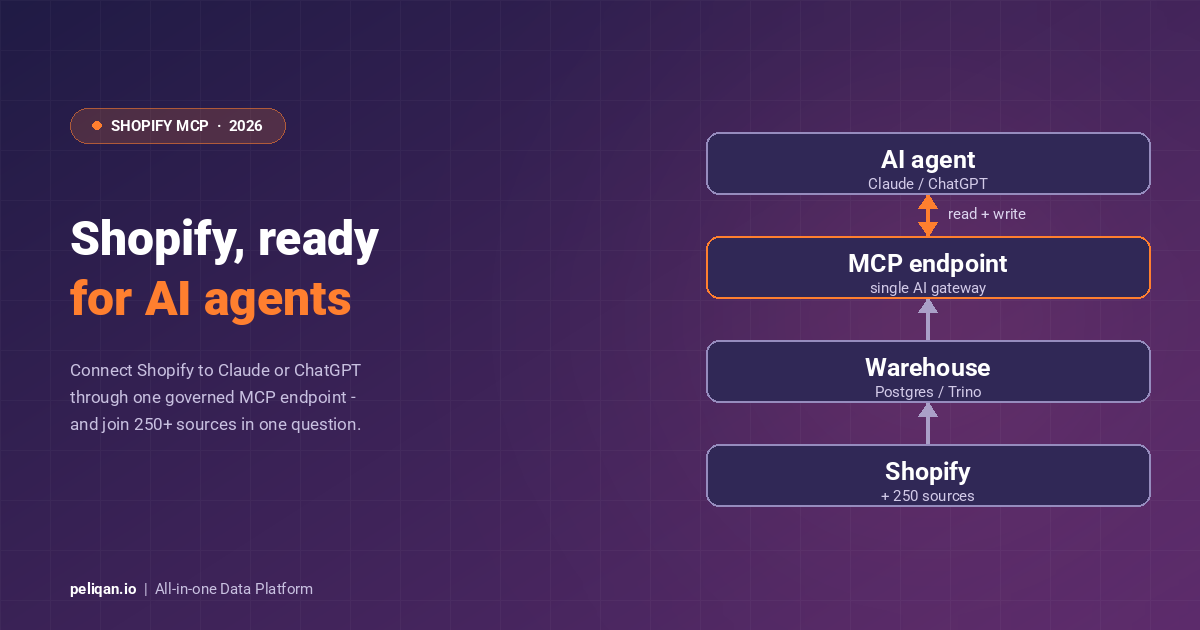
The solution is to sync Shopify data into a governed data warehouse alongside all your other sources, then expose everything to AI through a single MCP endpoint. This is exactly what Peliqan does. First, you connect Shopify to Peliqan with a few clicks and OAuth authentication, and your Shopify orders, customers, products, and inventory start syncing into Peliqan’s built-in Postgres and Trino data warehouse. Second, you connect your other data sources, since Peliqan has 300+ connectors, so your CRM, ERP, ad platforms, and accounting tools sync into the same data warehouse. Third, you point Claude, ChatGPT or any MCP client at Peliqan’s hosted MCP endpoint and authorise it with OAuth. The AI agent now queries all your data through one governed endpoint.
Peliqan capabilities for Shopify data
- Built-in data warehouse: Shopify data syncs into a Postgres and Trino data warehouse with automatic schema evolution, no separate infrastructure needed.
- Cross-source queries: JOIN Shopify orders with HubSpot contacts, Exact Online invoices, or Google Ads spend in a single SQL query.
- MCP server with read and write: AI agents query the data warehouse copy, so questions do not burn your Shopify API quota, and they can write back to Shopify through the writeback actions you enable.
- Text-to-SQL and RAG: ask questions in plain English and get SQL-powered answers, combined with semantic search over Shopify documents and records.
- Reverse ETL: sync enriched data back to Shopify, including customer health scores, product recommendations, or pricing adjustments. The loop is drawn out on our reverse ETL diagram.
- Data governance: SOC 2 Type II, ISO 27001 and GDPR certified, with support for HIPAA and CCPA compliance, EU-hosted on AWS, with automatic data lineage and quality monitoring.
This approach means your AI agent gets a complete picture. Ask “Which marketing channel drives the highest customer lifetime value?” and the AI can join Shopify order data with attribution data from multiple sources via reverse ETL, something no Shopify-only MCP server can do. The flow is always: Shopify and your other sources sync into the data warehouse, and the Peliqan MCP server exposes that data warehouse to AI agents. Because a SQL question runs against the synced copy rather than the Shopify API, analysis does not consume your store’s rate limit. Writeback is the exception and works by design: when you enable a writeback action, Peliqan calls the Shopify API to make the change.
Real-world example: CIC Hospitality
CIC Hospitality connected 120+ SaaS sources across 50 hotels through Peliqan, saving 30+ hours per month on reporting that previously required manual data consolidation. Their board reports now pull from all sources automatically through the same governed data warehouse. Read the case studies.
Direct Shopify MCP vs data warehouse MCP
If you are weighing these three routes more generally, the trade-off between live API access, an MCP endpoint and a data warehouse copy is the subject of our MCP vs API vs ETL diagram.
Which Shopify MCP approach fits your needs
- AI-powered shopping on your storefront: use the built-in Storefront MCP, already active on your store, no setup required.
- AI to manage store operations: set up the community admin MCP server (
npx shopify-mcp) with properly scoped API credentials. - Building Shopify apps with AI coding tools: install the Dev MCP (
npx @shopify/dev-mcp@latest) for documentation and API schema access. - Cross-source e-commerce analytics: connect Shopify to a data warehouse through Peliqan and expose everything via the Peliqan MCP server.
- Governed data for enterprise AI: the data warehouse approach with data lineage and quality monitoring ensures AI agents work with trusted, auditable data.
Many organizations end up using multiple approaches at once. The Storefront MCP handles customer-facing shopping, the admin MCP handles internal operations, and a data-warehouse-backed MCP server handles analytics and cross-source intelligence where data quality and governance matter most.
Getting started
For customer-facing AI shopping, you are already set, since the Storefront MCP endpoint is live on every Shopify store. For admin operations, install the community MCP server with npx shopify-mcp and configure your Claude Desktop, Cursor, or Claude Code client with your API credentials. For cross-source analytics that combine Shopify with your other business data, connect Shopify to Peliqan in under five minutes, where it syncs your store data into a governed data warehouse, lets you combine it with 300+ other sources using SQL or low-code Python, and exposes everything to AI agents through the Peliqan MCP server.
If you are already using Peliqan for other connectors, like Exact Online MCP for accounting or Snowflake for your data warehouse, adding Shopify takes minutes. All sources land in the same data warehouse, so your AI agent can answer questions that span e-commerce, finance, and operations in a single query. The MCP ecosystem around Shopify is evolving fast, and with UCP integration underway and the open-source community expanding the toolkit weekly, the best time to connect your Shopify data to AI is now.