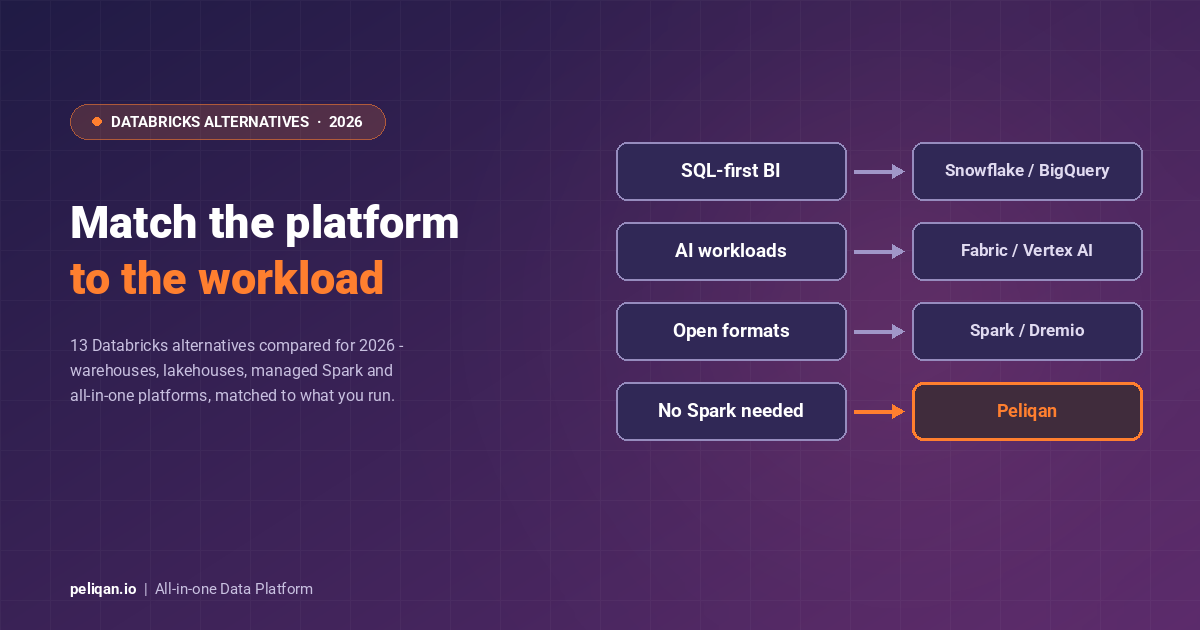





Databricks alternatives fall into clear workload categories: warehouses for SQL-first analytics, lakehouses and engines for AI workloads, managed Spark for teams that want the engine without the platform, and all-in-one platforms for teams that never needed Spark in the first place. This guide compares the 13 alternatives that matter in 2026, matched to the workload that is actually driving your evaluation.
Databricks pioneered the lakehouse and remains a leading platform for unified data and AI, but it comes with a steep learning curve, consumption pricing that is hard to forecast, and a Spark-centric interface that assumes deep expertise. DBU-based billing can grow quickly for large jobs or idle clusters, and the platform still leans on external services for dashboards and reverse ETL data activation. Those are the reasons technical leaders start shopping.
Most “Databricks is too expensive” complaints, though, are really workload-fit problems. The honest first question is not “which platform is cheaper” but “which category of platform matches what we actually run.” Start there, and the shortlist writes itself.
Triage: what is actually driving your evaluation?
- Cost unpredictability: fixed-price all-in-one (Peliqan) or reserved warehouse capacity (Redshift, Snowflake commits)
- Spark complexity without Spark workloads: a SQL warehouse (Snowflake, BigQuery) or an all-in-one platform
- AI and ML workloads: stay lakehouse-class – compare Fabric, BigQuery with Vertex AI, SageMaker plus Redshift, Dremio
- Lock-in worries: open engines and formats – Spark, Starburst, Dremio, Iceberg-native stacks
- EU data residency: an EU-hosted platform with European certifications
Why teams look beyond Databricks
The recurring drivers are consistent across reviews and RFPs. Complexity: Databricks is powerful but assumes Spark and SQL depth, and its rapid release cycle is a lot to track. Pricing uncertainty: consumption-based DBUs surprise budgets at scale. Lock-in: multi-cloud, yes, but built on proprietary components around Delta Lake and MLflow. Feature gaps: strong notebooks and pipelines, but BI, activation, and app-facing serving usually mean extra tools. And enterprise needs like hybrid deployment or domain-specific governance sometimes sit outside the box.
What changed at Databricks in 2025-2026
Any 2026 comparison should account for how fast this market moves. Databricks added Lakebase, an OLTP layer, in 2025, and continues to push agentic AI tooling on the platform. Snowflake answered with Cortex AI for ML inference. Apache Iceberg support is now table stakes across Databricks, Snowflake, BigQuery, and Redshift, which lowers the switching cost between all of them. The practical effect: proprietary table formats matter less, and workload fit plus cost model matter more than ever.
1. Peliqan – all-in-one data platform
Peliqan is a unified, cloud-native data platform that brings ELT pipelines, data warehousing, analytics, and data activation into one product. It is the alternative for teams that were never going to use Spark.
Connect data from 300+ sources, land it in a built-in Postgres and Trino warehouse with a federated query engine, transform it with AI-assisted SQL and low-code Python, and push results back into business apps.
The activation layer covers reverse ETL, API publishing, alerts, and interactive data apps.
A built-in MCP server exposes governed data to AI agents. It is SOC 2 Type II, ISO 27001, GDPR, HIPAA, and CCPA certified, EU-hosted on AWS Frankfurt, with custom connectors delivered within 2 weeks.
Pricing model: transparent fixed tiers, not consumption-based. Best for: data teams, SaaS companies, and consultancies that want the full stack in one tool with predictable costs.
Trade-off: not built for petabyte-scale Spark ML; a newer platform with a smaller community than the incumbents. On-prem sources connect through an agent rather than full on-prem deployment. For the storage layer itself, see how the built-in warehouse compares to standalone options.
2. Snowflake – cloud data platform
Snowflake is the warehouse-first alternative: a multi-cluster, shared-data architecture where independent virtual warehouses scale compute on demand, with native semi-structured data support, Time Travel, zero-copy cloning, and best-in-class data sharing. Cortex AI adds ML inference and LLM functions on warehouse data, narrowing the AI gap with Databricks for SQL-centric teams.
Pricing model: usage-based compute credits plus storage; powerful but forecast-sensitive. Best for: enterprise-scale SQL analytics, high concurrency BI, and data sharing across organisations. Trade-off: no native notebooks or built-in ETL and BI, so the stack still needs assembling; costs surprise teams that leave clusters running. You can feed it from other systems through the Snowflake connector.
Our Snowflake alternatives guide covers its side of the fence.
3. Google BigQuery – serverless data warehouse
BigQuery is Google Cloud’s fully managed, serverless warehouse for petabyte-scale analytics: columnar storage, a distributed query engine, and zero cluster management. BigQuery ML trains models in SQL, Vertex AI integration covers advanced ML, and BigLake extends queries over open formats like Iceberg. For AI workloads on GCP it is the strongest warehouse-side answer to Databricks.
Pricing model: pay per TiB scanned or reserved slots; simple at low volume, needs governance at scale. Best for: no-ops analytics, event and streaming data, and GCP-committed teams wanting built-in ML. Trade-off: tight GCP coupling and per-scan costs that climb with careless dashboards. The BigQuery connector bridges it to the rest of your stack.
4. Amazon Redshift – AWS data warehouse
Redshift is AWS’s petabyte-scale MPP warehouse. Redshift Spectrum queries data in S3 directly in open formats, blending lake and warehouse architectures, RA3 nodes separate compute from storage, and SageMaker integration covers the ML side. Paired with SageMaker, it is the AWS-native alternative for teams replacing Databricks with warehouse-plus-ML.
Pricing model: hourly clusters or serverless, with reserved instances up to 75% off; among the most forecastable. Best for: AWS-centric estates with S3, Glue, and Kinesis pipelines. Trade-off: needs tuning and maintenance for peak performance, and it is AWS-first by design. The Redshift connector keeps it connected to everything else.
5. Azure Synapse Analytics – unified Azure platform
Azure Synapse combines dedicated and serverless SQL pools, Spark pools, and Data Factory-style pipelines for ETL and ELT in one workspace.
Deep Power BI and Azure ML integration keeps it relevant for existing Azure estates, though Microsoft’s centre of gravity has moved to Fabric.
Pricing model: provisioned DWUs or serverless per-TB, inside Azure billing. Best for: Microsoft-committed enterprises with existing Synapse workloads. Trade-off: Azure lock-in, a real learning curve, and the strategic question of when to move to Fabric.
6. Microsoft Fabric – unified analytics on OneLake
Microsoft Fabric is the most direct platform-versus-platform rival to Databricks in 2026: data engineering, warehousing, real-time analytics, data science, and Power BI on one SaaS foundation, with OneLake storing everything in open Delta format. For Microsoft-first organisations weighing Databricks, Fabric is usually the incumbent option on the table.
Pricing model: capacity units (F-SKUs), with reserved capacity roughly 40% cheaper than pay-as-you-go. Best for: Microsoft-centric enterprises that want one platform and one bill, with Power BI at the front. Trade-off: capacity planning is its own discipline, and the platform is broad rather than deep in places. Our Microsoft Fabric alternatives guide covers that evaluation in detail.
7. Cloudera Data Platform – hybrid data cloud
Cloudera Data Platform (CDP) covers data engineering, warehousing, ML, and streaming across on-premises and multi-cloud environments, with SDX providing unified security, governance, and metadata across all workloads, plus Iceberg support for open lakehouse architecture.
Pricing model: subscription by nodes and users; enterprise-weighted. Best for: regulated industries, hybrid estates, and organisations modernising legacy Hadoop with strict compliance needs, including on-premises requirements. Trade-off: higher total cost of ownership and deployment complexity than cloud-native options; overkill for smaller teams.
8. Starburst – query engine for data lakes and mesh
Starburst, the enterprise distribution of Trino, queries data where it lives across data lakes, databases like MongoDB, and streaming systems, with no data movement. Support for Iceberg, Delta, and Hudi, plus fine-grained access control, makes it the standard pick for data mesh and federated architectures.
Pricing model: subscription or usage, from roughly $0.50 per compute hour. Best for: federated analytics across many sources and migration projects querying old and new systems at once, which removes ETL steps entirely for some workloads. Trade-off: a query engine, not a platform; ETL, ML, and storage live elsewhere, and performance depends on the underlying sources.
9. Dremio – lakehouse query platform
Dremio delivers warehouse-speed SQL directly on Apache Iceberg and open formats, with data reflections pre-computing common query patterns and a semantic layer exposing virtual datasets to BI tools without copying data. For teams leaving Databricks over lock-in worries while staying lakehouse-class, Dremio is the open-format-first answer.
Pricing model: subscription or usage, from around $1 per compute hour. Best for: Iceberg-committed organisations that want warehouse performance on the lake without vendor lock-in. Trade-off: no ETL or ML tooling of its own; it assumes the lake and pipelines already exist.
10. Apache Spark – the open-source engine itself
Apache Spark is the engine underneath Databricks, and running it yourself remains a genuine alternative for teams with infrastructure expertise. Unified APIs cover batch, streaming, SQL, and MLlib machine learning, in Scala, Python, Java, R, and SQL, on Kubernetes or YARN.
Pricing model: free open source; you pay for infrastructure and the engineers to run it. Best for: teams that want maximum control, zero licensing, and no vendor lock-in. Trade-off: cluster provisioning, monitoring, and optimisation are all yours, with no built-in storage layer or UI.
11. Amazon EMR – managed Spark on AWS
Amazon EMR runs Spark, Hadoop, Presto, and HBase as managed clusters, EMR Serverless, or EMR on EKS, with deep hooks into S3, Glue, and SageMaker. It is the “Spark without Databricks” option for AWS-centric teams.
Pricing model: pay per use on AWS instances, per-second billing, spot instances for savings. Best for: variable big-data workloads and on-prem Hadoop migrations into AWS. Trade-off: cluster startup lag, AWS lock-in, and a developer experience a step behind managed platforms.
12. Google Cloud Dataproc – managed Spark on GCP
Dataproc is GCP’s managed Spark and Hadoop service: clusters start in about 90 seconds, autoscaling and preemptible VMs keep costs down, and native BigQuery and Cloud Storage integration enables hybrid analytics between lake and warehouse.
Pricing model: pay per use on GCP instances with per-second billing. Best for: GCP teams running batch Spark on Cloud Storage data alongside BigQuery. Trade-off: GCP-specific, fewer platform features than Databricks (no Delta Lake, lighter ML tooling), and hands-on cluster management.
13. e6data – lakehouse compute engine
e6data accelerates high-concurrency SQL analytics, dashboards, ad-hoc queries, and scheduled workloads, directly on your existing lake or lakehouse without migrating data. It works with Iceberg, Delta, and Hudi through catalogs like Glue, Hive Metastore, Unity Catalog, and Apache Polaris, deploying in your own VPC or as a managed serverless option, with granular scaling down to a single vCPU.
Pricing model: usage-based. Best for: drop-in acceleration of high-concurrency BI on lakehouse storage, across cloud, VPC, and hybrid environments. Trade-off: a compute engine rather than a platform, and some advanced format and hybrid capabilities are still maturing.
Databricks alternatives comparison table
Peliqan vs Databricks: quick comparison
For teams comparing Databricks with an all-in-one platform, the table below highlights the differences in deployment, integration, analytics, and pricing.
Conclusion
Databricks pioneered the modern lakehouse, but no single platform suits every workload. Warehouses like Snowflake and BigQuery win SQL-first analytics; Fabric is the platform-scale rival for Microsoft shops; open engines like Spark, EMR, Dataproc, Starburst, and Dremio trade managed convenience for control and open formats; e6data accelerates the lake you already have.
And for the many teams whose workloads never needed Spark at all, an all-in-one platform is the honest answer: the full stack on one fixed price, without the cluster bill or the platform team.
That means pipelines, warehouse, transformations, dashboards, and AI in one product. Weigh usability against control, fixed pricing against pay-as-you-go, and pick the category that matches the workload you actually run.