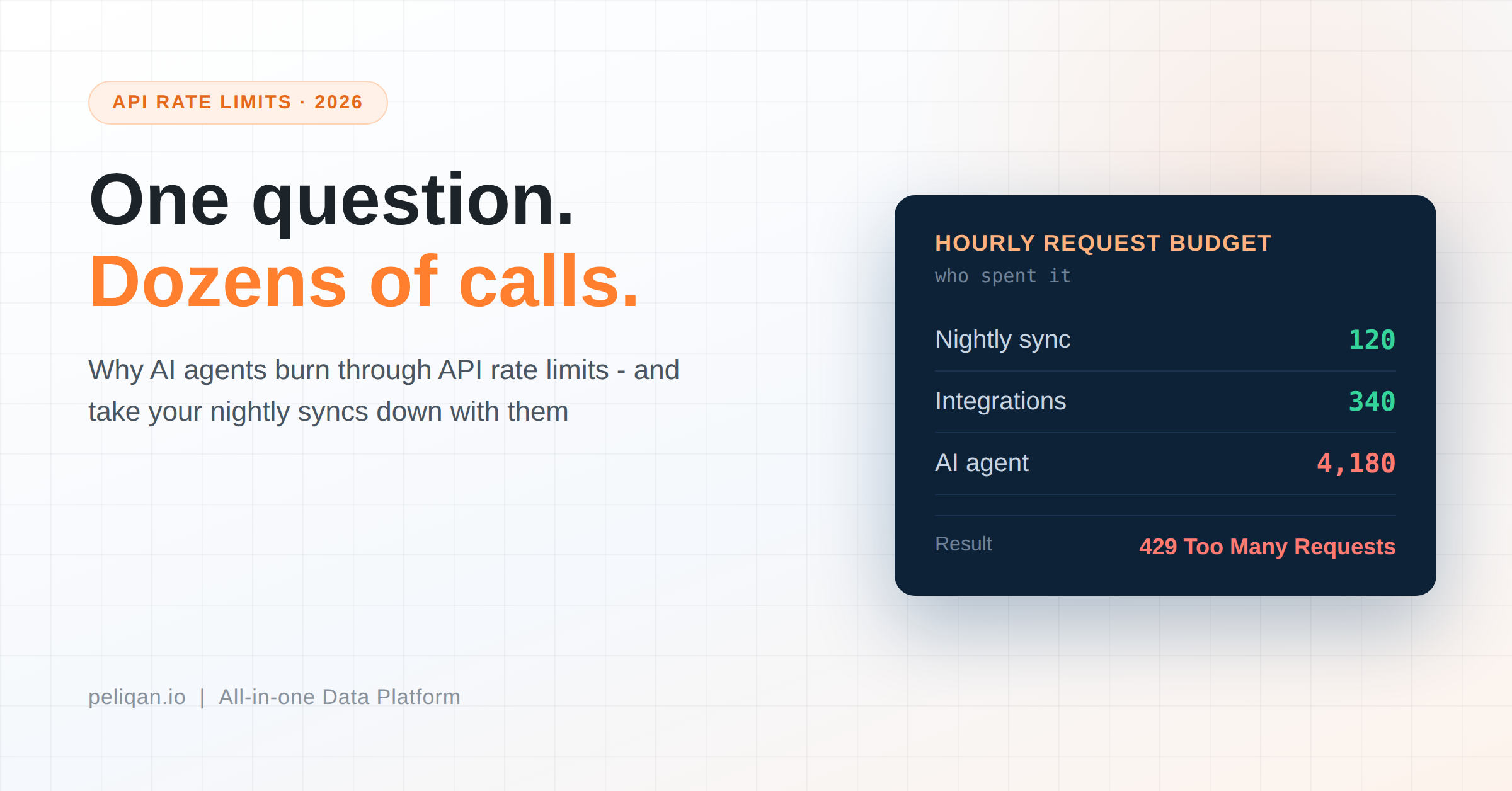





API rate limits cap how many requests you can send to a system in a given time. AI agents hit them faster than people do, because one question can trigger many calls – and when the limit is reached, your agent fails and your scheduled syncs often fail with it. This post explains why it happens and five practical ways to fix it.
Here is a failure that looks like an AI problem but isn’t.
Someone connects an AI assistant to the company CRM. It works beautifully for a week. Then one afternoon the answers stop coming, and the error mentions something about too many requests. Worse, the nightly sync that feeds the finance dashboard failed too – and nobody connected the two events until the next morning.
Both broke for the same reason. The agent used up the CRM’s request budget for the hour, and everything else that needed the same budget got turned away.
API rate limits are one of the least discussed problems in running AI on business data, and one of the most common. They are also fixable, once you understand what the meter counts.
What API rate limits are
Every SaaS system caps how often you can ask it for data. Send more requests than the cap allows, and the system rejects them with an error – usually “429 Too Many Requests” – until the window resets.
The caps exist for a good reason: they stop one noisy customer from degrading the service for everyone. They also vary widely. Each vendor sets its own limits, and those limits often depend on your subscription tier, so two companies using the same tool can have very different room to work with. Your HubSpot allowance is not your colleague’s.
The important part is that the budget is shared. Your syncs, your integrations, your custom scripts and now your AI agent all draw from the same pool.
Why agents burn through API rate limits faster than people
A human analyst asks a system for data a handful of times a day. An agent behaves very differently, for three reasons.
One question, many calls
Ask an agent “which customers with open deals have overdue invoices?” and it does not send one request. It fetches deals, then fetches invoices, then looks up customer records to match them, possibly page by page. One business question becomes dozens of API calls.
It explores
An agent that does not know your data structure discovers it by asking. Listing objects, reading schemas, sampling records – all of that is requests, spent before it even starts answering.
It retries
When a call fails, agents retry. Naive retry behaviour against a system that is already rejecting you makes the problem worse, not better, and can keep you locked out longer than the original window.
Put those together and a single curious user can consume in ten minutes what your scheduled pipelines were counting on for the whole hour.
What it actually costs you
Three costs, in rising order of annoyance.
The obvious one is the failed answer. Someone asks a question and gets an error, or worse, a partial answer built from the calls that succeeded before the limit hit.
The expensive one is collateral damage. Your agent’s exploration breaks the nightly sync, and now a dashboard is stale for a day. The team debugging it starts by looking at the pipeline, which is fine, because the pipeline is not the cause.
The subtle one is unpredictable speed. Agents that back off and wait for the window to reset feel slow and erratic. Users conclude the AI is unreliable, when the real limit sits in a different system entirely.
Five ways to stop hitting API rate limits
1. Query a copy, not the source
This is the big one. If your data already sits in a warehouse, the agent queries that warehouse instead of the live API – and a SQL query against your own warehouse has no vendor API rate limits at all.
The sync still calls the API, but on a predictable schedule you control, and incremental syncs only fetch what changed. One controlled reader beats an unpredictable one.
That is why a pre-synced setup like Salesforce into a warehouse behaves so differently from an agent calling Salesforce directly, even though both end up reading the same records.
2. Set sync schedules by need, not by habit
Every sync spends part of the same budget. A table set to every 15 minutes that only changes daily is wasting requests your agent could have used. We covered how to choose per source in the post on sync frequency.
3. Narrow what the agent can reach
An agent pointed at everything explores everything. Give it a small set of curated tables and it spends far fewer calls working out what exists – which reduces both request volume and wrong answers.
4. Use direct queries for repeated work
Known, repeated operations do not need an agent rediscovering them each run. Run those as plain scheduled queries and save the agent for questions nobody has asked yet. The trade-offs are in our post on CLI vs MCP.
5. Alert on 429s, not just on failures
Rate-limit errors are early warnings. If you only alert when a pipeline fails completely, you miss weeks of near-misses. Wire alerts to fire on rate-limit responses so you see the ceiling approaching.
When you do need live calls
To be fair to the other side: sometimes the copy is not good enough.
If an agent is about to send a payment reminder, it needs to know whether that invoice was paid ten minutes ago – and a warehouse synced hourly cannot tell it. For those moments, a live lookup on one specific record is the right call, and it costs one request rather than hundreds.
The workable pattern is a split: search and analysis run against the warehouse copy, and a targeted live call confirms the handful of facts that must be current before the agent acts.
The event-driven option
There is a third approach worth knowing about. Instead of asking a system repeatedly whether anything changed, you let the system tell you when something does – through webhooks or an event stream.
This inverts the cost. Polling spends requests to discover nothing happened; events cost nothing until something actually happens. Not every vendor supports it, but where they do, it removes the rate-limit question rather than managing it.
Heylog, a logistics SaaS company, built exactly this on Peliqan: real-time two-way pipelines across transport management systems using an MQTT event-driven setup, with 15+ connections and writeback. Their case study is a good illustration of events beating polling when the data has to be current.
How Peliqan handles this
Peliqan is built around fix number one. Your data syncs into a built-in warehouse, and AI agents query that warehouse through the MCP server – so agent questions become SQL against your own data rather than requests against a vendor’s API.
Syncs are incremental and run on a schedule you set per connection, which keeps API usage predictable instead of reactive. For databases you can also query live through the federated engine when a copy is not wanted.
And materialized tables let you hold a computed result rather than rebuilding it from the source each time, which cuts repeat work further.
Peliqan’s own connectors are subject to whatever API rate limits each vendor sets – no platform can raise your HubSpot allowance. What changes is who spends it: one scheduled, incremental reader instead of an agent improvising.
If your agent has been hitting API rate limits, book a demo and bring the system it keeps tripping over. We will point the same question at a synced copy and compare what each approach costs in requests.