
- MCP Server
- Snowflake
Query Snowflake with AI and write back
to your business apps
Connect Snowflake to Claude, ChatGPT, or any MCP client through Peliqan. Query your DWH in plain English, join it with 300+ apps in one SQL statement, and route writebacks to the right system – HubSpot, Salesforce, Stripe, Slack – through one governed MCP endpoint.
Snowflake MCPs handle SQL well. They stop short of what teams actually need.
There are several Snowflake MCP options – Snowflake’s own managed MCP server, official Snowflake Labs MCP, community projects on GitHub, and managed offerings. They run SELECT queries reliably. But the moment you need cross-source joins, writebacks to business apps, or governance across many AI agents, the gaps appear.
Most Snowflake MCPs are SQL-only and single-source
You can query Snowflake, but you can't join it with HubSpot CRM, Stripe, or Salesforce in one prompt without ELT-ing those sources into Snowflake first
No writeback to business apps from Snowflake queries
"Find inactive customers in Snowflake and tag them in HubSpot" needs a second tool - your Snowflake MCP can only write back to Snowflake itself, not to your CRM
Snowflake ELT is a separate stack
Getting SaaS data INTO Snowflake usually means a separate ELT vendor like Fivetran or Airbyte - more cost, more pipelines to monitor, more vendors to manage
- What you get
Query Snowflake tables in plain English from Claude, ChatGPT, or n8n
Join Snowflake with 300+ apps - run cross-source SQL in one statement
Use Snowflake as a target too - sync any SaaS source into your DWH via Peliqan ELT
SOC 2 Type II - EU-hosted, never hands raw DB credentials to AI
Type
Cloud data warehouse and AI data cloud
Auth
Key-pair authentication (RSA private key)
Website
- The solution
One MCP server. Snowflake plus 300+ apps, with smart writebacks.
Peliqan connects to your Snowflake account as both a source and a target, exposes it via MCP alongside 300+ SaaS connectors, and routes writebacks to the right system – whether that’s Snowflake itself, your CRM, your billing tool, or your data warehouse pipeline.
Cross-source joins federated via Trino
Snowflake-only MCPs need you to first ELT every other source into Snowflake before joining. Peliqan lets AI join Snowflake with HubSpot, Salesforce, Stripe, Postgres, or any of 300+ sources directly - federated by Trino, no ELT required for one-off questions.
Use Snowflake as your target warehouse
Peliqan can sync data from 300+ SaaS sources INTO your Snowflake account as an ELT target - replacing or complementing tools like Fivetran or Airbyte. Same Peliqan workspace, no extra vendor.
SQL + RAG on documents in one MCP
Combine structured SQL queries on Snowflake with semantic search across contracts, PDFs, chat transcripts, or any unstructured data stored in Peliqan. One MCP server, both retrieval styles.
Top 50 enterprise accounts: €18.4M ARR. 12 accounts have no active CS owner in HubSpot.
- Acme Industries - €1.2M ARR, NPS 6
- NordTech Group - €890K ARR, NPS 5
- Stellar BV - €720K ARR, NPS 6
- Data access
What AI can do with your Snowflake data
Peliqan exposes your Snowflake databases, schemas, and views through MCP – with granular controls on what AI can read, where it can write, and how it federates with other sources.
| Capability | What your AI can do | Writeback |
|---|---|---|
| Schema introspection | List databases, schemas, tables, columns, data types, comments | Read |
| SELECT queries | Plain English questions, joins, window functions, CTEs, semi-structured data | Read |
| Cross-source joins | Join Snowflake with HubSpot, Salesforce, Stripe, Postgres, BigQuery, 300+ more | Read |
| Writeback to Snowflake | Optional INSERT, UPDATE, MERGE – audited and gated by role | ✓ Opt-in |
| Writeback to business apps | Push Snowflake query results into HubSpot, Salesforce, Slack, and 300+ apps | ✓ Routed |
| Snowflake as target DWH | Use Peliqan ELT to sync SaaS sources into your Snowflake account | ✓ ELT |
| Stored procedures / UDFs | Call existing Snowflake procs and UDFs as AI tools | ✓ Opt-in |
| Views and dynamic tables | Expose curated views to AI instead of raw base tables | Read |
| Audit logging | Every query and writeback logged with user, agent, timestamp, and SQL | Always on |
| SQL + RAG combined | Mix structured Snowflake SQL with semantic search across documents | Read |
- How it works
One MCP. Snowflake plus your business stack.
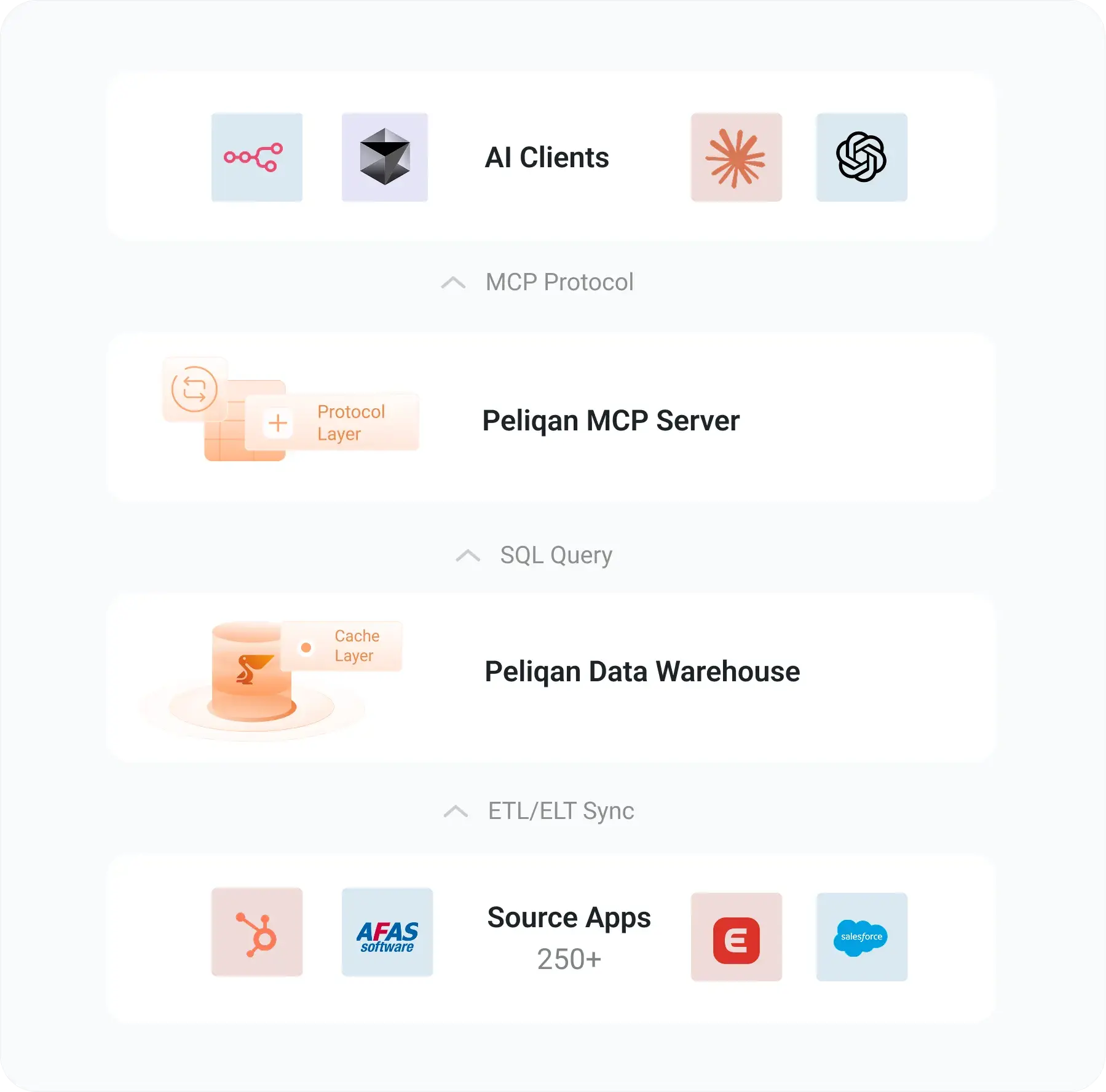
Peliqan connects to Snowflake via key-pair authentication and exposes it through MCP alongside 300+ other sources. Cross-source queries federate through Trino. Writebacks route to the right system – Snowflake itself or your business apps – through Peliqan’s connector layer.
Key-pair auth, not passwords
Peliqan authenticates to Snowflake with an RSA private key plus pass phrase. Your DBA can rotate keys without touching AI client configs - the keys live in Peliqan.
Two-way Snowflake
Use Snowflake as a source for AI queries and as a target for Peliqan ELT pipelines. One vendor for both read and ELT-write into your DWH.
Smart writeback routing
When AI says "update HubSpot based on this Snowflake query," Peliqan reads from Snowflake and writes to HubSpot's API - automatically, without you wiring two MCP servers together.
Trino federation across sources
Cross-source SQL queries route through Trino. One statement joins Snowflake with Postgres, HubSpot, Salesforce, Stripe, or any other connected source.
- Setup
Connect Snowflake to Claude in under 30 minutes
No DIY MCP server to host, no Snowflake stored procedure to write, no extra ELT vendor. Authenticate once in Peliqan and your MCP server is live.
1
Add your Snowflake connection
In Peliqan, go to Connections, add Snowflake, and enter your subdomain.region, Snowflake user, role, and target database. Make sure your user’s default role can list databases. Setup guide →
2
Create a scoped DB user
Generate an RSA private key with pass phrase, register the public key on your Snowflake user, SET RSA_PUBLIC_KEY, and paste the private key plus pass phrase into Peliqan. Keys rotate without touching AI configs. Permission scripts →
3
Create your MCP API handler
Use Peliqan’s built-in MCP template to choose which Snowflake databases, schemas, and tables your AI agents can see. Set read or write permissions per role, and optionally expose curated views instead of raw tables. AI agents docs →
4
Connect Claude or ChatGPT
Run pip install mcp-server-peliqan, add your Peliqan API credentials (not your Snowflake key), and start querying Snowflake with natural language. Open source on GitHub.
Peliqan vs other Snowflake MCP options
Snowflake MCP is a crowded space – Snowflake’s own native MCP, open-source community projects, and managed offerings all run SQL well. Here’s where Peliqan fits for teams who need more than just queries.
| Snowflake native MCP | Open-source Snowflake MCPs | Peliqan MCP | |
|---|---|---|---|
| SELECT queries on Snowflake | ✓ | ✓ | ✓ |
| Cross-source joins with SaaS apps | ✗ Snowflake-only | ✗ Snowflake-only | ✓ 300+ sources |
| Writeback to business apps | ✗ Snowflake-only | ✗ Snowflake-only | ✓ HubSpot, Salesforce, 300+ |
| Snowflake as ELT target | ✗ | ✗ | ✓ Built-in |
| SQL + RAG on documents | ✗ | ✗ | ✓ Combined |
| No Snowflake credentials in AI config | Varies | ✗ Inline creds | ✓ Peliqan token only |
| Audit logging across sources | Snowflake scope | Varies | ✓ Full audit trail |
| BI + ELT + reverse ETL | ✗ MCP only | ✗ MCP only | ✓ Full data platform |
- Beyond MCP
The full Peliqan Snowflake integration
MCP is one way to use your Snowflake in Peliqan. The full integration gives you a complete data platform for AI agents, ELT into Snowflake, BI on Snowflake, and reverse ETL out of Snowflake – all in one workspace.
Connect your favourite BI tool, write data transformations in SQL or Python, and set up data quality checks on your Postgres tables.
ELT into Snowflake
300+ SaaS sources to your DWH
MCP server
Claude, ChatGPT, n8n, Make
Text-to-SQL
Plain English Snowflake queries
Reverse ETL
Sync Snowflake rows into SaaS apps
Cross-source joins
Snowflake + 300 SaaS apps via Trino
Data quality
SQL checks + Slack/email alerts
Your AI agents. 300+ business apps. One MCP server.
Connect Snowflake, Exact Online, AFAS, Salesforce, and more to any MCP client – without writing API code, managing rate limits, or sacrificing governance.
Live in minutes - pip install, paste your token, query.
Read + write - pull data and push updates back to source.
Governed by default - SOC 2 Type II · GDPR · EU-hosted.
Snowflake MCP, answered
What is the Snowflake MCP server?
A Snowflake MCP server is a Model Context Protocol endpoint that lets AI agents like Claude, ChatGPT, and Cursor query a Snowflake account in plain English. Peliqan’s Snowflake MCP adds cross-source joins (Snowflake plus 300+ SaaS apps), writeback routing to business apps like HubSpot or Salesforce, optional use of Snowflake as an ELT target, and a single MCP endpoint that covers your full data stack.
How is Peliqan different from Snowflake's own native MCP server?
Snowflake’s native MCP server is excellent for Snowflake-only workflows – it runs inside Snowflake’s infrastructure and uses Snowflake’s governance. If your AI use case is purely SQL queries against Snowflake, it’s a great fit. Peliqan adds three things on top: cross-source joins with 300+ SaaS apps in one SQL statement, writeback to business apps (not just Snowflake), and the ability to use Snowflake as an ELT target through the same workspace. If you only query Snowflake, Snowflake’s native MCP is the simplest path. If you need to read Snowflake AND act on other systems based on those queries, Peliqan adds the missing routing layer.
Can I use Snowflake as both a source AND a target in Peliqan?
Yes – this is unique to Peliqan among Snowflake MCP options. You can connect Snowflake as a data source for AI queries, and configure it as a target database so Peliqan’s ELT engine syncs your 300+ SaaS sources directly into Snowflake. One Peliqan connection covers both directions. Most Snowflake MCP servers only handle the read side.
Can AI write to my Snowflake tables?
Only if you allow it. Peliqan defaults to read-only access. You can enable INSERT, UPDATE, MERGE per role, per schema, or per table – and every write is logged for audit. You can also restrict AI to specific stored procedures or views, so it can trigger Snowflake business logic without holding write privileges on base tables.
How do cross-source joins between Snowflake and SaaS apps actually work?
Peliqan uses Trino under the hood to federate queries. SaaS connectors (HubSpot, Salesforce, Stripe, etc.) sync into Peliqan’s built-in Postgres warehouse, and your Snowflake account is exposed as an external Trino catalog. AI writes a single SQL statement that joins across both – Trino plans the join, pulls from each source, and returns results. No ELT into Snowflake required for ad-hoc questions.
Will AI workloads consume Snowflake credits unpredictably?
AI queries are real Snowflake queries, so they consume warehouse credits like any other SQL workload. Two patterns help control cost. First, point Peliqan at a dedicated warehouse (e.g. AI_WH) with auto-suspend – so credits are scoped and visible. Second, expose curated views instead of raw base tables so AI queries scan less data. Snowflake’s resource monitors apply to Peliqan’s queries like any other client.
Does Peliqan replace Fivetran or Airbyte for Snowflake ELT?
It can. Peliqan supports Snowflake as an ELT target – syncing data from 300+ SaaS sources directly into your Snowflake account, on a schedule you choose. Teams that already use Fivetran or Airbyte can keep them and just use Peliqan for the MCP layer. Teams looking to consolidate often replace their existing ELT vendor with Peliqan, since the same workspace handles ELT, MCP, BI, and reverse ETL.