
- MCP Server
- Postgres
Query Postgres with AI and join it with 300+ apps
Connect your Postgres database to Claude, ChatGPT, or any MCP client through Peliqan. Ask questions in plain English, join product data with Salesforce, HubSpot, Stripe, or any of 300+ sources, and write updates back – with column-level access control, audit logs, and no raw DB credentials handed to AI.
Most Postgres MCP servers are SQL-only. That stops short of what teams actually need.
There are plenty of Postgres MCP servers – the official one from Anthropic, open-source projects on GitHub, and vendor-specific options. They’re great for letting Claude run SELECT queries. But the moment you need to join product data with Salesforce, mask PII columns from AI, or trigger writes safely, the gaps appear quickly.
Most Postgres MCPs are read-only and single-source
You can query your Postgres, but you can't join it with HubSpot CRM, Stripe, Salesforce, or any other SaaS source in one prompt
Raw connection strings end up in AI client configs
DIY Postgres MCP servers usually require pasting postgresql://user:password@host into Claude or Cursor settings - real credentials, real risk
One MCP per source means many MCP servers to manage
Running separate MCP servers for Postgres, HubSpot, Salesforce, Slack, and BigQuery means many configs, many auth flows, many things that can break in production
- What you get
Query any Postgres table in plain English from Claude, ChatGPT, or n8n
Join Postgres with 300+ apps - one query across product DB, CRM, billing, ads
Governance built in - masking, access, full audit logging
SOC 2 Type II - EU-hosted, never hands raw DB credentials to AI
Type
Open-source relational database
Versions
Postgres 11+, RDS, Cloud SQL, Aurora, Supabase
Website
- The solution
One MCP server. Postgres plus 300+ apps, governed for AI.
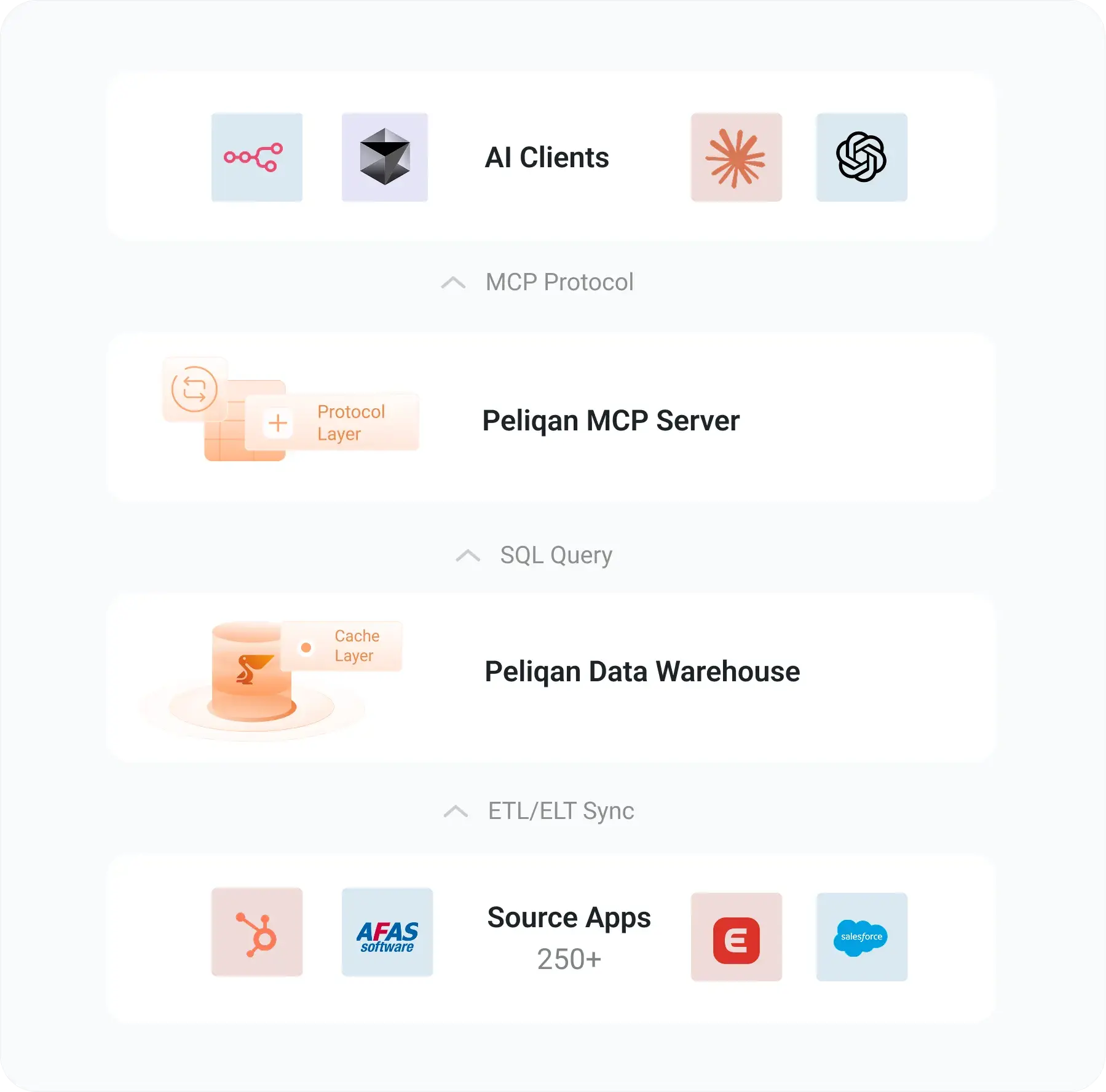
Peliqan connects directly to your Postgres database, exposes it via MCP alongside 300+ other sources, and routes every query through a governance layer with column-level masking, row-level access, and audit logging. No raw connection strings in AI configs.
Cross-source joins are the real wedge
Single-source Postgres MCPs let AI query your DB. Peliqan lets AI join your Postgres tables with HubSpot, Salesforce, Stripe, Snowflake, BigQuery, or any other connected source in one SQL statement, federated via Trino.
No raw DB credentials in AI configs
Your Postgres credentials live in Peliqan, not in Claude Desktop or Cursor settings. AI clients connect to Peliqan with a per-user API key. Rotate, scope, or revoke access without touching the DB.
SQL + RAG on documents in one MCP
Combine structured SQL queries on Postgres with semantic search across PDFs, contracts, chat transcripts, or any unstructured data stored in Peliqan. One MCP server, both retrieval styles.
Found 147 paying users from the last 30 days. 38 are not marked as MQL in HubSpot.
- acme.com - €4,200 ARR, marked as "Lead"
- nordstack.io - €2,800 ARR, marked as "SQL"
- buildwith.dev - €1,950 ARR, no stage set
- Data access
What AI can do with your Postgres data
Peliqan exposes your Postgres schemas, tables, and views through MCP – with granular controls on what AI can read, write, and mask.
| Capability | What your AI can do | Writeback |
|---|---|---|
| Schema introspection | List schemas, tables, columns, primary keys, foreign keys, data types | Read |
| SELECT queries | Plain English questions, joins, aggregations, window functions, CTEs | Read |
| Cross-source joins | Join Postgres with HubSpot, Salesforce, Stripe, BigQuery, Snowflake, 300+ more | Read |
| INSERT / UPDATE / DELETE | Optional write operations, audited and gated by role | ✓ Opt-in |
| Column-level masking | Hide PII, salaries, tokens, API keys from AI – per role or per agent | Policy |
| Row-level access | Scope AI to specific tenants, customers, or projects | Policy |
| Audit logging | Every query and writeback logged with user, agent, timestamp, and SQL | Always on |
| Stored procedures / functions | Call existing Postgres functions or stored procs as AI tools | ✓ Opt-in |
| Views and materialized views | Expose curated views to AI instead of raw base tables | Read |
| SQL + RAG combined | Mix structured SQL queries with semantic search across documents | Read |
- How it works
Direct DB connection, governed for AI
Peliqan connects directly to your Postgres database as an external DB connection – your data stays in your DB. Every AI query routes through Peliqan’s MCP server, governance layer, and audit log before it reaches Postgres. Writebacks follow the same governed path.
AI never holds your DB credentials
Postgres credentials live in Peliqan, not in Claude or Cursor configs. AI clients authenticate to Peliqan via API key, scoped per user or per agent.
Governance is per-agent, not per-DB-role
Define what each AI agent can see and do in Peliqan. Your DB admin doesn't need to create a new Postgres role every time you ship a new agent.
External DB, not warehouse copy
For Postgres, Peliqan makes a direct DB connection - your data is queried live, not duplicated into a warehouse. Always fresh, never stale.
Trino joins across Postgres and SaaS
When your AI needs to join Postgres with HubSpot or Stripe, Peliqan's Trino layer federates the query - one SQL statement, two backends.
- Setup
Connect Postgres to Claude in under 30 minutes
No raw connection strings in AI configs, no DBA ticket for every new agent. Authenticate once in Peliqan and your MCP server is live.
1
Add your Postgres connection
In Peliqan, go to Connections, add a new Postgres connection, and enter your host, database, user, and password. Peliqan connects with SSL by default. If your DB has IP whitelisting, add Peliqan’s static IPs. Setup guide →
2
Create a scoped DB user
Create a dedicated Postgres user for Peliqan (e.g. peliqan) with read-only privileges by default, or read + write for specific schemas. Peliqan’s docs include the exact GRANT statements. Permission scripts →
3
Create your MCP API handler
Use Peliqan’s built-in MCP template to choose which schemas and tables your AI agents can see. Apply column masking for PII or tokens. Set read-only or write permissions per role. AI agents docs →
4
Connect Claude or ChatGPT
Run pip install mcp-server-peliqan, add your Peliqan API credentials (not your DB password), and start querying Postgres with natural language. Open source on GitHub.
Peliqan vs other Postgres MCP options
Postgres MCP is a crowded category – the official Anthropic server, open-source community projects, and vendor-specific options all do the basics well. Here’s where Peliqan fits in for teams who need more than just SELECT queries.
| Official Anthropic Postgres MCP | Open-source Postgres MCPs | Peliqan MCP | |
|---|---|---|---|
| SELECT queries | ✓ | ✓ | ✓ |
| Writeback support | ✗ Read-only | Varies | ✓ Audited writeback |
| Cross-source joins | ✗ | ✗ | ✓ 300+ sources |
| Column-level masking | ✗ | ✗ | ✓ Built-in |
| Row-level access for AI | ✗ | DB-role based | ✓ Per-agent policy |
| No DB credentials in AI config | ✗ Inline conn string | ✗ Inline conn string | ✓ Peliqan token only |
| Audit logging | ✗ | Varies | ✓ Full audit trail |
| BI + ETL + reverse ETL | ✗ MCP only | ✗ MCP only | ✓ Full data platform |
- Beyond MCP
The full Peliqan Postgres integration
MCP is one way to use your Postgres in Peliqan. The full integration gives you a complete data platform for product analytics, reverse ETL into SaaS apps, and AI-powered internal tools – all governed by the same policy layer.
Connect your favourite BI tool, write data transformations in SQL or Python, and set up data quality checks on your Postgres tables.
External DB connection
Direct Postgres query, no copy
MCP server
Claude, ChatGPT, n8n, Make
Text-to-SQL
Plain English Postgres queries
Reverse ETL
Sync Postgres rows into SaaS apps
Cross-source joins
Postgres + 300 SaaS apps via Trino
Data quality
SQL checks + Slack/email alerts
Your AI agents. 300+ business apps. One MCP server.
Connect Postgres, Exact Online, AFAS, Salesforce, and more to any MCP client – without writing API code, managing rate limits, or sacrificing governance.
Live in minutes - pip install, paste your token, query.
Read + write - pull data and push updates back to source.
Governed by default - SOC 2 Type II · GDPR · EU-hosted.
Postgres MCP, answered
What is the Postgres MCP server?
A Postgres MCP server is a Model Context Protocol endpoint that lets AI agents like Claude, ChatGPT, and Cursor query a Postgres database in plain English. Peliqan’s Postgres MCP server adds cross-source joins (Postgres plus 300+ SaaS apps), column-level masking for PII, row-level access policies, audited writebacks, and the ability to expose Postgres alongside HubSpot, Salesforce, BigQuery, and other connectors through one MCP endpoint.
How is Peliqan different from the official Anthropic Postgres MCP?
Anthropic’s official Postgres MCP server is a great starting point for read-only schema inspection and SELECT queries. It does exactly that, well. Peliqan adds the things you need once AI moves into a production workflow: cross-source joins with 250+ SaaS apps, column-level masking for PII, row-level access per agent, audited writebacks, and a single MCP endpoint that also covers HubSpot, Salesforce, Stripe, Snowflake and other sources. If you only need quick read-only Postgres access from Claude, the official server is the simplest option. If you need governance, joins, and writebacks, Peliqan adds the missing layer.
Does Peliqan copy my Postgres data into a warehouse?
For Postgres, no – by default Peliqan uses a direct external DB connection. Your data stays in your Postgres instance and AI queries hit your DB live. If you also want a synced warehouse copy (for very heavy AI workloads or to decouple from production), Peliqan supports that as an option, syncing Postgres tables into its built-in Postgres + Trino warehouse on a schedule you choose.
Can AI write to my Postgres tables?
Only if you allow it. Peliqan defaults to read-only access. You can enable INSERT, UPDATE, and DELETE per role, per schema, or per table – and every write is logged for audit. You can also restrict AI to specific stored procedures or views, so it can trigger business logic without holding raw write privileges on base tables.
How do I prevent AI from seeing PII columns?
Peliqan’s MCP handler lets you mask columns at the policy layer – emails, password hashes, tokens, salary, payment details. Masked columns are either hidden entirely or returned as redacted values. Policies are per role or per agent, so a customer support agent and an analytics agent can have different views of the same table.
Does it work with managed Postgres (RDS, Aurora, Cloud SQL, Supabase)?
Yes. Peliqan connects to any Postgres instance reachable over the network – self-hosted, AWS RDS, AWS Aurora, Google Cloud SQL, Azure Database for Postgres, Supabase, Neon, and others. Add Peliqan’s static IPs to your DB’s IP allowlist if you use one. SSL is enabled by default.
How do cross-source joins between Postgres and SaaS apps actually work?
Peliqan uses Trino under the hood to federate queries. SaaS connectors (HubSpot, Salesforce, Stripe, etc.) sync into Peliqan’s built-in Postgres warehouse, and your Postgres database is exposed as an external Trino catalog. AI writes a single SQL statement that joins across both – Trino plans the join, pulls from each source, and returns results. You don’t write any glue code.