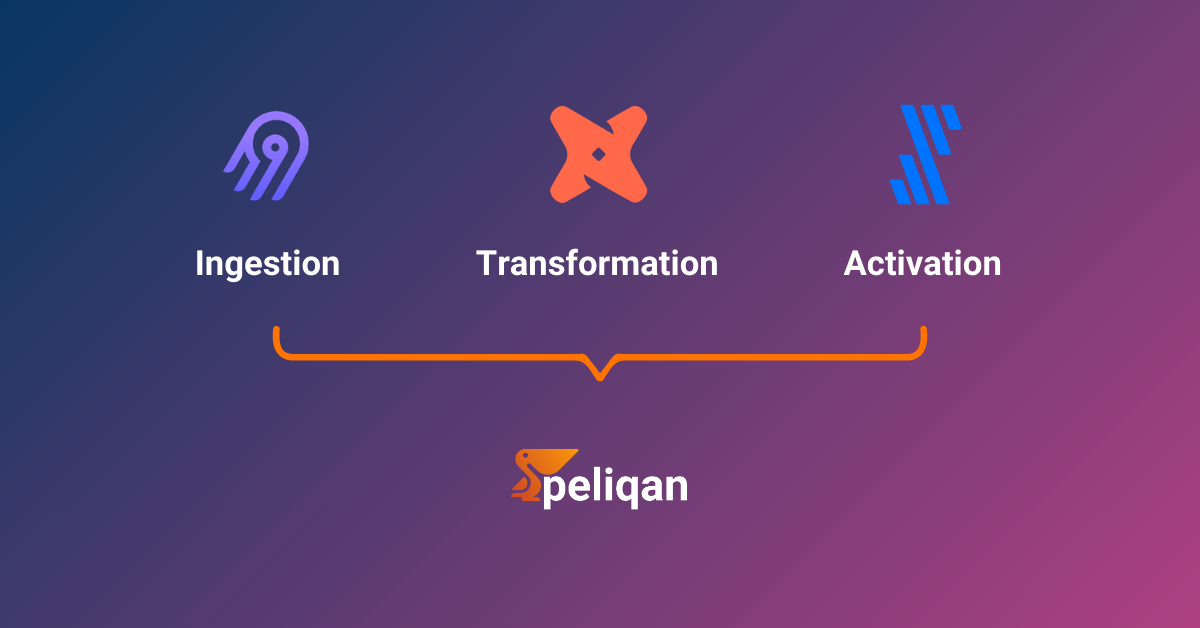





The modern data stack promised simplicity. Instead, most data teams ended up with three separate tools – Airbyte for ingestion, dbt for transformation, and Census for activation – each with its own pricing model, YAML configs, deployment lifecycle, and failure modes. Here’s how Peliqan collapses all three into a single platform without sacrificing the flexibility engineers actually need.
If you’ve built a production data pipeline in the last three years, you’re probably familiar with this architecture: raw SaaS data lands in your warehouse via Airbyte, dbt models transform it into clean analytical tables, and Census pushes enriched records back to your CRM or marketing automation tools. It works – but it’s also three separate tools, three billing relationships, three deployment pipelines, and a fragile chain where a schema change in Airbyte can silently break three downstream dbt models and surface as stale data in Salesforce four days later.
This post walks through the architecture of the Airbyte + dbt + Census stack, where the real complexity lives, and how Peliqan’s unified data platform replaces all three layers in a single system – with a Python SDK that handles ingestion, transformation, and activation with the same interface and the same execution context.
The 3-Tool Stack: What Each Layer Does
Before we compare, it’s worth being precise about what each tool actually handles – because the boundaries matter when things break.
Airbyte: Ingestion (ELT)
Airbyte is an open-source data integration platform with 600+ connectors. Its job is to extract data from sources (Salesforce, Stripe, PostgreSQL, etc.) and load it into a destination warehouse (BigQuery, Snowflake, Redshift). It does EL, not ELT – raw data lands in a staging schema with Airbyte’s own column naming conventions (_airbyte_raw_id, _airbyte_extracted_at, _airbyte_meta), and transformation is handled downstream.
Airbyte Cloud pricing is row-based (Monthly Active Rows), which sounds reasonable until you connect a high-volume source like a transactional database with millions of rows being updated daily. Self-hosting Airbyte on Kubernetes removes the per-row cost but adds infrastructure maintenance burden and requires dedicated DevOps time.
dbt: Transformation
dbt (data build tool) handles the T in ELT – it takes raw, staged data in your warehouse and applies SQL transformations to produce clean, modelled tables that analysts and BI tools can query. dbt projects are defined in YAML and SQL files, managed in Git, and run as jobs against your warehouse.
It is excellent at what it does – but it’s also a significant engineering investment. A production dbt project has model dependency DAGs, test suites, documentation, macros, environment configs, and CI/CD pipelines. dbt Core is free, but dbt Cloud (for scheduling, observability, and IDE) starts at $100/month for teams and scales quickly.
Census: Activation (Reverse ETL)
Census is a reverse ETL tool. Once your dbt models are built, Census reads from those warehouse tables and syncs enriched records back to operational tools – Salesforce, HubSpot, Intercom, Marketo, Slack, and others. You define sync configurations (source table, field mappings, destination object, sync behavior), and Census runs them on a schedule.
Census charges per destination, typically $350-800+/month for production use across multiple destinations. Each sync is stateless from Census’s perspective – it reads your warehouse, diffs against the previous state, and pushes deltas.
Where the Cracks Appear
The 3-tool stack is architecturally clean on paper. In practice, the seams between tools are where complexity accumulates.
Real Total Cost of Ownership: Airbyte + dbt + Census
3-5 hrs/week minimum per tool for maintenance, connector upgrades, schema drift handling, and job monitoringBeyond cost, there are five failure patterns that emerge repeatedly in production 3-tool pipelines:
1. Schema drift propagates silently. When an upstream SaaS API adds or renames a field, Airbyte’s schema detection may update the raw table structure. dbt models that reference specific column names break at compile time or – worse – produce wrong results silently if Airbyte renames a column and the old one starts returning NULLs.
2. Scheduler coupling creates race conditions. Most teams orchestrate Airbyte syncs, dbt runs, and Census syncs with separate Airflow DAGs or cron jobs. Coordinating dependencies between tools that don’t share a runtime means jobs run out of order – especially after a failed sync triggers a retry at the wrong time.
3. Reverse ETL reads stale models. Census doesn’t know when your dbt run finishes – it runs on its own schedule. If a dbt run is delayed by warehouse contention or a test failure, Census syncs yesterday’s data to Salesforce and nobody notices until a sales rep complains that lead scores haven’t updated.
4. YAML config sprawl across three systems. A moderately sized dbt project has dozens of model YAML files, source definitions, test configurations, and environment variables. Add Airbyte connection configs and Census sync definitions, and you have three separate config formats across three systems that all need to stay in sync with each other.
5. Three separate debugging surfaces. When something breaks, you’re debugging across three dashboards – Airbyte’s connection logs, dbt Cloud’s run history, and Census’s sync logs – none of which have visibility into the end-to-end pipeline.
Peliqan’s Unified Architecture: One Platform, Three Layers
Peliqan is an all-in-one data platform that handles ingestion, transformation, and activation in a single system. The architecture maps directly to what Airbyte, dbt, and Census do individually – but everything runs in the same execution context via Peliqan’s low-code Python environment and pq module.
Peliqan’s Three-Layer Architecture
Python writeback to 250+ SaaS APIs via pq SDK - Salesforce, HubSpot, Odoo, Slack, Intercom, Pipedrive and more - in a single line of codeThe key architectural difference is that all three layers share the same runtime. When Peliqan executes a data app (a Python or SQL script), it has direct access to the built-in warehouse, the connector layer, and the SaaS API wrappers in the same execution context. There’s no handoff between systems, no scheduler coupling, and no separate config format per layer.
Peliqan’s built-in warehouse is Postgres-based, and a Trino federated query engine lets you query live data across external databases without moving it. You can also bring your own warehouse – Snowflake, BigQuery, Redshift, or Azure SQL Server are all supported as ETL targets, and the pq SDK works identically regardless of which backend you use.
Step 1: Replacing Airbyte – Connecting Sources in Peliqan
In Airbyte, setting up a new source means configuring a connector, defining a destination, selecting streams, choosing a sync mode (full refresh vs incremental), and scheduling the job. Then you wait for the first sync to land raw data in your warehouse staging schema before you can do anything with it.
In Peliqan, you add a connection from the Connections panel, authenticate with OAuth or API key, and click Sync. Peliqan automatically detects schemas, maps columns to the built-in warehouse, and runs incremental syncs on your chosen schedule. No YAML, no stream selection, no separate staging schema to manage.
For programmatic control – triggering a sync as part of a larger data app – Peliqan exposes a single function call:
import peliqan as pq

# Refresh Salesforce before running transformation logic
# is_async=False blocks until the sync is fully complete
pq.refresh_connection(connection_name="Salesforce", is_async=False)

# Now query the freshly synced data from the built-in warehouse
dbconn = pq.dbconnect(pq.DW_NAME)
rows = dbconn.fetch(pq.DW_NAME, 'salesforce', 'opportunities')

for row in rows:
    print(row["name"], row["amount"], row["stage_name"])
The pq.refresh_connection() call with is_async=False blocks execution until the sync completes – which means your transformation logic in the same script always runs on fresh data. This eliminates the scheduler coupling problem entirely. There’s no separate Airbyte job to wait for, no Airflow DAG dependency to configure.
The current 250+ connector library spans CRM (Salesforce, HubSpot, Pipedrive, Attio), ERP (Odoo, SAP, MS Dynamics, Exact Online), e-commerce (Shopify, Lightspeed), databases (Postgres, MySQL, MongoDB, Snowflake), file sources (S3, SFTP, SharePoint), and marketing platforms (Google Analytics, Facebook Ads, LinkedIn Ads).
Step 2: Replacing dbt – SQL and Python Transformations Inside Peliqan
dbt’s value proposition is treating SQL transformations as software – version-controlled, tested, documented, and modular. Peliqan’s data apps deliver the same core value with a lower operational overhead and significantly more flexibility, supporting both SQL and Python in the same execution environment.
Where dbt projects are YAML + SQL files managed outside the warehouse, Peliqan data apps are Python scripts (or pure SQL) that run inside the platform with direct warehouse access. You get scheduling, Git-based version control, and modular reuse – without a separate deployment pipeline.
SQL Transformations: Building Clean Analytical Models
import peliqan as pq

dbconn = pq.dbconnect(pq.DW_NAME)

# Materialize a clean customer model joining Salesforce + Stripe + Intercom
# This replaces a dbt SQL model file - runs directly in Peliqan's warehouse
dbconn.execute(pq.DW_NAME, """
CREATE OR REPLACE TABLE analytics.dim_customers AS
SELECT
    sf.account_id,
    sf.company_name,
    sf.account_owner,
    sf.industry,
    stripe.subscription_status,
    stripe.current_mrr,
    stripe.trial_end_date,
    intercom.last_seen_at           AS last_active,
    intercom.session_count_30d,
    CASE
        WHEN intercom.session_count_30d = 0 THEN 'at_risk'
        WHEN intercom.session_count_30d < 5 THEN 'low_engagement'
        ELSE 'healthy'
    END                             AS engagement_tier,
    CURRENT_TIMESTAMP               AS updated_at
FROM salesforce.accounts sf
LEFT JOIN stripe.subscriptions stripe
    ON sf.stripe_customer_id = stripe.customer_id
LEFT JOIN intercom.users intercom
    ON sf.intercom_company_id = intercom.company_id
WHERE sf.account_type = 'Customer'
""")

print("dim_customers materialized")
Python Transformations: When SQL Is Not Enough
dbt handles SQL transformations well but struggles with anything requiring loops, ML model inference, pandas operations, or calls to external services mid-transformation. Peliqan data apps handle all of these natively – the Python environment includes pandas, numpy, scikit-learn, and any library available via pip, with the pq module providing direct warehouse access throughout.
import peliqan as pq
import pandas as pd

dbconn = pq.dbconnect(pq.DW_NAME)

# Fetch materialized customer table as a Pandas DataFrame
# df=True returns a standard pandas DataFrame instead of a row iterator
df = dbconn.fetch(
    pq.DW_NAME,
    query="SELECT * FROM analytics.dim_customers",
    df=True
)

# Python-based scoring logic - impossible to express cleanly in dbt SQL alone
# In production, swap this for a trained sklearn or XGBoost model
def churn_score(row):
    score = 0
    if row["engagement_tier"] == "at_risk": score += 40
    elif row["engagement_tier"] == "low_engagement": score += 20
    if row["subscription_status"] == "past_due": score += 30
    if pd.notna(row["trial_end_date"]): score += 10
    return min(score, 100)

df["churn_risk_score"] = df.apply(churn_score, axis=1)
df["scored_at"] = pd.Timestamp.utcnow()

# Write scores back to a new table in the warehouse
scored_df = df[["account_id", "company_name", "churn_risk_score", "engagement_tier", "scored_at"]]
dbconn.insert(pq.DW_NAME, "analytics", "customer_churn_scores", scored_df)

print(f"Scored {len(df)} customers. High-risk: {(df['churn_risk_score'] > 60).sum()}")
💡 Peliqan vs dbt: The Key Tradeoff
dbt is SQL-first and warehouse-native – excellent for well-structured, version-controlled SQL transformations with CI/CD. Peliqan data apps are Python-first with SQL support, which makes them more flexible but less opinionated. If your team is SQL-centric and already has dbt working at scale, the migration is incremental – you can port models one at a time. If you regularly fight dbt’s limits for anything that isn’t pure SQL (ML scoring, pandas operations, external API calls mid-transform), Peliqan’s Python environment is a significant unlock. See Peliqan for developers for the full SDK reference.
Step 3: Replacing Census – Writeback in a Single Line of Python
Census requires you to define sync configurations in its UI or API: choose a source table, map columns to destination object fields, set sync behavior (upsert, create, update), and schedule the run. For simple syncs this is fast. For complex scenarios – conditional syncs, custom merge logic, field-level transformations before writing – you hit Census’s limits quickly and the workarounds get ugly.
Peliqan’s reverse ETL writeback works through the same pq SDK used for transformation. You connect to any of the 250+ SaaS connectors and call the relevant API method – .add(), .update(), .delete() – directly. Complex merge logic, conditional field mappings, and per-record business rules are just Python.
Here’s what the Peliqan writeback looks like – from adding a contact to HubSpot to sending a Slack alert, all in the same script:
import peliqan as pq

# Connect to SaaS APIs via pq.connect()
# The connection name matches what you named it in Peliqan's Connections panel
HubSpot = pq.connect("HubSpot")
Slack   = pq.connect("Slack")
dbconn  = pq.dbconnect(pq.DW_NAME)

# Fetch high-risk customers from the scored table we built above
rows = dbconn.fetch(pq.DW_NAME, 'analytics', 'customer_churn_scores')

high_risk_count = 0

for row in rows:

    # Conditional logic before writeback - impossible in Census without workarounds
    lifecycle_stage = "salesqualifiedlead" if row["churn_risk_score"] > 60 else "marketingqualifiedlead"

    # Single-line writeback to HubSpot contact
    HubSpot.update("contact",
        id=row["hubspot_contact_id"],
        churn_risk_score=row["churn_risk_score"],
        engagement_tier=row["engagement_tier"],
        lifecyclestage=lifecycle_stage
    )

    if row["churn_risk_score"] > 60:
        high_risk_count += 1

# Post a summary alert to Slack after the sync is done
Slack.add('message',
    channel='cs-alerts',
    text=f'Churn sync complete: {high_risk_count} high-risk accounts flagged in HubSpot'
)

# Optionally refresh the HubSpot connection to pull the updated data back
# into the warehouse for verification - call ONCE at the end, not in the loop
pq.refresh_connection(connection_name="HubSpot")
The Peliqan writeback API is consistent across all 250+ connectors. Whether you’re writing to HubSpot, Salesforce, Odoo, Slack, Google Sheets, or any other connected system, the pattern is the same: ConnectorName.add(), .update(), or .delete(). The connection variable name matches whatever you named the connection in Peliqan’s UI.
Writeback to Odoo ERP: Updating Product Records
import peliqan as pq

Odoo   = pq.connect("Odoo")
dbconn = pq.dbconnect(pq.DW_NAME)

# Fetch updated pricing data from the warehouse (transformed from multiple sources)
rows = dbconn.fetch(pq.DW_NAME, 'analytics', 'product_pricing_updates')

for row in rows:

    # Update existing product in Odoo
    Odoo.update("product", id=row["odoo_product_id"], price=row["new_price"], name=row["product_name"])

# Create a new product if it doesn't exist yet
Odoo.add("product", name="New Enterprise Bundle", price=4999.00)

# Refresh Odoo connection to pull the changes back into the warehouse
pq.refresh_connection(connection_name="Odoo")
Putting It Together: End-to-End Pipeline in One Script
Here’s what the complete pipeline looks like as a single Peliqan data app – ingestion through activation, in one scheduled Python script that replaces Airbyte, dbt, and Census simultaneously:
import peliqan as pq
import pandas as pd

# ---------------------------------------------------------------
# LAYER 1: INGESTION (replaces Airbyte)
# Refresh source connections before transformation
# ---------------------------------------------------------------
pq.refresh_connection(connection_name="Salesforce",  is_async=False)
pq.refresh_connection(connection_name="Stripe",      is_async=False)
pq.refresh_connection(connection_name="Intercom",    is_async=False)

dbconn  = pq.dbconnect(pq.DW_NAME)
HubSpot = pq.connect("HubSpot")
Slack   = pq.connect("Slack")

# ---------------------------------------------------------------
# LAYER 2: TRANSFORMATION (replaces dbt)
# Build clean customer model and compute churn scores
# ---------------------------------------------------------------
dbconn.execute(pq.DW_NAME, """
CREATE OR REPLACE TABLE analytics.dim_customers AS
SELECT
    sf.account_id,
    sf.company_name,
    sf.hubspot_contact_id,
    stripe.subscription_status,
    stripe.current_mrr,
    intercom.session_count_30d,
    CASE
        WHEN intercom.session_count_30d = 0 THEN 'at_risk'
        WHEN intercom.session_count_30d < 5 THEN 'low_engagement'
        ELSE 'healthy'
    END AS engagement_tier
FROM salesforce.accounts sf
LEFT JOIN stripe.subscriptions stripe ON sf.stripe_customer_id = stripe.customer_id
LEFT JOIN intercom.users intercom    ON sf.intercom_company_id = intercom.company_id
WHERE sf.account_type = 'Customer'
""")

df = dbconn.fetch(pq.DW_NAME, query="SELECT * FROM analytics.dim_customers", df=True)
df["churn_score"] = df.apply(lambda r:
    (40 if r["engagement_tier"]=="at_risk" else 20 if r["engagement_tier"]=="low_engagement" else 5) +
    (30 if r["subscription_status"]=="past_due" else 0),
    axis=1
)
dbconn.insert(pq.DW_NAME, "analytics", "customer_scores",
              df[["account_id", "company_name", "hubspot_contact_id", "churn_score", "engagement_tier"]])

# ---------------------------------------------------------------
# LAYER 3: ACTIVATION (replaces Census)
# Write high-risk scores to HubSpot, alert CS team in Slack
# ---------------------------------------------------------------
high_risk = df[df["churn_score"] > 60]

for _, row in high_risk.iterrows():
    HubSpot.update("contact",
        id=row["hubspot_contact_id"],
        churn_risk_score=row["churn_score"],
        engagement_tier=row["engagement_tier"]
    )

Slack.add('message', channel='cs-alerts',
          text=f'Pipeline run complete: {len(high_risk)} high-risk accounts synced to HubSpot')

print("Done.")
This single script replaces what would otherwise be a multi-file dbt project, Airbyte connection config, Census sync definition, and an Airflow DAG to coordinate them. When scheduled in Peliqan, it produces a single log stream and a single alert on failure – no cross-tool debugging required.
Federated Queries with Peliqan’s Trino Engine
One capability that has no direct equivalent in the Airbyte + dbt + Census stack is Peliqan’s Trino-powered federated query engine. Trino allows Peliqan to query data across external databases, data warehouses, and connected sources without first copying it into the built-in warehouse.
This is especially valuable for queries that join your built-in Peliqan warehouse with data from an external Snowflake instance or a live PostgreSQL production database – without running a full sync first:
import peliqan as pq

# SQL on anything: join Peliqan warehouse + external Postgres + live Salesforce
# Trino handles the distributed query - no full sync required
dbconn = pq.dbconnect(pq.DW_NAME)

result = dbconn.fetch(
    pq.DW_NAME,
    query="""
    SELECT
        p.company_name,
        p.churn_score,
        prod_db.usage_events_30d,
        sf.arr_value
    FROM analytics.customer_scores p
    JOIN postgres_prod.public.usage_summary prod_db
        ON p.account_id = prod_db.account_id
    JOIN salesforce.accounts sf
        ON p.account_id = sf.account_id
    WHERE p.churn_score > 60
    ORDER BY p.churn_score DESC
    LIMIT 50
    """,
    df=True
)

print(result)
In the traditional 3-tool stack, this query would require a full Airbyte sync of both the Postgres database and Salesforce data into a common warehouse before it could be joined. With Peliqan’s Trino engine, it runs against live data in seconds – a meaningful performance and cost advantage for exploratory analysis and real-time dashboards.
Feature Comparison: Peliqan vs Airbyte + dbt + Census
| Capability | Airbyte + dbt + Census | Peliqan |
|---|---|---|
| Data Ingestion | Airbyte: 600+ connectors, row-based pricing | 250+ one-click connectors, fixed pricing, 48hr custom connector SLA |
| SQL Transformation | dbt: YAML + SQL, warehouse-native, CI/CD friendly | SQL data apps in same environment as ingestion and activation |
| Python Transformation | Limited (dbt-py models, complex setup, restricted environment) | Full Python environment: pandas, numpy, sklearn, any pip library |
| ML Model Integration | Requires custom dbt-python models or external compute service | Native – import any ML library directly in the data app |
| Reverse ETL / Writeback | Census: per-destination pricing, no-code sync UI | pq SDK: code-based, 250+ SaaS targets, no per-destination fee |
| Federated Queries | Not supported natively – requires full data copy first | Trino engine: live cross-system joins without ETL |
| Built-in Warehouse | Not included – Snowflake / BigQuery / Redshift required separately | Included (Postgres + Trino), or BYO warehouse as ETL target |
| Pipeline Orchestration | Separate Airflow / Prefect DAG required to coordinate tools | Built-in scheduler – sequential execution in one script, one log |
| Schema Drift Handling | Airbyte detects changes but dbt models can break silently downstream | Single system surfaces schema changes in one unified log |
| Pricing Model | 3 separate bills: row-based + per-seat dbt + per-destination Census | Single fixed monthly price from ~$199/month |
| Data Lineage | dbt provides lineage for SQL models only – no cross-tool lineage | Built-in data lineage tracking across ingestion and transformation |
| Publish Data APIs | Not supported natively – requires separate API layer | Publish REST API endpoints directly from Python data apps |
| GDPR / Data Residency | Varies by tool – complex multi-vendor compliance posture | SOC 2 Type II, GDPR-native, EU data residency available |
| White-Label / Embedding | Not supported by any of the three tools | White-label and embed Peliqan components in your own product |
When to Stick with the 3-Tool Stack
Peliqan is a strong replacement for Airbyte + dbt + Census in most production scenarios. There are four situations where the original architecture still has defensible advantages:
When the 3-Tool Stack Still Makes Sense
- You have a mature dbt project (500+ models): Migrating a large dbt codebase is non-trivial. If dbt is working well and your team is productive, the marginal benefit of switching may not justify migration effort in the short term. Start by replacing Census and Airbyte first.
- You need Airbyte’s connector breadth for niche sources: Airbyte has 600+ connectors vs Peliqan’s 250+. If you rely on niche connectors Peliqan doesn’t yet support, Airbyte may still be the better ingestion layer – though Peliqan builds custom connectors on 48hr request.
- Your team is deeply SQL-first and test-driven: dbt’s opinionated, test-driven SQL workflow is excellent for analytics engineering teams with strong code review culture. Peliqan data apps offer more flexibility but less structure – which can be a drawback for large teams that need strict governance on transformation logic.
- You’re embedded in the Snowflake ecosystem: dbt’s deep Snowflake integrations (Dynamic Tables, Iceberg support, cost-based optimization) are hard to replicate in a platform-agnostic tool. If Snowflake-specific features are central to your transformation strategy, dbt Cloud stays competitive at that layer.
For teams setting up a new stack from scratch, or teams actively managing the complexity and cost of three separate tools, Peliqan’s unified approach eliminates entire categories of operational overhead. The most common migration path we see is: replace Census first (lowest risk, immediate cost saving), then move ingestion from Airbyte to Peliqan, and port dbt models incrementally as the team gets comfortable with the data app model.
Getting Started: Your First Data App on Peliqan
Recommended Migration Path from Airbyte + dbt + Census
Port dbt models to Peliqan SQL data apps incrementally, starting with the most frequently modified models. Complex Python transformations come first - they're the biggest leverage gain.You can start a free trial at app.eu.peliqan.io, connect your first source, and have data flowing into Peliqan’s built-in warehouse in under 10 minutes. For more on the pq Python SDK, see the writeback documentation and the Python SDK reference. For an architectural overview of how ETL, the data warehouse, and data apps fit together, the ETL architecture guide is a good starting point.
Conclusion
The Airbyte + dbt + Census stack is a coherent architecture – each tool is well-built for its specific role. But as data teams scale, the operational burden of managing three tools, three billing relationships, and three separate failure surfaces becomes a meaningful drag on velocity.
Peliqan replaces all three layers with a single Python SDK, a built-in warehouse with Trino federated query support, 250+ connectors, and a unified execution environment where ingestion, transformation, and activation share the same runtime and the same log stream. Pipelines become simpler to write, easier to debug, and significantly cheaper to run.
For teams building on the modern data stack, the question is no longer whether you need ingestion, transformation, and activation – you clearly do. The question is whether you need three separate vendors for it, or one platform that handles the full lifecycle with a consistent programming model, predictable pricing, and a 48-hour custom connector SLA.
See how to build your first data pipeline on Peliqan or start a free trial today.